

Amazing 7tsp Glassify Icon Pack
7tsp Glassify Icon Pack : The 7TSP Glassify Icon Pack for Windows is a premium customization pack designed for users who want a modern, transparent, and futuristic look across their system

7TSP Glassify Icon Pack For Windows
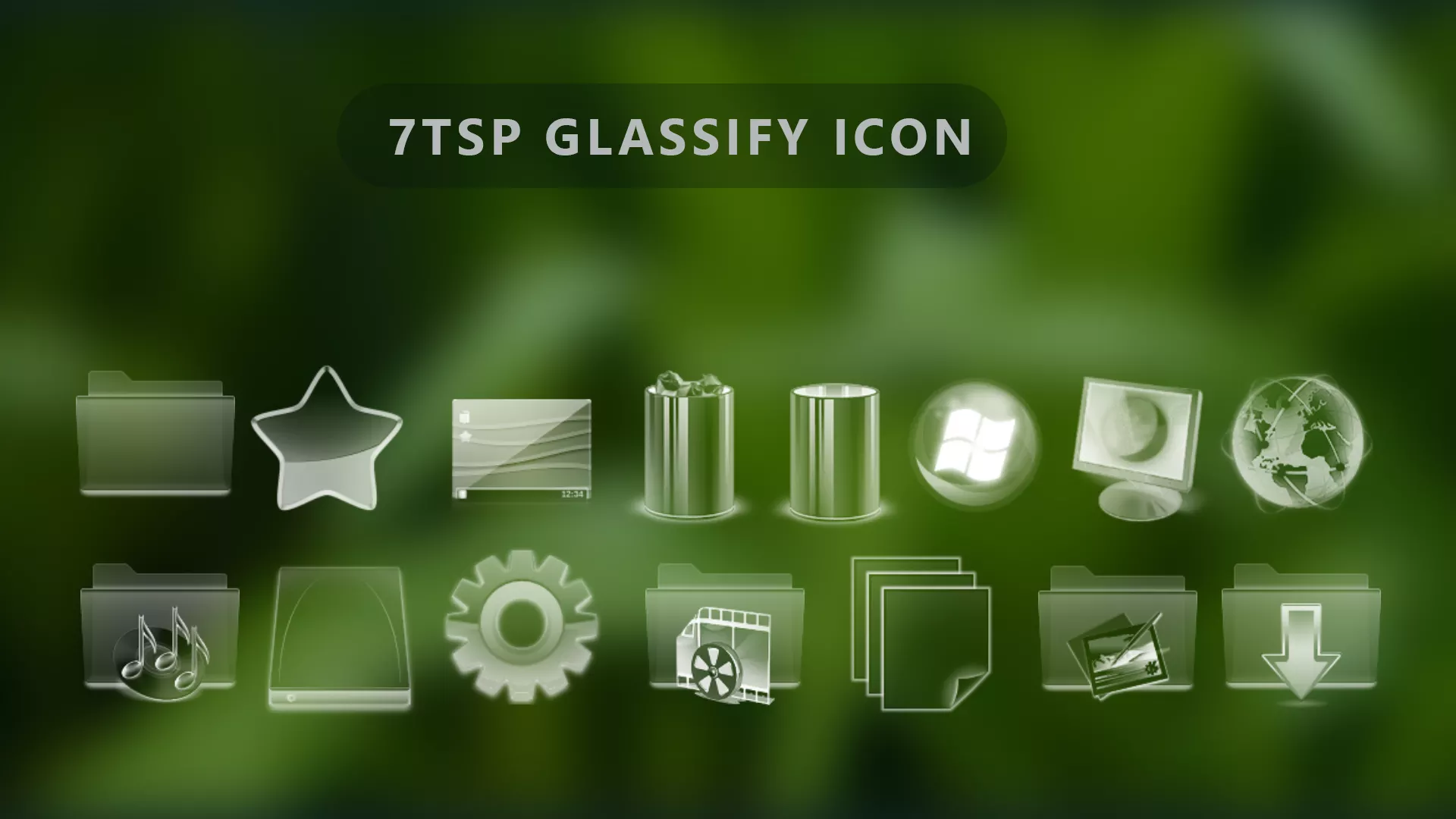
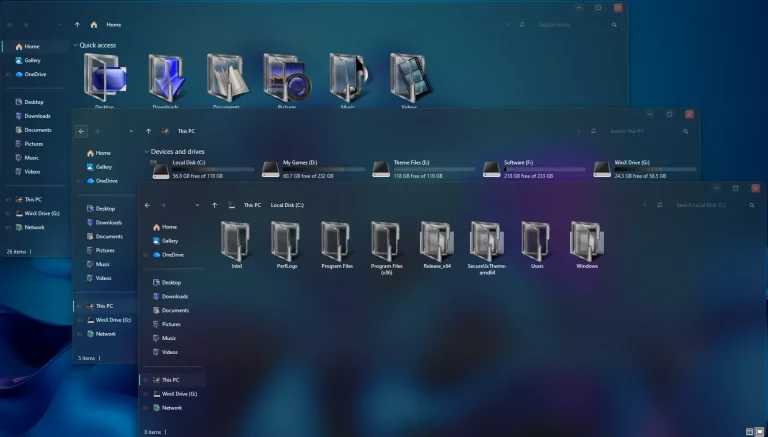
7TSP Glassify Icon Pack is a full transparent Windows icon pack created for users who want a clear glass-style appearance across supported system icons. Instead of using solid colors, the icons are built around transparent surfaces, soft highlights, and light reflective details that give folders, drives, media icons, and other Windows resources a see-through glass look.
The transparent design is the main character of Glassify. Folder icons, system icons, media resources, settings-related icons, and other supported elements keep their familiar shapes while replacing the usual solid appearance with clear glass-style forms.
This is a 7TSP icon customization pack, not a complete Windows theme. It changes supported icon resources only. File Explorer styling, wallpapers, taskbar customization, Start menu changes, blur effects, and other desktop modifications are separate.
Full Transparent Glass Icon Style
Glassify focuses on transparency rather than a fixed color palette. The icon bodies are largely see-through, with pale outlines, soft reflections, and subtle highlights used to keep each shape visible.
The transparent treatment is applied across different icon types while preserving recognizable Windows forms. Folders, drives, settings, media, downloads, pictures, system resources, and other supported icons follow the same glass-inspired direction.
Features
- Full transparent glass-style Windows icons
- See-through folder and system icon surfaces
- Soft highlights and reflective details around supported icons
- Matching transparent treatment across folders, drives, media, and system resources
- Familiar icon shapes remain easy to recognize
- Designed for use with a compatible version of 7TSP GUI
- Can be used separately from your Windows theme or wallpaper
What Is Included?
- 7TSP Glassify Icon Pack: Contains the transparent icon resources used to replace supported Windows folders, drives, system locations, media icons, and other compatible resources through 7TSP GUI.
Compatibility
- Windows 11: Use with a compatible 7TSP release
- Windows 10: Use with a compatible 7TSP release
Compatibility can vary between Windows builds because Microsoft may change system icon resources through updates. Check both the Glassify pack notes and your 7TSP version before applying the patch.
Requirements
- A Windows build supported by the selected 7TSP release
- A compatible version of 7TSP GUI
- Administrator access
- A System Restore Point created before patching
- Enough free storage space for the backup files created by 7TSP
To check your Windows build, press Windows + R, type winver, and press Enter. Compare the displayed version with the compatibility information for the 7TSP release you plan to use.
Before You Install
Save your open work and create a System Restore Point before applying the icon pack. Keep the backup options inside 7TSP enabled as well, since those files provide the easiest way to return to your previous Windows icons.
If another 7TSP pack is already active, restore it before installing Glassify. Applying several patched icon sets over one another makes restoration needlessly messy, because apparently Windows customization needed its own archaeology department.
How to Install 7TSP Glassify Icon Pack
- Create a Restore Point: Make a Windows System Restore Point before changing system icon resources.
- Download Glassify: Download the icon-pack archive using the button below.
- Extract the Outer Archive: Open the downloaded package and read any included instructions before continuing.
- Locate the 7TSP Pack: Find the actual Glassify pack file. If it is supplied as an inner archive intended for 7TSP, keep that file intact unless the included instructions say otherwise.
- Prepare 7TSP GUI: Download a compatible version from the 7TSP GUI developer page.
- Run as Administrator: Open 7TSP GUI with administrator privileges.
- Add Glassify: Choose Add a Custom Pack and select the Glassify 7TSP pack file.
- Start Patching: Review the selected pack, keep the available backup options enabled, and begin the patching process.
- Restart Windows: Let 7TSP finish completely, then restart your PC and check the updated icons.
For related resources, you can also check:
Download 7TSP Glassify Icon Pack
7TSP Glassify Icon Pack 9MB
DownloadHow to Restore the Default Windows Icons
- Open 7TSP GUI: Run the same 7TSP application as administrator.
- Choose Restore: Open the available Restore option.
- Select the Original Backup: Choose the backup created before Glassify was applied.
- Restore the Resources: Let 7TSP finish restoring the previous Windows icon files without closing the application.
- Restart Windows: Reboot the PC and check File Explorer and other system areas to confirm that the original icons have returned.
Some versions of 7TSP may place the recovery option under Program > Restore Backup. The wording can differ slightly, so use the command that restores the backup created before patching.
More Resources
Glassify can be used as a standalone transparent icon pack. If you want the rest of Windows to follow a similar glass direction, you can add a separate theme or Explorer style later. Those changes are optional and are not part of the 7TSP pack itself.
Credits
Creator credit: Credit for the original icon-pack artwork and design goes to Store KDE. Link Vegas Theme does not claim ownership of third-party artwork, names, or trademarks referenced in this post.
Disclaimer
7TSP Glassify Icon Pack is a third-party Windows customization resource intended for personal desktop customization. It is not affiliated with, endorsed by, sponsored by, or officially connected to Microsoft, KDE, or the developers of 7TSP GUI. Windows and other trademarks belong to their respective owners. Because 7TSP modifies Windows icon resources, create a System Restore Point and keep the generated backup files before patching.
Final Word
Glassify is all about transparency. Instead of covering Windows icons with strong colors, it gives supported folders, drives, media resources, and system icons a clear glass body with soft highlights and subtle reflections.
That transparent approach also makes the pack easy to pair with different desktop styles. You can use Glassify on its own or combine it with a separate glass-style Windows theme without changing what the icon pack itself does.
Disclaimer: All themes, visual styles, and concepts shared on this website are unofficial, fan-made creations built from imagination for customization purposes. We are not affiliated with, endorsed by, or sponsored by Microsoft or any other official brand.