Windows 7 Reborn Start Menu Style
Windows 7 Reborn Start Menu Style : Windows 7 Reborn Start Menu Style 2025 brings back the legendary look and feel of the classic Windows 7 Start Menu—revamped with modern design enhancements for today’s users

Windows 7 Reborn Start Menu Style Windhawk
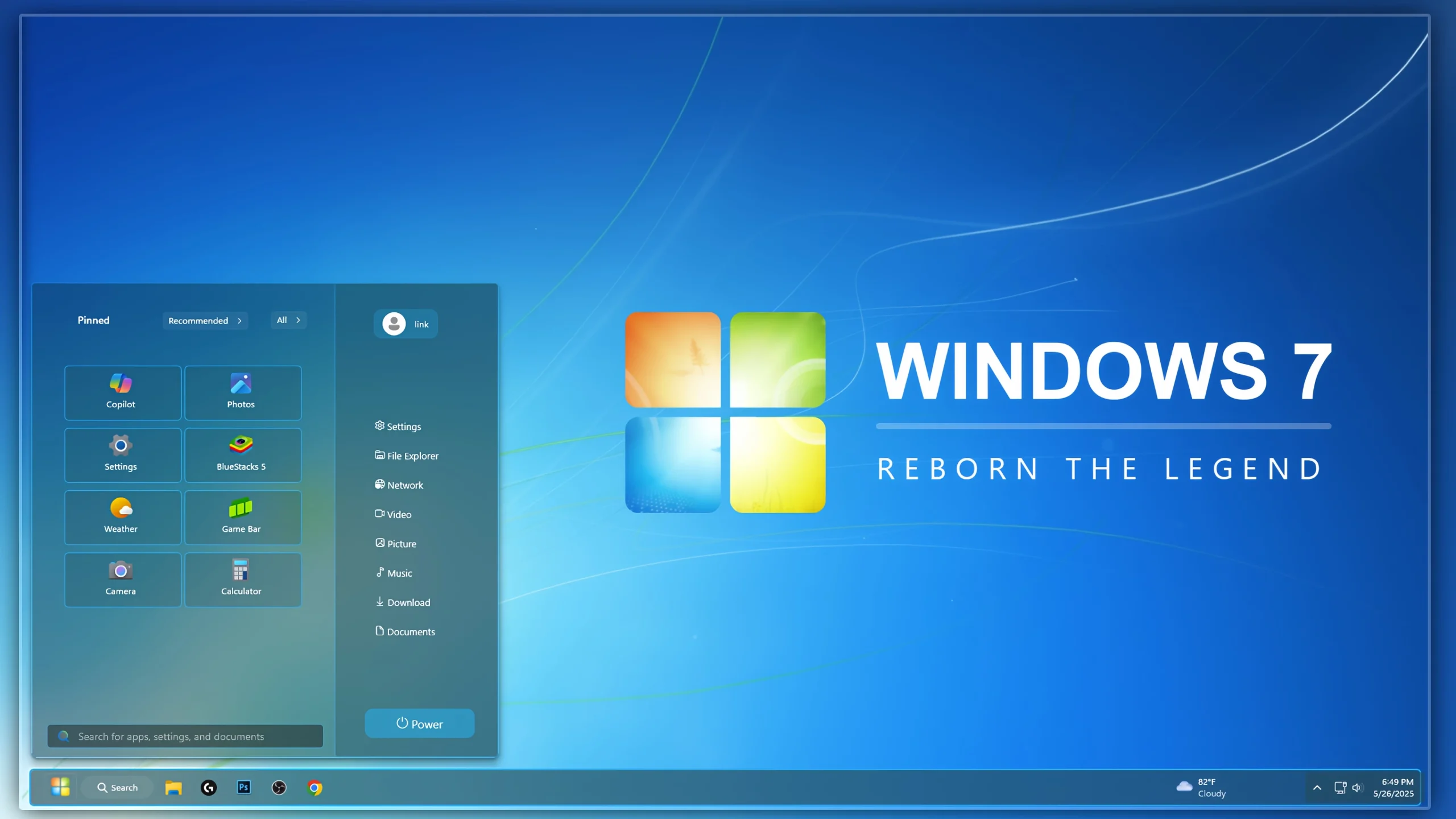
Bring back the legendary Windows 7 experience on your modern Windows 11 PC with the Windows 7 Reborn Start Menu Style Windhawk. This custom Start Menu style is carefully designed for users who miss the clean, classic, and elegant appearance of Windows 7. Using Windhawk, you can completely transform the default Windows 11 Start Menu into a familiar layout that captures the nostalgic feel of Microsoft’s most beloved operating system.
The Windows 7 Reborn Start Menu Style offers a balanced combination of classic design and modern functionality. Whether you are a longtime Windows enthusiast or simply prefer a cleaner interface, this style provides a refreshing desktop experience without sacrificing performance.
Classic Windows 7 Look on Windows 11
One of the biggest reasons users love Windows 7 is its simple and user-friendly Start Menu. The Windows 7 Reborn Start Menu Style recreates that iconic appearance with carefully crafted visual elements, refined spacing, classic menu sections, and a polished design that feels instantly familiar.
From the menu layout to the overall styling, every detail has been optimized to provide a genuine Windows 7-inspired experience while remaining fully compatible with modern Windows 11 systems.
Why Choose Windows 7 Reborn Start Menu Style?
- Authentic Windows 7 inspired Start Menu design
- Fully compatible with Windows 11
- Easy installation using Windhawk
- Clean and lightweight configuration
- Improved desktop aesthetics
- Modern performance with a classic appearance
- Perfect for customization enthusiasts
- Regularly updated and optimized
Designed for Windhawk Users
Windhawk has become one of the most popular customization tools for Windows 11. The Windows 7 Reborn Start Menu Style takes full advantage of Windhawk’s powerful Start Menu customization capabilities, allowing users to achieve a professional-looking desktop without complicated modifications.
The style integrates seamlessly with existing Windows 11 features while enhancing visual consistency across your desktop environment. Whether you use custom themes, icon packs, or taskbar modifications, this Start Menu style fits perfectly into almost any customization setup.
Enhanced Visual Experience
The goal of the Windows 7 Reborn Start Menu Style is not simply to copy an old design. Instead, it modernizes the classic Windows 7 appearance while preserving the elements users loved most. The result is a refined Start Menu that feels familiar yet fresh.
Smooth edges, improved transparency effects, balanced spacing, and carefully adjusted visual elements help create a premium desktop experience. The style is suitable for productivity users, gamers, content creators, and anyone who enjoys desktop customization.
Easy Installation Process
Installing the Windows 7 Reborn Start Menu Style is straightforward. Simply install Windhawk, import the style configuration, and apply the settings. Within minutes, your Windows 11 Start Menu can be transformed into a stunning Windows 7-inspired interface.
No advanced technical knowledge is required. The style is designed to be accessible for beginners while still offering excellent customization opportunities for advanced users.
Perfect for Windows Customization Enthusiasts
If you enjoy transforming the appearance of Windows 11, the Windows 7 Reborn Start Menu Style is an excellent addition to your setup. It pairs beautifully with classic wallpapers, Windows 7 icon packs, Aero-inspired themes, and custom taskbar styles.
Many users consider Windows 7 to be one of the most visually appealing versions of Windows ever released. This Start Menu style helps bring that timeless design philosophy back to modern systems.
- Windows 11 21H2: May work, but not recommended for the best experience
- 22H2 YES
- 22H3 YES
- 24H2 YES
- Windows 11 25H2: YES work, but test carefully after Windows updates
- Download & Install windhawk.
- install & Open the Windows 11 Start Menu Styler mod in Windhawk.
- Go to the “Advanced” tab.
- Copy the content below to the text box under “Mod settings” and click “Save”.
- Windhwak Styles
- Wallpapers
ZIP 6KB
DownloadFinal Thoughts
The Windows 7 Reborn Start Menu Style Windhawk is the perfect solution for anyone who wants to combine the reliability of Windows 11 with the nostalgic charm of Windows 7. Featuring a beautiful design, easy installation process, and seamless Windhawk integration, this style delivers a premium desktop customization experience.
Download the Windows 7 Reborn Start Menu Style today and rediscover the classic Start Menu experience that millions of Windows users loved for years.