Windows 15 Concept Theme for Windows 11 – Modern UI Customization
Download Windows 15 Concept Theme for Windows 11 with modern UI customization, icon pack, wallpaper, Windhawk mods, Blur Mica support, and a futuristic desktop design.

Windows 15 Concept Theme for Windows 11 – Modern UI Customization
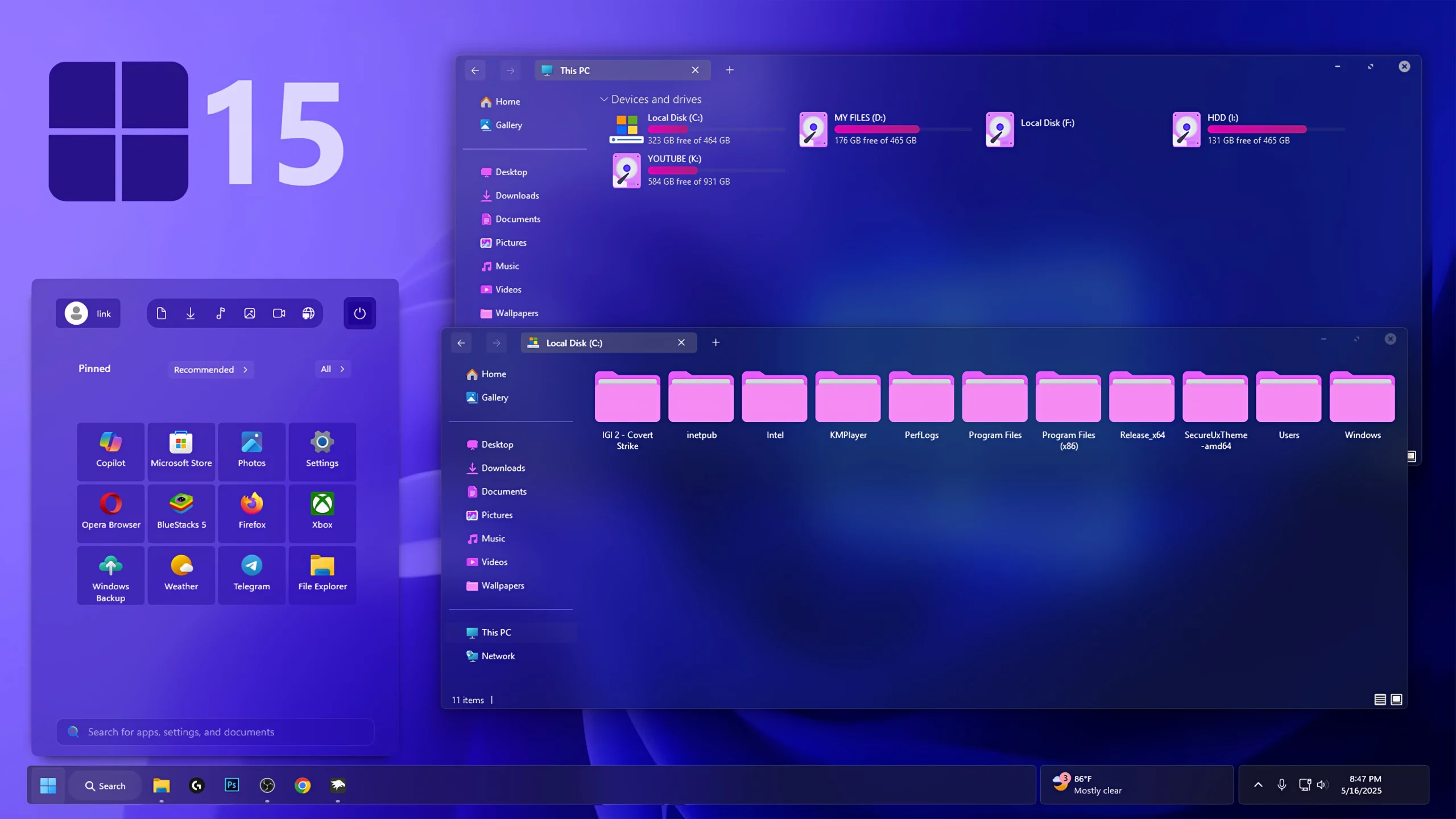
Windows 15 Concept Theme for Windows 11 – Modern UI Customization is a stylish and futuristic desktop customization pack made for users who want to give their Windows 11 PC a fresh, modern, and premium-looking interface. This theme is inspired by next-generation Windows concept designs and brings a clean modern UI style with smooth visuals, refined icons, glassy effects, stylish wallpapers, and a more polished desktop appearance.
If you are tired of the default Windows 11 look and want something more creative, this Windows 15 Concept Theme for Windows 11 can be a great choice. It does not turn your PC into an official Windows 15 operating system, but it gives your Windows 11 desktop a concept-based modern design that feels cleaner, smoother, and more visually attractive.
The main focus of this Windows 15 Theme is to improve the overall desktop experience without making the interface look too complicated. The theme combines minimal design, futuristic color tones, updated icons, and modern UI tweaks to create a balanced desktop setup for daily use, content creation, and Windows customization lovers.
About Windows 15 Concept Theme for Windows 11
Windows 15 Concept Theme for Windows 11 is designed for users who enjoy customizing their desktop with modern themes, icon packs, wallpapers, and UI enhancement tools. The theme gives Windows 11 a more advanced and concept-style appearance while keeping the interface familiar and easy to use.
This customization pack includes essential visual elements that work together to create a complete modern desktop setup. From the refreshed icon style to the clean wallpaper and Windhawk mods, every part of the Windows 15 Concept Theme is arranged to make your PC look more elegant and futuristic.
Modern UI Customization Experience
The Windows 15 Concept Theme brings a modern UI customization experience to Windows 11 with a smooth and premium design style. It uses clean spacing, rounded elements, soft transparency, and eye-catching visuals to make the desktop look more refined than the default Windows 11 interface.
This theme is especially useful for users who want a futuristic Windows setup for personal use, desktop screenshots, YouTube videos, or customization showcases. The overall design looks modern without being too heavy, making it suitable for both casual users and tech enthusiasts.
Why Choose This Windows 15 Theme?
The biggest reason to try this Windows 15 Theme for Windows 11 is its clean and futuristic look. It gives your desktop a fresh identity while still keeping Windows 11 smooth and usable. The combination of modern icons, wallpaper, theme files, and UI tweaks creates a complete visual upgrade for your PC.
Unlike basic theme packs, this Windows 15 Concept Theme focuses on a full desktop transformation. It is not only about changing wallpaper or colors; it also improves the overall appearance of your Start Menu, taskbar, Explorer visuals, and desktop environment when used with the recommended customization tools.
Key Features of Windows 15 Concept Theme
This Windows 15 Concept Theme for Windows 11 includes several visual improvements that help your desktop look more modern and attractive. The theme uses a futuristic design approach with a clean layout, premium wallpaper, redesigned icons, and optional UI enhancement tools.
- Windows 11 Custom Theme
- Modern Icon Pack
- Windhawk Mods
- Premium Wallpaper
- Modern UI Customization Files
- Concept-Style Desktop Look
More Download Links
- Create a system restore point before applying any Windows customization.
- Install the required theme patcher first, because third-party Windows themes need theme patching support.
- Download the Windows 15 Concept Theme file and extract it properly.
- Apply the Windows 11 custom theme using the recommended theme tool.
- Use 7TSP GUI if you want to apply the included modern icon pack.
- Use Windhawk and Blur Mica only if you want extra taskbar, Explorer, and UI customization effects.
- Restart your computer after applying the theme and icon changes for the best result.
- Theme support: Windows 11.
Windows 15 Concept Theme 19MB
DownloadImportant Safety Note
Windows 15 Concept Theme for Windows 11 is a third-party customization theme. It is not an official Microsoft Windows 15 update, and it is not an official Microsoft product. This theme is created only for visual customization and personal desktop styling purposes.
Before installing any custom Windows theme, icon pack, or UI modification tool, it is always recommended to create a restore point. This simple step helps you return to your previous setup if something does not work properly after customization.
Best For Windows Customization Lovers
This Windows 15 Concept Theme is perfect for users who love modern Windows customization. If you enjoy changing your desktop style, creating clean setups, or making Windows 11 look more futuristic, this theme can help you achieve a premium modern UI look.
The theme is also useful for YouTube creators, bloggers, and desktop customization fans who want an attractive Windows 11 setup for videos, screenshots, or tutorials. With the right wallpaper, icon pack, and UI tools, the Windows 15 Concept Theme can make your desktop look unique and professional.
Download Windows 15 Concept Theme
You can download the Windows 15 Concept Theme for Windows 11 from the button below. After downloading, extract the file and follow the installation steps carefully. For the best experience, use the included theme, icon pack, wallpaper, and recommended customization tools together.