

New MacOS WhiteSur Transparent Rainmeter Skins
MacOS WhiteSur Transparent Rainmeter Skins:Bring the clean, elegant look of macOS Big Sur to your Windows desktop with the macOS WhiteSur Transparent Edition Rainmeter Skins! This Rainmeter theme delivers a sleek, translucent UI inspired by macOS, blending modern Apple aesthetics with powerful customization.

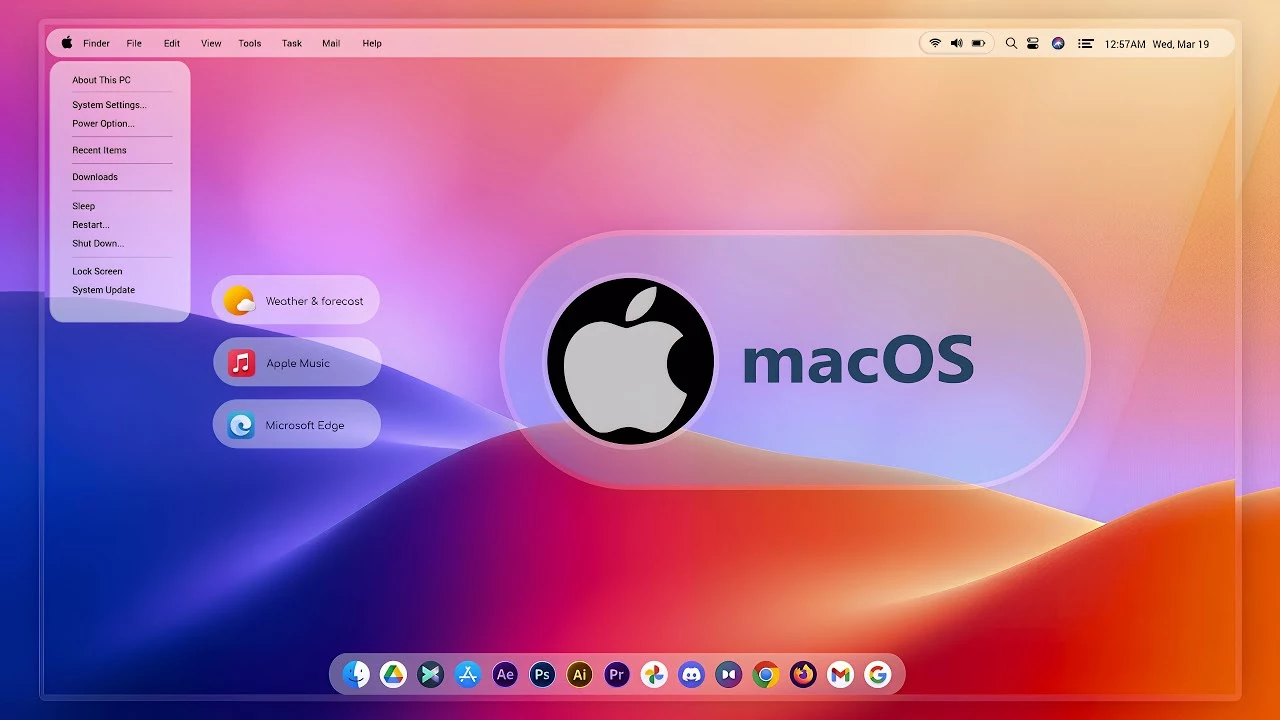
MacOS WhiteSur Transparent Rainmeter Skins for Windows
The MacOS WhiteSur Transparent Rainmeter Skins are designed for Windows users who want a clean, glass-style desktop inspired by the macOS WhiteSur look. This Rainmeter skin can help improve your desktop by adding stylish widgets, visual elements, and a more organized interface without changing your operating system.
If you enjoy minimal desktop setups, transparent panels, soft UI elements, and a MacOS-inspired appearance, this skin can be a great addition to your Windows customization setup. It works best when paired with a matching wallpaper, icon pack, cursor theme, and clean taskbar layout.
Rainmeter Skin Overview
The MacOS WhiteSur Transparent Rainmeter Skins focus on a smooth and elegant desktop style. The design is inspired by modern macOS aesthetics, using transparent or glass-like elements to create a soft and premium-looking Windows desktop.
This type of Rainmeter skin is ideal for users who want desktop information panels, simple widgets, and a clean workspace. It can fit well with productivity setups, design-focused desktops, minimal wallpapers, and MacOS-style Windows themes.
Included Widgets or Elements
Depending on the skin package, Rainmeter skins may include different widgets or desktop elements such as a clock, date display, weather panel, system monitor, music player, app launcher, visualizer, calendar, or shortcut panel.
The exact widgets included in the MacOS WhiteSur Transparent Rainmeter Skins may vary based on the version of the package. Before installing, users should check the included files, preview images, and instructions to understand which elements are available and whether any extra setup is required.
Design Style
The design style of this skin is clean, transparent, and MacOS-inspired. It gives the desktop a glass-like look that feels modern without being too heavy or distracting. The transparent layout helps the wallpaper remain visible while still adding useful desktop information and visual structure.
This skin works especially well with light, white, grey, blue, or blurred wallpapers. It can also match minimal icon packs and MacOS-style docks for a more complete desktop customization experience.
- Clean macOS-inspired desktop style
- Transparent and minimal visual design
- Lightweight Rainmeter skin setup
- Beginner-friendly customization
- Useful widgets for desktop personalization
- Rainmeter Skin
- Rainmeter Official Website
- More Rainmeter Skin
- Download and install Rainmeter from the official website.
- After installation, Rainmeter will start automatically.
- Download and extract the Rainmeter skin file if it is provided in a compressed folder.
- Double-click the .rmskin file to open the Rainmeter Skin Installer.
- Click Install to add the skin to Rainmeter.
- Right-click the Rainmeter icon from the system tray.
- Go to Skins and select the installed skin.
- Click Load to apply the skin to your desktop.
Zip File 36MB
DownloadCustomization Tips
- Match the skin with your wallpaper.
- Keep widgets organized.
- Use readable font sizes.
- Avoid too many widgets on one screen.
- Place important widgets where they are easy to see.
- Use a matching icon pack or dock for a complete setup.
Disclaimer
This independently created Rainmeter skin package is intended for personal Windows desktop customization. The terms “macOS” and “WhiteSur” are used only as visual-style references. This package is not an official Apple product, macOS release, update, or Apple-developed software, and it is not affiliated with, endorsed by, or sponsored by Apple Inc. All trademarks and brand names belong to their respective owners.
Final Thoughts
The MacOS WhiteSur Transparent Rainmeter Skins are a good choice for Windows users who want a clean, elegant, and MacOS-inspired desktop look. With the right wallpaper and desktop layout, this skin can make your Windows setup feel more modern, organized, and visually appealing.
For the best experience, install Rainmeter from the official source, check the included instructions, and customize the layout carefully. When used properly, this skin can give your Windows desktop a smooth transparent style while keeping your workspace clean and practical.







