Windows Aero Start Menu Rainmeter Skins

Windows Aero Start Menu Rainmeter Skins

Windows 7 Rainmeter Skins;Windows 7 Rainmeter Skins bring a fresh and nostalgic twist to your desktop customization. Designed to blend the classic charm of Windows 7 with modern aesthetics,

Windows Aero Start Menu Rainmeter Skin

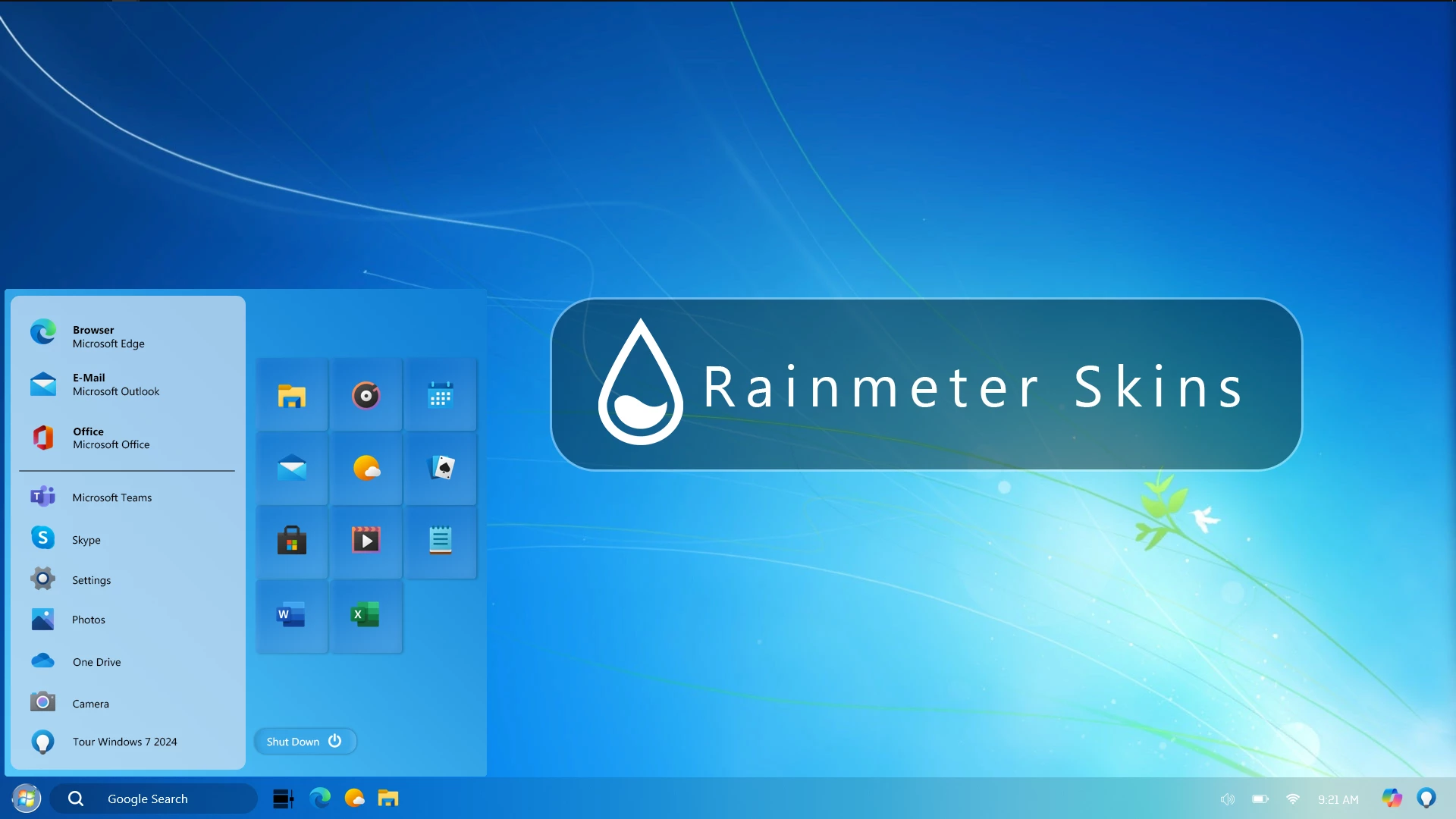
Windows Aero Start Menu Rainmeter Skin is a classic Windows-inspired desktop customization designed for users who love the nostalgic look of the Windows 7 Aero era. This Rainmeter setup recreates the familiar Start Menu-style appearance with transparent panels, organized shortcuts, and a clean glass-inspired visual style for modern Windows desktops.

The skin focuses on bringing a classic desktop feeling through Rainmeter customization. It includes a Start Menu-inspired panel with application shortcuts, organized sections, and a transparent Aero-style design that blends well with Windows 7-inspired wallpapers and themes.

Windows Aero Start Menu Rainmeter Skin allows users to personalize their desktop without modifying Windows system files. Through Rainmeter, users can load the available components, adjust their placement, and create a nostalgic yet modern desktop environment.

Design Highlights

This customization is inspired by the classic Windows Aero interface, featuring transparent visual elements, soft colors, and a familiar Start Menu layout. It is suitable for users who want to recreate a retro Windows appearance while keeping the flexibility of modern desktop customization.

Key Features

  • Windows 7 Aero-inspired Start Menu design.
  • Transparent glass-style desktop interface.
  • Classic application shortcut layout.
  • Rainmeter-based desktop customization.
  • Nostalgic Windows-inspired visual appearance.
  • Works well with classic wallpapers and themes.
  • Suitable for retro and modern desktop setups.

System Requirements

  1. Windows 10 or Windows 11 operating system.
  2. Rainmeter application installed on your computer.
  3. Basic knowledge of managing Rainmeter skins.
  4. A desktop environment capable of running Rainmeter smoothly.

What Is Included in This Download?

  1. Windows Aero Start Menu Rainmeter Skin.
  2. Rainmeter configuration files.
  3. Desktop customization components.

Required Customization Tool

  1. Rainmeter

How to Install Windows Aero Start Menu Rainmeter Skin

  • Download and install Rainmeter from the official website.
  • Download the Windows Aero Start Menu Rainmeter Skin package.
  • Extract the downloaded file if required.
  • Open the included .rmskin file.
  • Click Install to add the skin components.
  • Open Rainmeter from the Windows system tray.
  • Navigate to the installed skin folder.
  • Select the Start Menu components and click Load.
  • Adjust the position and layout according to your desktop preference.
Zip File99MB
Download

Customization Tips

For the best result, combine this Rainmeter skin with a Windows 7-inspired wallpaper, matching icons, and a clean desktop layout. Keeping the setup simple helps maintain the classic Aero appearance.

How to Remove Windows Aero Start Menu Rainmeter Skin

Removing this Rainmeter skin only removes the desktop customization elements. It does not modify or delete Windows system files.

  • Right-click on an active Rainmeter element.
  • Select Unload Skin.
  • Open Rainmeter Manage from the system tray.
  • Find the Windows Aero Start Menu components.
  • Unload the active components to remove the customization.
  • Uninstall Rainmeter if you no longer want to use the application.

Who Should Use This Skin?

Windows Aero Start Menu Rainmeter Skin is suitable for users who enjoy classic Windows designs and nostalgic desktop customization.

  • Users who miss the Windows 7 Aero visual style.
  • People who enjoy retro-inspired desktop setups.
  • Rainmeter users looking for classic Start Menu designs.
  • Users who want a different look from the default Windows interface.

Disclaimer

Windows Aero Start Menu Rainmeter Skin is a third-party desktop customization resource created for Windows personalization purposes. It is not an official Microsoft product and is not affiliated with Microsoft Corporation. The Windows name, logos, and related trademarks belong to their respective owners. This website provides customization resources for personal desktop personalization only.

Final Thoughts

Windows Aero Start Menu Rainmeter Skin provides an easy way to bring a classic Windows-inspired appearance to modern desktops. With its transparent Aero-style design and Start Menu layout, users can create a nostalgic desktop experience while still using modern customization tools.

For users who enjoy Windows 7 aesthetics and personalized desktop setups, this Rainmeter skin can be a great addition to a custom Windows environment.

Leave a Reply

Your email address will not be published. Required fields are marked *

Downloading issue

Ad-Blocker Detected!

Oops! unable to access the file download link. It seems that your ad blocker is removing the download link. Please try again or consider whitelisting our site in your ad blocker to resolve this issue.

We have detected that an ad blocker is active in your browser. This can lead to conflicts with our site, blocking many important scripts, and affecting downloads.

The revenue we generate from ads is vital for maintaining and managing this website. Therefore, we kindly request that you whitelist our website in your ad-blocker. Please rest assured that we won't inundate you with an excessive number of ads, nor will we inconvenience you or slow down your browsing experience. Your support is immensely appreciated!

How to Fix






