Linux Inspired Menu Black Rainmeter Skin

Linux Inspired Menu Black Rainmeter Skin

Linux Menu Black Rainmeter Skin:Black Linux

Linux Menu Black Rainmeter Skin

The Linux Menu Black Rainmeter Skin offers a sleek, minimalist interface designed for desktop users who appreciate the aesthetic of Linux-style UI. With its clean black theme and simple sidebar layout, this skin transforms your Windows desktop into a professional and functional workspace. The flat design ensures distraction-free navigation, making it perfect for coders, tech enthusiasts, or anyone who enjoys a Linux-inspired setup.

This Rainmeter skin includes a launcher menu with customizable app shortcuts, system stats (CPU, RAM, storage), and essential widgets like clock, date, and power controls. The lightweight configuration ensures low system resource usage while still providing high functionality and real-time data. Whether you're switching from Linux or just love the look, this skin enhances both style and productivity.

optimized for Rainmeter lovers, the Linux Menu Black Skin stands out for its unique blend of aesthetics and performance. It’s fully customizable, user-friendly, and compatible with most resolutions. Download today to give your desktop a modern, Linux-themed makeover with real usability.


  1. Rainmeter Skins
  2. Wallpaper
  1. Rainmeter
  • Download & Install Rainmeter.
  • Once installed, Rainmeter will start automatically
  • Download the .rmskin file (Rainmeter Skin Installer format) Double-click the .rmskin file..
  • The Rainmeter Skin Installer will open,Click Install to add it to Rainmeter.
  • Right-click the Rainmeter icon in the system tray
  • Navigate to Skins and select the installed skin.
  • Click Load to apply it.
Theme Files
3MB

Download

Rainmeter Skin is a minimalist and sleek Rainmeter skin inspired by the aesthetics of Linux operating systems.

Linux Inspired Menu Black Rainmeter Skin

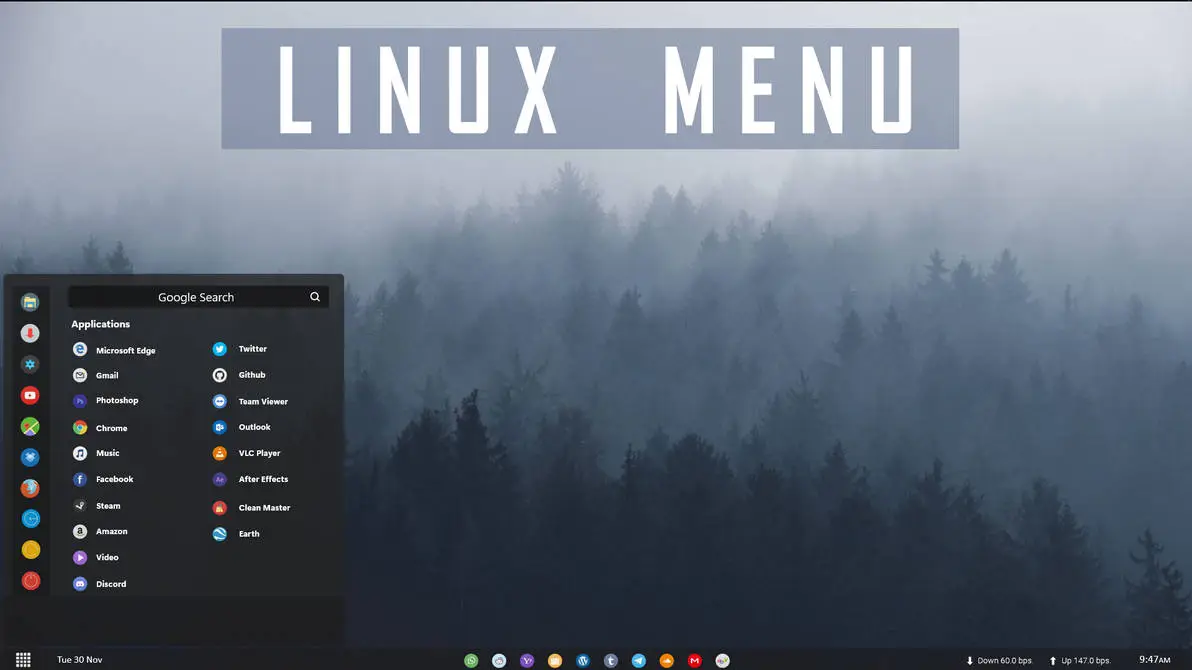
Linux Inspired Menu Black Rainmeter Skin is a clean and modern desktop customization theme designed for Windows users who enjoy Linux-style interface concepts. Inspired by Linux desktop menu layouts, this Rainmeter skin brings a dark application menu design with an organized shortcut panel and minimal visual style.

The skin features a black sidebar-style menu with application shortcuts and a search area, creating a simple and practical way to personalize your Windows desktop. It provides a Linux-inspired appearance while keeping Windows as the original operating system.

Linux Inspired Menu Black Rainmeter Skin works well with dark wallpapers, minimal desktop setups, and other customization resources. Whether you like Linux aesthetics or simply want a different desktop menu style, this Rainmeter skin can help create a unique and organized workspace.

Key Features

  • Linux-inspired dark menu interface.
  • Black sidebar-style application layout.
  • Organized app shortcut menu.
  • Search bar style interface.
  • Minimal and clean desktop appearance.
  • Works well with dark wallpapers and modern themes.
  • Rainmeter-based desktop customization.

System Requirements

  1. Windows operating system.
  2. Rainmeter installed on your computer.
  3. Basic knowledge of loading and managing Rainmeter skins.
  4. A desktop environment capable of running Rainmeter smoothly.

How to Install Linux Inspired Menu Black Rainmeter Skin

  • Download and install Rainmeter from the official website.
  • Download the Linux Inspired Menu Black Rainmeter Skin package.
  • Extract the ZIP file if required.
  • If the package contains a .rmskin file, double-click it to open the Rainmeter Skin Installer.
  • Click Install to add the skin to Rainmeter.
  • Right-click the Rainmeter icon from the system tray.
  • Go to Skins and select the installed Linux Menu Black skin.
  • Click Load to apply the available components.
  • Adjust the menu position according to your preferred desktop layout.
  1. Rainmeter Skins
  2. Wallpaper
  1. Rainmeter
Theme Files 3MB
Download
  1. Windows 11 Themes
  2. More Rainmeter Skins

How to Remove Linux Inspired Menu Black Rainmeter Skin

If you want to remove Linux Inspired Menu Black Rainmeter Skin from your desktop, you can easily disable it through the Rainmeter application. Removing the skin only removes the customization elements and does not affect your Windows system files.

  • Right-click on the active Linux Menu Black Rainmeter element.
  • Select Unload Skin to remove the menu from your desktop.
  • Open the Rainmeter Manage window from the system tray.
  • Find Linux Menu Black from the installed skin list.
  • Unload all related components.
  • Delete the skin folder from the Rainmeter Skins directory if you no longer want to keep the files.

Who Should Use This Skin?

Linux Inspired Menu Black Rainmeter Skin is suitable for users who enjoy dark interfaces and alternative desktop customization styles.

  • Users who like Linux-inspired visual designs.
  • People who prefer dark and minimal desktop layouts.
  • Rainmeter users looking for menu-style skins.
  • Users who enjoy creative Windows customization.

Disclaimer

Linux Inspired Menu Black Rainmeter Skin is a third-party desktop customization resource created for Rainmeter users. It is not an official Linux distribution, Windows feature, Microsoft product, or software released by any Linux organization. The term “Linux Inspired” refers only to the visual design concept. Linux, Windows, Rainmeter, and related trademarks belong to their respective owners.

Conclusion

Linux Inspired Menu Black Rainmeter Skin provides a simple way to bring a dark Linux-inspired interface style to your Windows desktop. With its sidebar menu design, organized shortcuts, and minimal appearance, it helps create a unique and personalized workspace.

For users who enjoy dark themes, alternative interfaces, and Rainmeter customization, this skin can be a useful addition to their desktop collection.

Leave a Reply

Your email address will not be published. Required fields are marked *

Downloading issue

Ad-Blocker Detected!

Oops! unable to access the file download link. It seems that your ad blocker is removing the download link. Please try again or consider whitelisting our site in your ad blocker to resolve this issue.

We have detected that an ad blocker is active in your browser. This can lead to conflicts with our site, blocking many important scripts, and affecting downloads.

The revenue we generate from ads is vital for maintaining and managing this website. Therefore, we kindly request that you whitelist our website in your ad-blocker. Please rest assured that we won't inundate you with an excessive number of ads, nor will we inconvenience you or slow down your browsing experience. Your support is immensely appreciated!

How to Fix






