

Everforest Start Menu Style For Windows 11
Everforest Start Menu For Windows 11:Everforest Start Menu for Windows 11 – A Nature-Inspired UI Experience

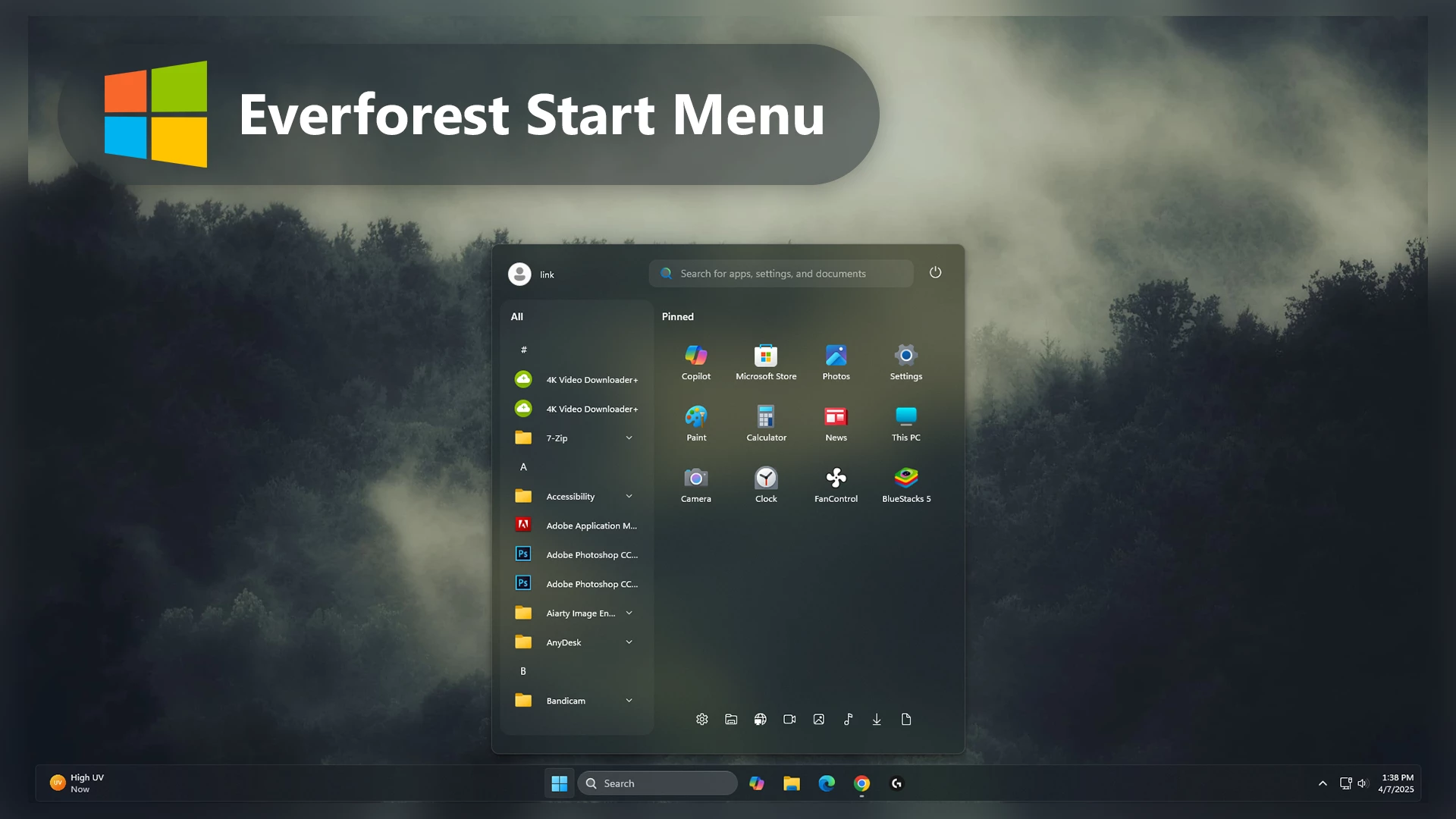
Everforest Start Menu Style for Windows 11
The Everforest Start Menu Style for Windows 11 is a clean and visually balanced Windhawk customization inspired by the Everforest color palette. It combines soft green tones, dark backgrounds, subtle transparency, and a minimal layout to give the Windows 11 Start Menu a calm and modern appearance.
This style is designed for users who enjoy customizing their Windows 11 desktop while keeping the familiar Start Menu functionality. Its natural color combination and organized visual layout can work well with coding setups, productivity desktops, gaming themes, and minimal desktop customization.
Main Features of Everforest Start Menu Style
- Clean Everforest-inspired visual design
- Soft green and dark color combination
- Transparency and acrylic-inspired effects
- Minimal and organized Start Menu layout
- Balanced icon spacing and UI styling
- Designed for Windows 11 personalization
- Applied through compatible Windhawk Start Menu Styler configurations
- Works well with matching wallpapers, icons, and taskbar styles
- Suitable for productivity, coding, gaming, and minimal desktop setups
The Everforest Start Menu Style can be a good choice if you prefer softer colors and a less distracting desktop appearance. Pairing it with a matching Everforest-inspired wallpaper, dark taskbar style, and complementary icons can help create a more consistent Windows 11 setup.
Why Choose Everforest Start Menu Style?
The Everforest Start Menu Style For Windows 11 is designed for users who appreciate aesthetic desktop customization without sacrificing usability. Unlike heavy custom themes, this style keeps your system responsive while providing a premium desktop appearance.
The calm green palette reduces visual strain and creates a comfortable workspace environment. Whether you are building a modern productivity setup or a stylish gaming desktop, this start menu style blends perfectly with dark wallpapers, icon packs, and transparent taskbar setups.
Compatible With Windows 11 Customization
This custom start menu style is fully optimized for Windows 11 and works smoothly alongside popular desktop customization tools like Windhawk. It enhances the overall Windows experience by improving the appearance of the start menu while keeping the familiar functionality users already know.
The style supports modern desktop layouts and pairs perfectly with rounded taskbars, glass effects, minimal icon packs, and modern widgets.
Download Windhawk To Use The Style
Compatibility
- Windows 11 21H2: May work, but not recommended for the best experience
- 22H2 YES
- 23H2 YES
- 24H2 YES
- Windows 11 25H2: YES work, but test carefully after Windows updates
Installation steps:
- Download & Install windhawk.
- install & Open the Windows 11 Start Menu Styler mod in Windhawk.
- Go to the “Advanced” tab.
- Copy the content below to the text box under “Mod settings” and click “Save”.
{ "theme": "", "controlStyles[0].target": "Grid#MainMenu", "controlStyles[0].styles[0]": "Width=650", "controlStyles[0].styles[1]": "MinWidth=650", "controlStyles[0].styles[2]": "MaxWidth=650", "controlStyles[1].target": "Grid#FrameRoot", "controlStyles[1].styles[0]": "Height=700", "controlStyles[1].styles[1]": "MaxHeight=700", "controlStyles[2].target": "Grid#SideBySidePinnedWrapper", "controlStyles[2].styles[0]": "ColumnDefinitions:=<ColumnDefinitionCollection><ColumnDefinition Width=\"290*\"/><ColumnDefinition Width=\"360*\"/></ColumnDefinitionCollection>", "controlStyles[3].target": "GridView#AllAppsGrid > Border > Grid#SideBySidePinnedWrapper > ScrollViewer#ScrollViewer", "controlStyles[3].styles[0]": "Grid.Column=0", "controlStyles[3].styles[1]": "Margin=0", "controlStyles[4].target": "ScrollViewer#SideBySidePinnedScrollViewer", "controlStyles[4].styles[0]": "Grid.Column=1", "controlStyles[4].styles[1]": "Margin=0", "controlStyles[5].target": "Grid#SideBySidePinnedWrapper > ScrollViewer > Border#Root > Grid > ScrollContentPresenter > ItemsPresenter > ItemsWrapGrid", "controlStyles[5].styles[0]": "Margin=20,0,20,14", "controlStyles[6].target": "Grid#AllListHeading", "controlStyles[6].styles[0]": "Margin=0,3,0,0", "controlStyles[7].target": "Grid#AllListHeading > TextBlock#AllListHeadingText", "controlStyles[7].styles[0]": "Margin=30,6,8,7", "controlStyles[8].target": "Grid#AllListHeading > Microsoft.UI.Xaml.Controls.DropDownButton#ViewSelectionButton", "controlStyles[8].styles[0]": "Margin=0,0,18,0", "controlStyles[8].styles[1]": "Width=30", "controlStyles[8].styles[2]": "Height=30", "controlStyles[8].styles[3]": "CornerRadius=10", "controlStyles[9].target": "GridView#AllAppsGrid", "controlStyles[9].styles[0]": "Margin=0,0,0,65", "controlStyles[10].target": "StartMenu.PinnedList#StartMenuPinnedList", "controlStyles[10].styles[0]": "Width=350", "controlStyles[10].styles[1]": "MaxWidth=350", "controlStyles[10].styles[2]": "Height=520", "controlStyles[10].styles[3]": "MaxHeight=520", "controlStyles[10].styles[4]": "Margin=5,12,5,0", "controlStyles[11].target": "TextBlock#PinnedListHeaderText", "controlStyles[11].styles[0]": "Visibility=Visible", "controlStyles[11].styles[1]": "Margin=20,4,0,0", "controlStyles[12].target": "Microsoft.UI.Xaml.Controls.PipsPager#PinnedListPipsPager", "controlStyles[12].styles[0]": "Visibility=Collapsed", "controlStyles[13].target": "Grid#TopLevelSuggestionsListHeader", "controlStyles[13].styles[0]": "Visibility=Collapsed", "controlStyles[13].styles[1]": "Height=0", "controlStyles[14].target": "Grid#TopLevelSuggestionsRoot", "controlStyles[14].styles[0]": "Visibility=Collapsed", "controlStyles[14].styles[1]": "Height=0", "controlStyles[14].styles[2]": "MaxHeight=0", "controlStyles[15].target": "Grid#TopLevelSuggestionsContainer", "controlStyles[15].styles[0]": "Visibility=Collapsed", "controlStyles[15].styles[1]": "Height=0", "controlStyles[16].target": "GridView#RecommendedList", "controlStyles[16].styles[0]": "Visibility=Collapsed", "controlStyles[16].styles[1]": "Height=0", "controlStyles[17].target": "Grid#ShowMoreSuggestions", "controlStyles[17].styles[0]": "Visibility=Collapsed", "controlStyles[17].styles[1]": "Height=0", "controlStyles[18].target": "Grid#MoreSuggestionsRoot", "controlStyles[18].styles[0]": "Visibility=Collapsed", "controlStyles[18].styles[1]": "Height=0", "controlStyles[19].target": "StartMenu.SearchBoxToggleButton#SearchBoxToggleButton", "controlStyles[19].styles[0]": "Height=38", "controlStyles[19].styles[1]": "Width=340", "controlStyles[19].styles[2]": "HorizontalAlignment=Right", "controlStyles[19].styles[3]": "Margin=0,0,18,14", "controlStyles[19].styles[4]": "Canvas.ZIndex=10", "controlStyles[20].target": "StartMenu.SearchBoxToggleButton#SearchBoxToggleButton > Grid@CommonStates > Border#BorderElement", "controlStyles[20].styles[0]": "Background:=<SolidColorBrush Color=\"#11FFFFFF\"/>", "controlStyles[20].styles[1]": "BorderBrush:=<RevealBorderBrush Color=\"Transparent\" TargetTheme=\"1\" Opacity=\".65\"/>", "controlStyles[20].styles[2]": "BorderThickness=1", "controlStyles[20].styles[3]": "CornerRadius=10", "controlStyles[21].target": "Border#AcrylicBorder", "controlStyles[21].styles[0]": "Background:=<AcrylicBrush BackgroundSource=\"Backdrop\" TintColor=\"{ThemeResource CardStrokeColorDefaultSolid}\" TintOpacity=\"0\" TintLuminosityOpacity=\".50\"/>", "controlStyles[21].styles[1]": "BorderBrush:=<RevealBorderBrush Color=\"Transparent\" TargetTheme=\"1\" Opacity=\".80\"/>", "controlStyles[21].styles[2]": "BorderThickness=1", "controlStyles[21].styles[3]": "CornerRadius=10", "controlStyles[21].styles[4]": "Margin=0", "controlStyles[22].target": "Border#AcrylicOverlay", "controlStyles[22].styles[0]": "Background:=<AcrylicBrush BackgroundSource=\"Backdrop\" TintColor=\"{ThemeResource CardStrokeColorDefaultSolid}\" TintOpacity=\"0\" TintLuminosityOpacity=\".18\"/>", "controlStyles[22].styles[1]": "CornerRadius=10", "controlStyles[22].styles[2]": "Margin=0", "controlStyles[23].target": "Border#DropShadow", "controlStyles[23].styles[0]": "CornerRadius=10", "controlStyles[23].styles[1]": "Margin=0", "controlStyles[24].target": "Border#StartDropShadow", "controlStyles[24].styles[0]": "CornerRadius=10", "controlStyles[25].target": "StartMenu.PinnedList#StartMenuPinnedList Border#ContentBorder@CommonStates > Grid#DroppedFlickerWorkaroundWrapper > Border", "controlStyles[25].styles[0]": "Background@Normal:=<RevealBorderBrush Color=\"Transparent\" TargetTheme=\"1\" Opacity=\".12\"/>", "controlStyles[25].styles[1]": "Background@PointerOver:=<RevealBorderBrush Color=\"Transparent\" TargetTheme=\"1\" Opacity=\".30\"/>", "controlStyles[25].styles[2]": "BorderBrush@PointerOver:=<RevealBorderBrush Color=\"White\" TargetTheme=\"1\" Opacity=\".55\"/>", "controlStyles[25].styles[3]": "BorderThickness=1", "controlStyles[25].styles[4]": "CornerRadius=10", "controlStyles[25].styles[5]": "Margin=1", "controlStyles[26].target": "StartMenu.PinnedList#StartMenuPinnedList Border#ContentBorder@CommonStates > Grid#DroppedFlickerWorkaroundWrapper > Border#BackgroundBorder", "controlStyles[26].styles[0]": "Background@Normal:=<RevealBorderBrush Color=\"Transparent\" TargetTheme=\"0\" Opacity=\".10\"/>", "controlStyles[26].styles[1]": "Background@PointerOver:=<RevealBorderBrush Color=\"Transparent\" TargetTheme=\"1\" Opacity=\".25\"/>", "controlStyles[26].styles[2]": "Margin=2", "controlStyles[26].styles[3]": "CornerRadius=9", "controlStyles[27].target": "Grid#NavPanePlaceholder", "controlStyles[27].styles[0]": "Margin=22,0,22,0", "controlStyles[28].target": "StartDocked.NavigationPaneView#UserControl > Grid#RootPanel", "controlStyles[28].styles[0]": "FlowDirection=1", "controlStyles[29].target": "StartDocked.PowerOptionsView#PowerButton", "controlStyles[29].styles[0]": "FlowDirection=0", "controlStyles[30].target": "ItemsStackPanel > ListViewItem", "controlStyles[30].styles[0]": "FlowDirection=0", "controlStyles[31].target": "StartDocked.AppListView#NavigationPanePlacesListView > Border", "controlStyles[31].styles[0]": "Background:=<RevealBorderBrush Color=\"Transparent\" TargetTheme=\"1\" Opacity=\".18\"/>", "controlStyles[31].styles[1]": "BorderBrush:=<RevealBorderBrush Color=\"Transparent\" TargetTheme=\"1\" Opacity=\".60\"/>", "controlStyles[31].styles[2]": "BorderThickness=1", "controlStyles[31].styles[3]": "CornerRadius=10", "controlStyles[32].target": "StartDocked.AppListViewItem > Grid@CommonStates > Border", "controlStyles[32].styles[0]": "Background@Normal:=<RevealBorderBrush Color=\"Transparent\" TargetTheme=\"1\" Opacity=\".12\"/>", "controlStyles[32].styles[1]": "Background@PointerOver:=<RevealBorderBrush Color=\"Transparent\" TargetTheme=\"1\" Opacity=\".30\"/>", "controlStyles[32].styles[2]": "BorderBrush@PointerOver:=<RevealBorderBrush Color=\"Transparent\" TargetTheme=\"1\" Opacity=\".80\"/>", "controlStyles[32].styles[3]": "BorderThickness=1", "controlStyles[32].styles[4]": "CornerRadius=10", "controlStyles[33].target": "StartDocked.NavigationPaneButton#PowerButton > Grid@CommonStates > Border#BackgroundBorder", "controlStyles[33].styles[0]": "Background@Normal:=<RevealBorderBrush Color=\"Transparent\" TargetTheme=\"1\" Opacity=\".18\"/>", "controlStyles[33].styles[1]": "Background@PointerOver:=<RevealBorderBrush Color=\"Transparent\" TargetTheme=\"1\" Opacity=\".35\"/>", "controlStyles[33].styles[2]": "BorderBrush@Normal:=<RevealBorderBrush Color=\"Transparent\" TargetTheme=\"1\" Opacity=\".45\"/>", "controlStyles[33].styles[3]": "BorderBrush@PointerOver:=<RevealBorderBrush Color=\"White\" TargetTheme=\"1\" Opacity=\".65\"/>", "controlStyles[33].styles[4]": "BorderThickness=1", "controlStyles[33].styles[5]": "CornerRadius=20", "controlStyles[34].target": "StartDocked.UserTileView", "controlStyles[34].styles[0]": "Height=42", "controlStyles[35].target": "StartDocked.NavigationPaneButton#UserTileButton > Grid@CommonStates > Border", "controlStyles[35].styles[0]": "Background@Normal:=<RevealBorderBrush Color=\"Transparent\" TargetTheme=\"1\" Opacity=\".15\"/>", "controlStyles[35].styles[1]": "Background@PointerOver:=<RevealBorderBrush Color=\"Transparent\" TargetTheme=\"1\" Opacity=\".30\"/>", "controlStyles[35].styles[2]": "BorderBrush@PointerOver:=<RevealBorderBrush Color=\"White\" TargetTheme=\"1\" Opacity=\".55\"/>", "controlStyles[35].styles[3]": "BorderThickness=1", "controlStyles[35].styles[4]": "CornerRadius=10", "controlStyles[36].target": "StartDocked.PowerOptionsView > StartDocked.NavigationPaneButton > Grid > Border", "controlStyles[36].styles[0]": "CornerRadius=20", "controlStyles[36].styles[1]": "Margin=2,3,2,0", "controlStyles[37].target": "StartMenu.ExpandedFolderList > Grid > Grid", "controlStyles[37].styles[0]": "CornerRadius=10", "controlStyles[38].target": "StartMenu.ExpandedFolderList > Grid > Grid > Microsoft.UI.Xaml.Controls.PipsPager#PinnedListPipsPager", "controlStyles[38].styles[0]": "Visibility=Collapsed", "controlStyles[39].target": "MenuFlyoutPresenter > Border", "controlStyles[39].styles[0]": "BorderBrush:=<RevealBorderBrush Color=\"Transparent\" TargetTheme=\"1\" Opacity=\".80\"/>", "controlStyles[39].styles[1]": "BorderThickness=1", "controlStyles[39].styles[2]": "CornerRadius=10", "controlStyles[40].target": "Windows.UI.Xaml.Controls.Primitives.ToggleButton#ShowHideCompanion", "controlStyles[40].styles[0]": "Visibility=Collapsed", "controlStyles[41].target": "Grid#CompanionRoot", "controlStyles[41].styles[0]": "Visibility=Collapsed", "controlStyles[42].target": "Grid#RightCompanionContainerGrid", "controlStyles[42].styles[0]": "Visibility=Collapsed", "disableNewStartMenuLayout": "newLayoutSideBySide"}Final Words
The Everforest Start Menu Style for Windows 11 is a clean and calming customization for users who prefer natural colors, a minimal layout, and a more organized desktop appearance. Its soft green tones, dark surfaces, and subtle transparency can give the Start Menu a distinctive look while keeping the familiar Windows 11 experience.
For a more consistent setup, you can pair this style with matching Everforest-inspired wallpapers, icons, and taskbar customizations. Since Windows updates and Windhawk versions may affect compatibility, keep a backup of your current settings before applying changes.
You may also like


Disclaimer: All themes, visual styles, and concepts shared on this website are unofficial, fan-made creations built from imagination for customization purposes. We are not affiliated with, endorsed by, or sponsored by Microsoft or any other official brand.