


Elegant & Modern Rainmeter Suite
Elegant & Modern Rainmeter Suite:Transform your Windows desktop into a visually stunning and highly functional workspace with the Elegant & Modern Rainmeter Suite.

Elegant & Modern Rainmeter Suite
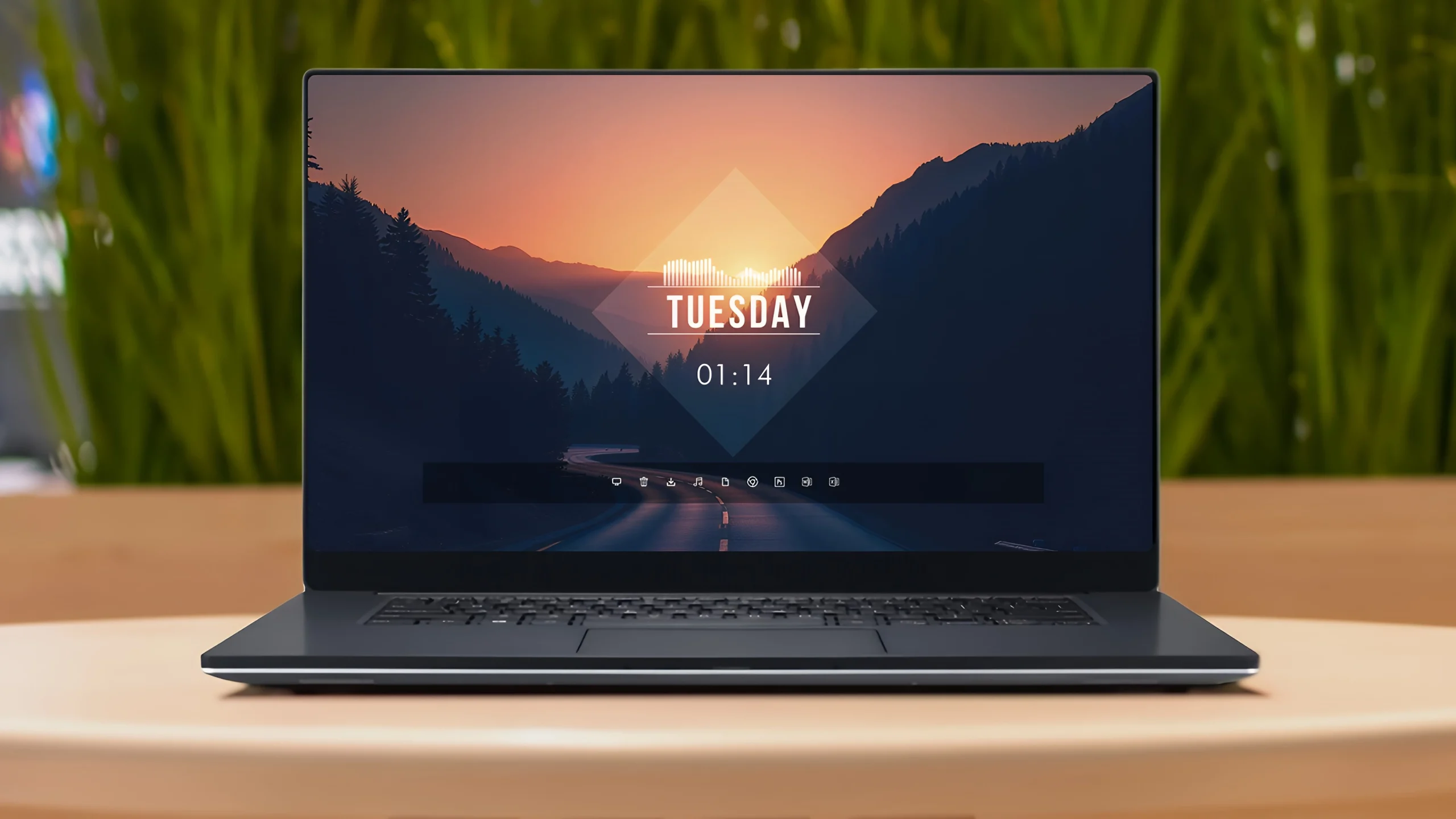
Elegant & Modern Rainmeter Suite is a complete desktop customization setup designed for Windows users who prefer a clean, minimal, and modern workspace. This suite combines multiple Rainmeter elements together to create a balanced desktop appearance with a stylish clock, date display, dock, and visualizer.
Unlike a single Rainmeter skin, this setup includes several components that work together to create the complete desktop look. The combination of minimal widgets, transparent elements, and a carefully arranged layout gives the Windows desktop a more organized and elegant appearance.
Elegant & Modern Rainmeter Suite works well with scenic, nature, and minimal wallpapers. The simple design focuses on clean spacing, readable information, and a distraction-free workspace that feels modern and professional.
Design Overview
The main focus of this setup is a minimal desktop layout with a clean clock and date display placed near the center of the screen. A dock-style launcher provides quick access to applications, while the visualizer adds a dynamic element to the overall design.
The dark transparent interface elements blend naturally with the wallpaper, creating a smooth and balanced desktop environment. Each Rainmeter component has its own purpose, and together they complete the full visual style of the setup.
Key Features
- Complete Rainmeter desktop customization suite.
- Minimal clock and date display.
- Modern dock-style application launcher.
- Audio visualizer Rainmeter element.
- Clean and organized desktop layout.
- Transparent interface elements with a modern appearance.
- Works well with scenic and minimal wallpapers.
- Multiple Rainmeter components combined for a complete setup.
What is Included in This?
Elegant & Modern Rainmeter Suite includes multiple Rainmeter elements that work together to create the complete desktop setup. All included components are required to achieve the same overall appearance.
- Minimal Clock Widget
- Date Display Widget
- Dock-style Application Launcher
- Audio Visualizer
- Desktop Customization Elements
Compatibility
Elegant & Modern Rainmeter Suite is designed for Windows desktop customization using Rainmeter. The final appearance may vary depending on your wallpaper, screen resolution, and personal Rainmeter settings.
System Requirements
- Windows operating system.
- Rainmeter installed on your computer.
- Basic knowledge of managing Rainmeter skins.
- A desktop environment capable of running multiple Rainmeter components.
Required Customization Tool
How to Install Elegant & Modern Rainmeter Suite
- Download and install Rainmeter on your Windows PC.
- Download the Elegant & Modern Rainmeter Suite package from this page.
- Extract the downloaded file if required.
- Install all included Rainmeter components from the package.
- Open Rainmeter Manage from the system tray.
- Load the clock, date, dock, and visualizer elements.
- Arrange the components according to your preferred desktop layout.
- Set a suitable wallpaper to match the overall design.
Theme Files74MB
Download More Resources
How to Remove Elegant & Modern Rainmeter Suite
Removing Elegant & Modern Rainmeter Suite only removes the Rainmeter customization elements from your desktop. It does not affect Windows files or installed applications.
- Open Rainmeter Manage from the system tray.
- Find the active clock, date, dock, and visualizer components.
- Unload the Rainmeter elements you want to remove.
- Remove the installed Rainmeter components if you no longer want to use the setup.
Who Should Use This Suite?
Elegant & Modern Rainmeter Suite is suitable for users who enjoy clean, modern, and organized desktop designs. It is a good choice for people who prefer minimal layouts with useful desktop elements.
- Users who like elegant and minimal desktop setups.
- People who prefer clean and distraction-free workspaces.
- Rainmeter users looking for a complete customization package.
- Users who enjoy combining widgets, wallpapers, and desktop elements.
Disclaimer
Elegant & Modern Rainmeter Suite is a third-party desktop customization resource created for Rainmeter users. It is not an official Microsoft product or Windows feature. Rainmeter, Windows, and related trademarks belong to their respective owners.
Conclusion
Elegant & Modern Rainmeter Suite provides a simple way to create a clean and stylish Windows desktop experience. By combining multiple Rainmeter elements such as the clock, date display, dock, and visualizer, users can build a more organized and personalized workspace.
For users who enjoy minimal designs, scenic wallpapers, and creative desktop customization, this complete Rainmeter suite offers an easy way to transform a regular desktop into a modern and elegant setup.







Disclaimer: All themes, visual styles, and concepts shared on this website are unofficial, fan-made creations built from imagination for customization purposes. We are not affiliated with, endorsed by, or sponsored by Microsoft or any other official brand.