Windows XP Inspired Start Menu Style
Windows XP Style Start Menu The Windows XP Style Start Menu brings back the nostalgic charm of one of Microsoft’s most beloved user interfaces. Known for its colorful layout, rounded corners, and classic two-column design, this Start Menu combines familiarity with functionality.

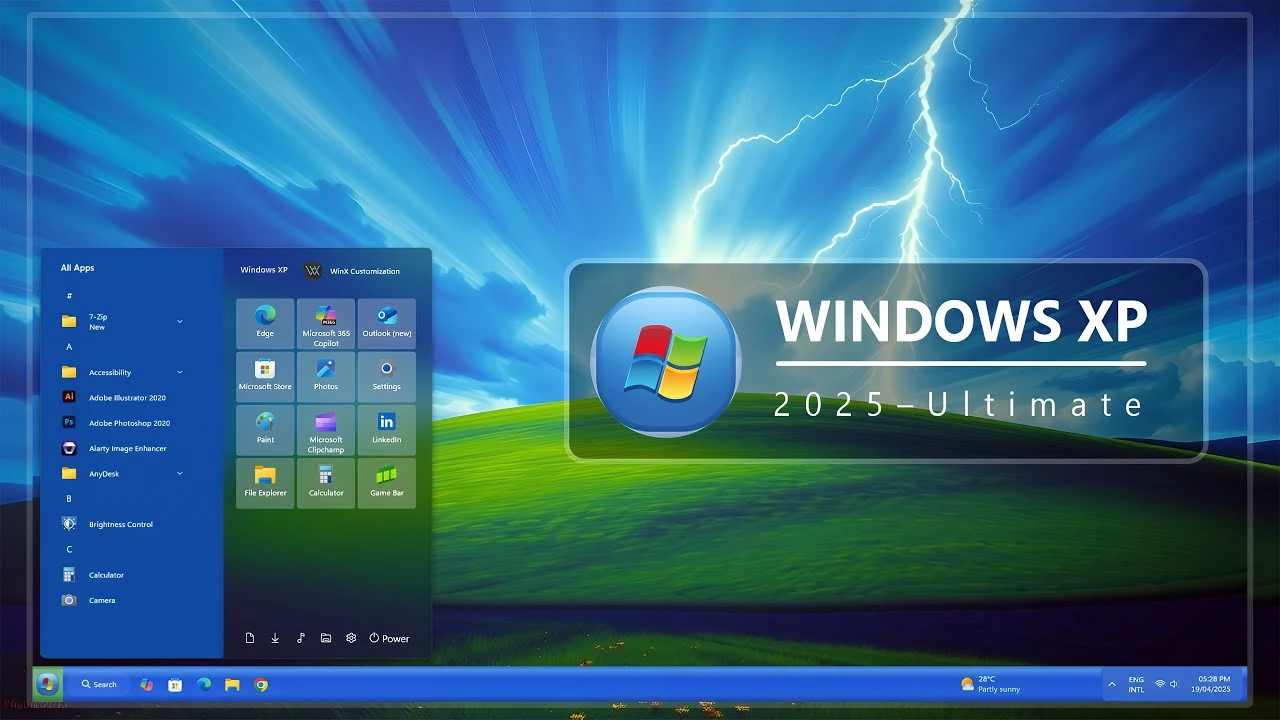
Windows XP Style Start Menu for Windows 11
The Windows XP Style Start Menu for Windows 11 is a retro-inspired Windhawk customization created for users who enjoy the familiar visual character of classic Windows desktop designs. It brings an XP-inspired Start Menu appearance to Windows 11 with a compact layout, classic-style navigation, recognizable color choices, and a more traditional desktop feel.
This customization is intended for visual personalization only. It does not install Windows XP, replace Windows 11, or restore the original Microsoft Windows XP Start Menu. Instead, it uses compatible Windhawk styling settings to modify supported visual elements of the existing Windows 11 Start Menu.
Features of Windows XP Style Start Menu
- Windows XP-inspired Start Menu appearance
- Classic blue and retro-style color direction
- Compact Start Menu layout
- Traditional navigation-inspired design
- Designed for Windows 11 personalization
- Applied through compatible Windhawk Start Menu styling
- Works well with retro wallpapers and classic-style icon setups
- Can be combined with matching taskbar and desktop customizations
Why Choose a Windows XP-Inspired Start Menu?
The Windows XP Style Start Menu can be a good option for users who prefer a more traditional desktop appearance or enjoy creating retro-inspired Windows setups. The familiar visual direction, compact organization, and classic color palette can give the Windows 11 desktop a noticeably different personality.
It is also suitable for users building a nostalgic desktop theme with matching wallpapers, icons, taskbar styles, and other compatible Windows customization elements. The goal is to create an XP-inspired visual experience while continuing to use Windows 11 as the underlying operating system.
Windows XP Start Menu Customization for Windows 11
This style can be paired with Windows XP-inspired wallpapers, classic-style taskbars, retro icons, and blue-themed desktop elements to create a more consistent visual setup. The exact appearance will depend on the configuration being used, your Windows build, display scaling, Windhawk version, and other active customization mods.
- Windows 11 21H2: May work, but not recommended for the best experience
- 22H2 YES
- 23H2 YES
- 24H2 YES
- Windows 11 25H2: YES work, but test carefully after Windows updates
- Download & Install windhawk.
- install & Open the Windows 11 Start Menu Styler mod in Windhawk.
- Go to the “Advanced” tab.
- Copy the content below to the text box under “Mod settings” and click “Save”.
{ "theme": "Windows XP 2025 Edition by Link Vegas", "controlStyles[0].target": "Windows.UI.Xaml.Controls.Grid#UndockedRoot", "controlStyles[0].styles[0]": "Visibility=Visible", "controlStyles[0].styles[1]": "Width=428", "controlStyles[0].styles[2]": "Transform3D:=<CompositeTransform3D TranslateX=\"178\" />", "controlStyles[0].styles[3]": "Margin=-80,-10,0,0", "controlStyles[0].styles[4]": "Padding=0,0,0,0", "controlStyles[1].target": "Windows.UI.Xaml.Controls.Grid#AllAppsRoot", "controlStyles[1].styles[0]": "Visibility=Visible", "controlStyles[1].styles[1]": "Width=320", "controlStyles[1].styles[2]": "Margin=-770,-20,830,0", "controlStyles[2].target": "Windows.UI.Xaml.Controls.Grid#ShowMoreSuggestions", "controlStyles[2].styles[0]": "Visibility=Collapsed", "controlStyles[3].target": "Windows.UI.Xaml.Controls.Grid#SuggestionsParentContainer", "controlStyles[3].styles[0]": "Visibility=Collapsed", "controlStyles[4].target": "Windows.UI.Xaml.Controls.Grid#TopLevelSuggestionsListHeader", "controlStyles[4].styles[0]": "Visibility=Collapsed", "controlStyles[5].target": "StartDocked.SearchBoxToggleButton", "controlStyles[5].styles[0]": "Visibility=Collapsed", "controlStyles[6].target": "Windows.UI.Xaml.Controls.Grid#TopLevelRoot > Windows.UI.Xaml.Controls.Border", "controlStyles[6].styles[0]": "Visibility=Collapsed", "controlStyles[7].target": "Windows.UI.Xaml.Controls.Button#CloseAllAppsButton", "controlStyles[7].styles[0]": "Visibility=Collapsed", "controlStyles[8].target": "StartDocked.PowerOptionsView", "controlStyles[8].styles[0]": "Margin=0,0,0,0", "controlStyles[9].target": "StartDocked.UserTileView", "controlStyles[9].styles[0]": "Visibility=Collapsed", "controlStyles[10].target": "StartMenu.PinnedList", "controlStyles[10].styles[0]": "Height=504", "controlStyles[11].target": "StartMenu.ExpandedFolderList > Grid > Border", "controlStyles[11].styles[0]": "Margin=-40,0,40,0", "controlStyles[11].styles[1]": "Width=325", "controlStyles[12].target": "StartMenu.ExpandedFolderList > Grid > Grid", "controlStyles[12].styles[0]": "CornerRadius=8", "controlStyles[12].styles[1]": "Margin=-85,0,0,0", "controlStyles[12].styles[2]": "Width=350", "controlStyles[13].target": "StartMenu.ExpandedFolderList > Grid > Grid > Microsoft.UI.Xaml.Controls.PipsPager#PinnedListPipsPager", "controlStyles[13].styles[0]": "Margin=-15,0,0,0", "controlStyles[14].target": "StartDocked.StartSizingFrame", "controlStyles[14].styles[0]": "MaxWidth=620", "controlStyles[14].styles[1]": "MinWidth=620", "controlStyles[14].styles[2]": "MaxHeight=650", "controlStyles[15].target": "Grid#RootContent", "controlStyles[15].styles[0]": "MinWidth=620", "controlStyles[15].styles[1]": "CornerRadius=10", "controlStyles[16].target": "Border#AcrylicOverlay", "controlStyles[16].styles[0]": "Visibility=Visible", "controlStyles[17].target": "Border#ContentBorder@CommonStates > Grid#DroppedFlickerWorkaroundWrapper > Border", "controlStyles[17].styles[0]": "FocusVisualPrimaryBrush:=<SolidColorBrush Color=\"#b3cefd\" Opacity=\".10\"/>", "controlStyles[17].styles[1]": "CornerRadius=4", "controlStyles[17].styles[2]": "Height=80", "controlStyles[17].styles[3]": "Width=92", "controlStyles[18].target": "StartMenu.PinnedList#StartMenuPinnedList", "controlStyles[18].styles[0]": "MaxWidth=445", "controlStyles[18].styles[1]": "Margin=42,15,0,0", "controlStyles[18].styles[2]": "Height=504", "controlStyles[19].target": "Windows.UI.Xaml.Controls.Border#ContentBorder@CommonStates > Windows.UI.Xaml.Controls.Grid#DroppedFlickerWorkaroundWrapper > Border#BackgroundBorder", "controlStyles[19].styles[0]": "Background:=<AcrylicBrush TintColor=\"{ThemeResource SystemListLowColor}\" TintOpacity=\"0\" TintLuminosityOpacity=\".25\"/>", "controlStyles[19].styles[1]": "Background@PointerOver:=<AcrylicBrush TintColor=\"{ThemeResource SystemListLowColor}\" TintOpacity=\"0\" TintLuminosityOpacity=\".15\"/>", "controlStyles[20].target": "Border#AcrylicBorder", "controlStyles[20].styles[0]": "Background:=<AcrylicBrush TintColor=\"{ThemeResource CardStrokeColorDefaultSolid}\" FallbackColor=\"{ThemeResource CardStrokeColorDefaultSolid}\" TintOpacity=\"0\" TintLuminosityOpacity=\".55\"/>", "controlStyles[20].styles[2]": "BorderThickness=1", "controlStyles[20].styles[3]": "CornerRadius=8", "controlStyles[20].styles[4]": "Margin=0", "controlStyles[21].target": "StartMenu.ExpandedFolderList > Grid > Grid > Microsoft.UI.Xaml.Controls.PipsPager#PinnedListPipsPager", "controlStyles[21].styles[0]": "Margin=-15,0,0,0", "controlStyles[22].target": "Border#AcrylicOverlay", "controlStyles[22].styles[0]": "Background:=#1049a2", "controlStyles[22].styles[1]": "Width=290", "controlStyles[22].styles[2]": "Margin=-330,0,0,-65", "controlStyles[22].styles[3]": "CornerRadius=5", "controlStyles[23].target": "Border#AcrylicBorder", "controlStyles[23].styles[0]": "Background:= <AcrylicBrush BackgroundSource=\"Backdrop\" TintColor=\"{ThemeResource SystemChromeAltHighColor}\" TintOpacity=\"0\" TintLuminosityOpacity=\".5\" />", "controlStyles[24].target": "Windows.UI.Xaml.Controls.TextBlock#PinnedListHeaderText", "controlStyles[24].styles[0]": "Margin=20,25,0,0", "controlStyles[25].target": "TextBlock#AppDisplayName", "controlStyles[25].styles[0]": "Foreground=#ffffff", "controlStyles[26].target": "TextBlock#AllAppsHeading", "controlStyles[26].styles[0]": "Foreground:=#ffffff", "controlStyles[27].target": "TextBlock#FolderGlyph", "controlStyles[27].styles[0]": "Foreground:=#ffffff", "controlStyles[28].target": "TextBlock#StatusMessage", "controlStyles[28].styles[0]": "Foreground:=#ffffff", "controlStyles[29].target": "TextBlock#FolderGlyph", "controlStyles[29].styles[0]": "Foreground:=#ffffff", "controlStyles[30].target": "TextBlock#Text ", "controlStyles[30].styles[0]": "Foreground:=#ffffff", "controlStyles[31].target": "TextBlock#AppDisplayName", "controlStyles[31].styles[0]": "Foreground:=#ffffff", "controlStyles[32].target": "StartMenu.ExpandedFolderList > Grid > Border", "controlStyles[32].styles[0]": "Background=#34294f", "controlStyles[33].target": "TextBlock#DisplayName", "controlStyles[33].styles[0]": "Foreground:=#ffffff", "controlStyles[34].target": "StartDocked.LauncherFrame > Grid#RootGrid > Grid#RootContent > Grid#MainContent > Grid#InnerContent > Rectangle", "controlStyles[34].styles[0]": "Visibility=Collapsed", "controlStyles[9].styles[1]": "Visibility=Visible", "controlStyles[9].styles[2]": "Transform3D:=<CompositeTransform3D TranslateX=\"350\" TranslateY=\"-580\" />", "controlStyles[35].target": "TextBlock#PinnedListHeaderText", "controlStyles[35].styles[0]": "Text=Windows XP", "controlStyles[35].styles[1]": "FontSize=13", "controlStyles[35].styles[2]": "Opacity=.75", "controlStyles[35].styles[3]": "FontWeight=600", "controlStyles[35].styles[4]": "Transform3D:=<CompositeTransform3D TranslateX=\"0\" TranslateY=\"-20\" />", "controlStyles[36].target": "TextBlock#AllAppsHeading", "controlStyles[36].styles[0]": "Text=All Apps", "controlStyles[37].target": "StartDocked.AppListView#NavigationPanePlacesListView", "controlStyles[37].styles[0]": "Transform3D:=<CompositeTransform3D TranslateX=\"0\"/>", "controlStyles[38].target": "Windows.UI.Xaml.Controls.TextBlock[Text=]", "controlStyles[38].styles[0]": "Text= Power", "controlStyles[38].styles[1]": "FontFamily=Segoe UI, Segoe MDL2 Assets", "controlStyles[38].styles[2]": "Foreground=#ffffff", "controlStyles[39].target": "StartDocked.NavigationPaneButton#PowerButton", "controlStyles[39].styles[0]": "Width=80", "controlStyles[39].styles[1]": "Margin=0,0,-25,0", "controlStyles[40].target": "StartDocked.LauncherFrame > Grid#RootPanel > Grid#RootGrid", "controlStyles[40].styles[0]": "MinWidth=620", "controlStyles[40].styles[1]": "MaxWidth=620", "controlStyles[41].target": "StartDocked.LauncherFrame > Grid#RootPanel > Grid#RootGrid > Grid#RootContent", "controlStyles[41].styles[0]": "MinWidth=620", "controlStyles[41].styles[1]": "MaxWidth=620", "disableNewStartMenuLayout": "legacyClassicLayout"}{ "theme": "", "controlStyles[0].target": "Grid#MainMenu", "controlStyles[0].styles[0]": "Width=620", "controlStyles[0].styles[1]": "MinWidth=620", "controlStyles[0].styles[2]": "MaxWidth=620", "controlStyles[1].target": "Grid#FrameRoot", "controlStyles[1].styles[0]": "Height=650", "controlStyles[1].styles[1]": "MaxHeight=650", "controlStyles[2].target": "Grid#SideBySidePinnedWrapper", "controlStyles[2].styles[0]": "ColumnDefinitions:=<ColumnDefinitionCollection><ColumnDefinition Width=\"290*\"/><ColumnDefinition Width=\"330*\"/></ColumnDefinitionCollection>", "controlStyles[3].target": "GridView#AllAppsGrid > Border > Grid#SideBySidePinnedWrapper > ScrollViewer#ScrollViewer", "controlStyles[3].styles[0]": "Grid.Column=0", "controlStyles[3].styles[1]": "Margin=0", "controlStyles[4].target": "ScrollViewer#SideBySidePinnedScrollViewer", "controlStyles[4].styles[0]": "Grid.Column=1", "controlStyles[4].styles[1]": "Margin=0", "controlStyles[5].target": "GridView#AllAppsGrid > Border > Grid#SideBySidePinnedWrapper > ScrollViewer#ScrollViewer > Border#Root", "controlStyles[5].styles[0]": "Background:=<SolidColorBrush Color=\"#1049A2\"/>", "controlStyles[5].styles[1]": "CornerRadius=6", "controlStyles[5].styles[2]": "Margin=5,5,3,5", "controlStyles[6].target": "Grid#SideBySidePinnedWrapper > ScrollViewer > Border#Root > Grid > ScrollContentPresenter > ItemsPresenter > ItemsWrapGrid", "controlStyles[6].styles[0]": "Margin=15,0,15,14", "controlStyles[7].target": "GridView#AllAppsGrid", "controlStyles[7].styles[0]": "Margin=0,0,0,58", "controlStyles[8].target": "Grid#AllListHeading", "controlStyles[8].styles[0]": "Margin=0,4,0,0", "controlStyles[9].target": "Grid#AllListHeading > TextBlock#AllListHeadingText", "controlStyles[9].styles[0]": "Text=All Apps", "controlStyles[9].styles[1]": "Foreground=#FFFFFF", "controlStyles[9].styles[2]": "FontWeight=600", "controlStyles[9].styles[3]": "FontSize=14", "controlStyles[9].styles[4]": "Margin=24,6,8,7", "controlStyles[10].target": "Grid#AllListHeading > Microsoft.UI.Xaml.Controls.DropDownButton#ViewSelectionButton", "controlStyles[10].styles[0]": "Margin=0,0,14,0", "controlStyles[11].target": "GridView#AllAppsGrid TextBlock#AppDisplayName", "controlStyles[11].styles[0]": "Foreground=#FFFFFF", "controlStyles[12].target": "GridView#AllAppsGrid TextBlock#DisplayName", "controlStyles[12].styles[0]": "Foreground=#FFFFFF", "controlStyles[13].target": "GridView#AllAppsGrid TextBlock#FolderGlyph", "controlStyles[13].styles[0]": "Foreground=#FFFFFF", "controlStyles[14].target": "StartMenu.PinnedList#StartMenuPinnedList", "controlStyles[14].styles[0]": "Width=320", "controlStyles[14].styles[1]": "MaxWidth=320", "controlStyles[14].styles[2]": "Height=500", "controlStyles[14].styles[3]": "MaxHeight=500", "controlStyles[14].styles[4]": "Margin=5,15,5,0", "controlStyles[15].target": "TextBlock#PinnedListHeaderText", "controlStyles[15].styles[0]": "Text=Windows XP", "controlStyles[15].styles[1]": "FontSize=13", "controlStyles[15].styles[2]": "FontWeight=600", "controlStyles[15].styles[3]": "Opacity=.85", "controlStyles[15].styles[4]": "Margin=18,5,0,0", "controlStyles[16].target": "Microsoft.UI.Xaml.Controls.PipsPager#PinnedListPipsPager", "controlStyles[16].styles[0]": "Visibility=Collapsed", "controlStyles[17].target": "Grid#TopLevelSuggestionsListHeader", "controlStyles[17].styles[0]": "Visibility=Collapsed", "controlStyles[17].styles[1]": "Height=0", "controlStyles[18].target": "Grid#TopLevelSuggestionsRoot", "controlStyles[18].styles[0]": "Visibility=Collapsed", "controlStyles[18].styles[1]": "Height=0", "controlStyles[18].styles[2]": "MaxHeight=0", "controlStyles[19].target": "Grid#TopLevelSuggestionsContainer", "controlStyles[19].styles[0]": "Visibility=Collapsed", "controlStyles[19].styles[1]": "Height=0", "controlStyles[20].target": "GridView#RecommendedList", "controlStyles[20].styles[0]": "Visibility=Collapsed", "controlStyles[20].styles[1]": "Height=0", "controlStyles[21].target": "Grid#ShowMoreSuggestions", "controlStyles[21].styles[0]": "Visibility=Collapsed", "controlStyles[21].styles[1]": "Height=0", "controlStyles[22].target": "Grid#MoreSuggestionsRoot", "controlStyles[22].styles[0]": "Visibility=Collapsed", "controlStyles[22].styles[1]": "Height=0", "controlStyles[23].target": "StartMenu.SearchBoxToggleButton", "controlStyles[23].styles[0]": "Visibility=Collapsed", "controlStyles[23].styles[1]": "Height=0", "controlStyles[23].styles[2]": "Width=0", "controlStyles[24].target": "Border#AcrylicBorder", "controlStyles[24].styles[0]": "Background:=<AcrylicBrush BackgroundSource=\"Backdrop\" TintColor=\"{ThemeResource SystemChromeAltHighColor}\" TintOpacity=\"0\" TintLuminosityOpacity=\".50\"/>", "controlStyles[24].styles[1]": "BorderBrush:=<SolidColorBrush Color=\"#4B7FD0\"/>", "controlStyles[24].styles[2]": "BorderThickness=1", "controlStyles[24].styles[3]": "CornerRadius=8", "controlStyles[24].styles[4]": "Margin=0", "controlStyles[25].target": "Border#AcrylicOverlay", "controlStyles[25].styles[0]": "Visibility=Collapsed", "controlStyles[26].target": "Border#DropShadow", "controlStyles[26].styles[0]": "CornerRadius=8", "controlStyles[26].styles[1]": "Margin=0", "controlStyles[27].target": "Border#StartDropShadow", "controlStyles[27].styles[0]": "CornerRadius=8", "controlStyles[28].target": "StartMenu.PinnedList#StartMenuPinnedList Border#ContentBorder@CommonStates > Grid#DroppedFlickerWorkaroundWrapper > Border", "controlStyles[28].styles[0]": "FocusVisualPrimaryBrush:=<SolidColorBrush Color=\"#B3CEFD\" Opacity=\".10\"/>", "controlStyles[28].styles[1]": "CornerRadius=4", "controlStyles[28].styles[2]": "Height=80", "controlStyles[28].styles[3]": "Width=92", "controlStyles[29].target": "StartMenu.PinnedList#StartMenuPinnedList Border#ContentBorder@CommonStates > Grid#DroppedFlickerWorkaroundWrapper > Border#BackgroundBorder", "controlStyles[29].styles[0]": "Background@Normal:=<AcrylicBrush TintColor=\"{ThemeResource SystemListLowColor}\" TintOpacity=\"0\" TintLuminosityOpacity=\".25\"/>", "controlStyles[29].styles[1]": "Background@PointerOver:=<AcrylicBrush TintColor=\"{ThemeResource SystemListLowColor}\" TintOpacity=\"0\" TintLuminosityOpacity=\".15\"/>", "controlStyles[29].styles[2]": "BorderThickness=1", "controlStyles[29].styles[3]": "CornerRadius=4", "controlStyles[30].target": "StartMenu.ExpandedFolderList > Grid > Border", "controlStyles[30].styles[0]": "Background=#34294F", "controlStyles[30].styles[1]": "Width=300", "controlStyles[30].styles[2]": "Margin=0", "controlStyles[31].target": "StartMenu.ExpandedFolderList > Grid > Grid", "controlStyles[31].styles[0]": "CornerRadius=8", "controlStyles[31].styles[1]": "Width=300", "controlStyles[31].styles[2]": "Margin=0", "controlStyles[32].target": "StartMenu.ExpandedFolderList > Grid > Grid > Microsoft.UI.Xaml.Controls.PipsPager#PinnedListPipsPager", "controlStyles[32].styles[0]": "Visibility=Collapsed", "controlStyles[33].target": "Grid#NavPanePlaceholder", "controlStyles[33].styles[0]": "Margin=18,0,18,0", "controlStyles[34].target": "StartDocked.NavigationPaneView#UserControl > Grid#RootPanel", "controlStyles[34].styles[0]": "FlowDirection=1", "controlStyles[35].target": "StartDocked.PowerOptionsView#PowerButton", "controlStyles[35].styles[0]": "FlowDirection=0", "controlStyles[36].target": "ItemsStackPanel > ListViewItem", "controlStyles[36].styles[0]": "FlowDirection=0", "controlStyles[37].target": "StartDocked.AppListView#NavigationPanePlacesListView > Border", "controlStyles[37].styles[0]": "Background:=<AcrylicBrush TintColor=\"#1049A2\" TintOpacity=\".22\" FallbackColor=\"#1049A2\"/>", "controlStyles[37].styles[1]": "BorderBrush:=<SolidColorBrush Color=\"#4B7FD0\"/>", "controlStyles[37].styles[2]": "BorderThickness=1", "controlStyles[37].styles[3]": "CornerRadius=5", "controlStyles[38].target": "StartDocked.UserTileView", "controlStyles[38].styles[0]": "Visibility=Visible", "controlStyles[38].styles[1]": "Height=42", "controlStyles[39].target": "Grid#UserTileIcon", "controlStyles[39].styles[0]": "Width=38", "controlStyles[39].styles[1]": "Height=38", "controlStyles[40].target": "StartDocked.NavigationPaneButton#UserTileButton > Grid@CommonStates > Border", "controlStyles[40].styles[0]": "Background:=<SolidColorBrush Color=\"#1049A2\"/>", "controlStyles[40].styles[1]": "BorderBrush:=<SolidColorBrush Color=\"#4B7FD0\"/>", "controlStyles[40].styles[2]": "BorderThickness=1", "controlStyles[40].styles[3]": "CornerRadius=8", "controlStyles[41].target": "StartDocked.NavigationPaneButton#PowerButton", "controlStyles[41].styles[0]": "Width=80", "controlStyles[42].target": "StartDocked.NavigationPaneButton#PowerButton > Grid@CommonStates > Border#BackgroundBorder", "controlStyles[42].styles[0]": "Background@Normal:=<SolidColorBrush Color=\"#1049A2\"/>", "controlStyles[42].styles[1]": "Background@PointerOver:=<SolidColorBrush Color=\"#2C69C7\"/>", "controlStyles[42].styles[2]": "BorderBrush@Normal:=<SolidColorBrush Color=\"#4B7FD0\"/>", "controlStyles[42].styles[3]": "BorderBrush@PointerOver:=<SolidColorBrush Color=\"#80B4FF\"/>", "controlStyles[42].styles[4]": "BorderThickness=1", "controlStyles[42].styles[5]": "CornerRadius=8", "controlStyles[43].target": "Windows.UI.Xaml.Controls.Primitives.ToggleButton#ShowHideCompanion", "controlStyles[43].styles[0]": "Visibility=Collapsed", "controlStyles[44].target": "Grid#CompanionRoot", "controlStyles[44].styles[0]": "Visibility=Collapsed", "controlStyles[45].target": "Grid#RightCompanionContainerGrid", "controlStyles[45].styles[0]": "Visibility=Collapsed", "disableNewStartMenuLayout": "newLayoutSideBySide"}{ "controlStyles[0].target": "Rectangle#BackgroundStroke", "controlStyles[0].styles[0]": "Fill:=<LinearGradientBrush StartPoint=\"0.5,0\" EndPoint=\"0.5,1\"> <GradientStop Color=\"#3168d5\" Offset=\"0.0\" /> <GradientStop Color=\"#4993E6\" Offset=\"0.1\" /> <GradientStop Color=\"#2157D7\" Offset=\"0.35\" /> <GradientStop Color=\"#2663E0\" Offset=\"0.8\" /> <GradientStop Color=\"#1941A5\" Offset=\"1.0\" /></LinearGradientBrush>", "controlStyles[0].styles[1]": "VerticalAlignment=Stretch", "controlStyles[0].styles[2]": "Height=Auto", "controlStyles[1].target": "Taskbar.TaskbarBackground#HoverFlyoutBackgroundControl > Grid > Rectangle#BackgroundFill", "controlStyles[1].styles[0]": "Fill:=<LinearGradientBrush StartPoint=\"0.5,0\" EndPoint=\"0.5,1\"> <GradientStop Color=\"#3168d5\" Offset=\"0.0\" /> <GradientStop Color=\"#4993E6\" Offset=\"0.1\" /> <GradientStop Color=\"#2157D7\" Offset=\"0.35\" /> <GradientStop Color=\"#2663E0\" Offset=\"0.8\" /> <GradientStop Color=\"#1941A5\" Offset=\"1.0\" /></LinearGradientBrush>", "controlStyles[2].target": "Taskbar.ExperienceToggleButton#LaunchListButton[AutomationProperties.AutomationId=StartButton]", "controlStyles[2].styles[0]": "CornerRadius=0", "controlStyles[2].styles[1]": "Margin=0,0,4,0", "controlStyles[2].styles[2]": "MaxWidth=48", "controlStyles[3].target": "Taskbar.ExperienceToggleButton#LaunchListButton[AutomationProperties.AutomationId=StartButton] > Taskbar.TaskListButtonPanel", "controlStyles[3].styles[0]": "Padding=0", "controlStyles[3].styles[1]": "Background:=<LinearGradientBrush StartPoint=\"0.5,0\" EndPoint=\"0.5,1\"> <GradientStop Color=\"#388238\" Offset=\"0.0\" /> <GradientStop Color=\"#71B571\" Offset=\"0.1\" /> <GradientStop Color=\"#71B571\" Offset=\"0.35\" /> <GradientStop Color=\"#47AA47\" Offset=\"0.8\" /> <GradientStop Color=\"#307443\" Offset=\"1.0\" /></LinearGradientBrush>", "controlStyles[3].styles[2]": "MaxWidth=48", "controlStyles[4].target": "Taskbar.ExperienceToggleButton#LaunchListButton[AutomationProperties.AutomationId=StartButton] > Taskbar.TaskListButtonPanel > Border#BackgroundElement", "controlStyles[4].styles[0]": "Background:=<ImageBrush Stretch=\"None\" ImageSource=\"https://i.imgur.com/BvXJlkj.png\" />", "controlStyles[5].target": "Taskbar.ExperienceToggleButton#LaunchListButton[AutomationProperties.AutomationId=StartButton] > Taskbar.TaskListButtonPanel > Microsoft.UI.Xaml.Controls.AnimatedVisualPlayer#Icon", "controlStyles[5].styles[0]": "Visibility=Collapsed", "controlStyles[6].target": "TextBlock#LabelControl", "controlStyles[6].styles[0]": "Foreground=White", "controlStyles[7].target": "Rectangle#RunningIndicator", "controlStyles[7].styles[0]": "Visibility=Collapsed", "controlStyles[8].target": "TextBlock#TimeInnerTextBlock", "controlStyles[8].styles[0]": "Foreground=White", "controlStyles[9].target": "TextBlock#DateInnerTextBlock", "controlStyles[9].styles[0]": "Foreground=White", "controlStyles[10].target": "SystemTray.TextIconContent > Grid > SystemTray.AdaptiveTextBlock#Base > TextBlock", "controlStyles[10].styles[0]": "Foreground=White", "controlStyles[11].target": "Taskbar.TaskListLabeledButtonPanel@RunningIndicatorStates > Border#BackgroundElement", "controlStyles[11].styles[0]": "Background@NoRunningIndicator=Transparent", "controlStyles[11].styles[1]": "Background@ActiveRunningIndicator:=<LinearGradientBrush StartPoint=\"0.5,0\" EndPoint=\"0.5,1\"> <GradientStop Color=\"#1B67D7\" Offset=\"0.0\" /> <GradientStop Color=\"#1542A8\" Offset=\"0.1\" /> <GradientStop Color=\"#1951BA\" Offset=\"0.15\" /> <GradientStop Color=\"#1951BA\" Offset=\"0.95\" /> <GradientStop Color=\"#1542A8\" Offset=\"1.0\" /></LinearGradientBrush>", "controlStyles[11].styles[2]": "Background:=<LinearGradientBrush StartPoint=\"0.5,0\" EndPoint=\"0.5,1\"> <GradientStop Color=\"#3358B5\" Offset=\"0.0\" /> <GradientStop Color=\"#8AC4FD\" Offset=\"0.1\" /> <GradientStop Color=\"#56A3FF\" Offset=\"0.2\" /> <GradientStop Color=\"#56A3FF\" Offset=\"0.85\" /> <GradientStop Color=\"#378DF6\" Offset=\"0.9\" /> <GradientStop Color=\"#163E95\" Offset=\"1.0\" /></LinearGradientBrush>", "controlStyles[11].styles[3]": "BorderThickness@ActiveRunningIndicator=1", "controlStyles[11].styles[4]": "BorderBrush@NoRunningIndicator=Transparent", "controlStyles[11].styles[5]": "BorderBrush@ActiveRunningIndicator=#1B67D7", "controlStyles[11].styles[6]": "BorderBrush=#3358B5", "controlStyles[12].target": "Taskbar.TaskListButton", "controlStyles[12].styles[0]": "Margin=-1.5", "controlStyles[13].target": "Grid#SystemTrayFrameGrid", "controlStyles[13].styles[0]": "Background:=<LinearGradientBrush StartPoint=\"0.5,0\" EndPoint=\"0.5,1\"> <GradientStop Color=\"#16ADF0\" Offset=\"0.0\" /> <GradientStop Color=\"#19B9F3\" Offset=\"0.1\" /> <GradientStop Color=\"#118FE9\" Offset=\"0.35\" /> <GradientStop Color=\"#0E9EF0\" Offset=\"0.8\" /> <GradientStop Color=\"#1580D9\" Offset=\"1.0\" /></LinearGradientBrush>", "controlStyles[13].styles[1]": "BorderThickness=1,1,0,1", "controlStyles[13].styles[2]": "BorderBrush=#095BC9", "controlStyles[13].styles[3]": "Padding=4,0,0,0", "controlStyles[14].target": "Grid#OverflowRootGrid > Border", "controlStyles[15].target": "Grid#SystemTrayFrameGrid", "controlStyles[15].styles[0]": "Background:=<AcrylicBrush TintColor=\"{ThemeResource SystemChromeHighColor}\" TintOpacity=\"0.1\" FallbackColor=\"{ThemeResource SystemChromeLowColor}\" />", "controlStyles[15].styles[1]": "Margin=70,0,8,1", "controlStyles[15].styles[2]": "CornerRadius=8", "controlStyles[15].styles[3]": "Padding=0", "controlStyles[16].target": "SystemTray.AdaptiveTextBlock > TextBlock", "controlStyles[16].styles[0]": "Foreground=#ffffff", "controlStyles[17].target": "TextBlock#DateInnerTextBlock", "controlStyles[17].styles[0]": "Foreground=#ffffff", "controlStyles[18].target": "TextBlock#TimeInnerTextBlock", "controlStyles[18].styles[0]": "Foreground=#ffffff", "controlStyles[19].target": "Taskbar.ExperienceToggleButton#LaunchListButton[AutomationProperties.AutomationId=StartButton] > Taskbar.TaskListButtonPanel > Microsoft.UI.Xaml.Controls.AnimatedVisualPlayer#Icon", "controlStyles[19].styles[0]": "Visibility=Collapsed", "controlStyles[20].target": "Taskbar.ExperienceToggleButton#LaunchListButton[AutomationProperties.AutomationId=StartButton] > Taskbar.TaskListButtonPanel > Border#BackgroundElement", "controlStyles[20].styles[0]": "Background:=<ImageBrush Stretch=\"none\" ImageSource=\"https://i.imgur.com//8GmvrJR.png\" />"}{ "IconSize": 22, "TaskbarHeight": 56, "TaskbarButtonWidth": 48}Compatibility Notes
Compatibility can vary between Windows 11 builds because Microsoft may change Start Menu interface elements through updates. A configuration that works correctly on one system may need adjustments after a major Windows update or when a redesigned Start Menu layout is introduced.
For the most reliable result, use a version of Windhawk and the Start Menu Styler mod that supports your current Windows setup, and avoid running multiple Start Menu customization tools that modify the same interface elements at the same time.
⚠️ Disclaimer: This Windows XP-inspired Start Menu style is an unofficial Windows 11 customization provided for UI personalization and educational purposes. It is not developed, endorsed, or supported by Microsoft and does not install or restore the original Windows XP operating system or Start Menu. Compatibility may vary depending on your Windows build, Windhawk version, Start Menu Styler version, installed mods, and system configuration. Keep a backup of your current settings before applying changes.
Final Words
The Windows XP Style Start Menu for Windows 11 offers a simple way to give your desktop a more classic and nostalgic appearance. Its XP-inspired colors, compact layout, and traditional visual direction can work well for users who enjoy retro Windows customization while continuing to use Windows 11.
For a more complete setup, combine the Start Menu style with matching wallpapers, icons, and taskbar customization. Since Windows updates can affect third-party UI styling, keep your configuration backed up and review compatibility after major system updates.