

Modern Start Menu Style 2.0 for Windhawk (Win 11)
Modern Start Menu Style 2.0 for Windhawk:Transform your desktop experience with Modern Start Menu Style 2.0 for Windhawk, the next-level customization mod built exclusively for Windows 11. This sleek and minimalistic design offers a cleaner, more intuitive Start Menu with enhanced layout controls, glass blur effects, and dynamic color themes that perfectly sync with your wallpaper

Windows Modern Start Menu Style 2.0 for Windhawk (Windows 11)
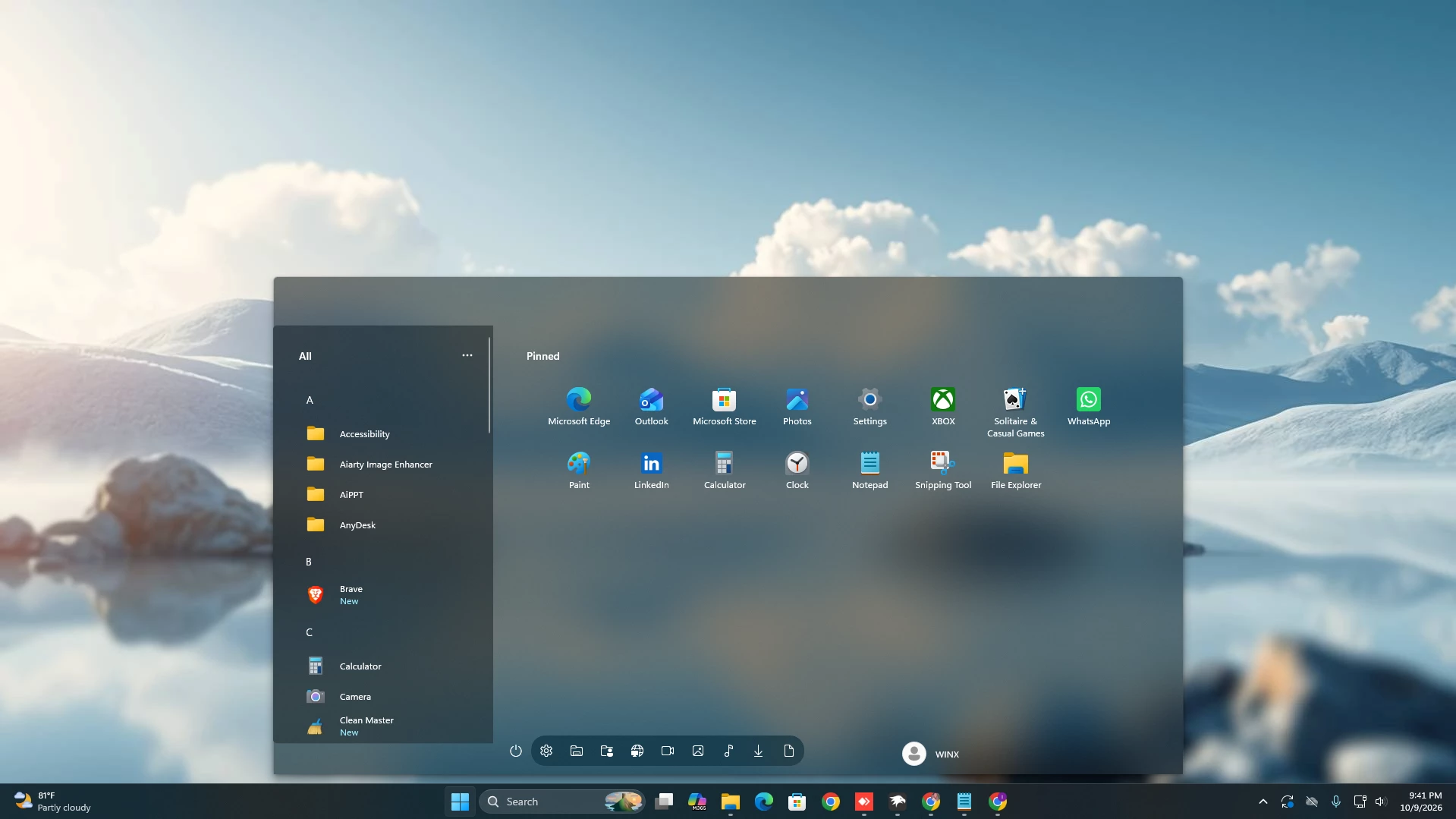
Windows Modern Start Menu Style 2.0 for Windhawk gives Windows 11 a wider and more spacious Start Menu layout with a soft glass-like appearance. Instead of using a small centered panel, this design opens into a large horizontal interface with a translucent blue-gray background, smooth edges, and a subtle blurred effect that allows the desktop wallpaper to remain visible behind it.
The layout is divided into two clear sections. The left side contains the All apps panel, where applications are arranged alphabetically with folder-style icons, app names, letter sections, and a slim scrollbar. The larger right side is reserved for pinned applications, creating a clean separation between the complete app list and the apps you use most often.
At the bottom, a rounded navigation panel contains the power button and several useful shortcuts. The user profile area appears on the lower-right side of the Start Menu, while the translucent Windows taskbar remains visible underneath. Together, these elements create a practical layout that feels more open and organized than the default Start Menu.
Wide Modern Start Menu Design
The main feature of this style is its wide horizontal design. The Start Menu covers a larger area of the desktop, giving the pinned applications enough room to sit comfortably in a single, well-spaced layout. This makes the interface feel less cramped and provides a better view of frequently used apps.
The background uses a muted blue-gray glass effect with soft transparency and gentle blur. This allows the wallpaper to influence the appearance of the Start Menu without making the text or app icons difficult to see. The overall look is modern, calm, and suitable for both everyday use and carefully customized desktop setups.
Bottom Navigation Panel
A rounded navigation strip is placed along the bottom of the Start Menu. It includes the power button along with several shortcuts for accessing common Windows locations and system functions. The dark translucent strip separates these controls from the main content while matching the glass appearance of the larger panel.
The user profile button is positioned on the lower-right side with the profile name displayed beside it. This arrangement keeps important account and system controls easy to reach without taking attention away from the pinned applications.
Windhawk-Based Windows Customization
Windhawk allows users to customize different parts of the Windows interface through compatible mods and configuration settings. This Start Menu style is intended for use with Windhawk-based customization, giving you a way to change the layout and appearance while keeping the familiar Windows 11 environment.
Because the design changes the Start Menu structure and visual styling, its exact appearance may depend on your Windows version, Windhawk settings, display scaling, and other installed customization tools. A restore point is recommended before applying major interface changes.
Suitable for Wallpaper-Focused Desktops
The wide translucent panel works especially well with bright, scenic, minimal, and softly blurred wallpapers. Since the background remains partially visible through the Start Menu, the wallpaper becomes part of the overall desktop design instead of being completely covered by an opaque interface.
You can pair this style with a matching transparent taskbar, modern icons, and a clean wallpaper to create a complete Windows 11 setup. Its spacious structure is suitable for productivity desktops, showcase layouts, gaming setups, and users who prefer seeing more information at once.
Main Features
- Wide horizontal Start Menu layout for Windows 11
- Large translucent blue-gray interface
- Soft glass blur effect with smooth edges
- Dedicated All apps panel on the left side
- Alphabetical application list with letter sections
- Vertical scrollbar for browsing installed applications
- Spacious Pinned apps section on the right
- Clean icon-based app layout without heavy tiles
- Clear application names displayed below the icons
- Rounded bottom navigation panel
- Power button and useful system shortcuts
- User profile area on the lower-right side
- Works well with scenic, minimal, and blurred wallpapers
- Designed for Windhawk-based Windows customization
Compatibility
- Windows 11 21H2: Not Tested
- Windows 11 22H2: Not Tested
- Windows 11 23H2: Not Tested
- Windows 11 24H2: Not Tested
- Windows 11 25H2: Tested and Working
- Latest Test: Checked on Windows 11 26H2 (Build 26300.9550)
How to Install
- Download and install Windhawk
- Open Windhawk and install the Windows 11 Start Menu Styler mod
- Go to the Advanced tab
- Paste the provided configuration code into the “Mod settings” box
- Click Save to apply the style
- For more details, visit this GitHub guide
{ "theme": "Modern 2.0 By Link vegas", "controlStyles[0].target": "Grid#MainMenu", "controlStyles[0].styles[0]": "Width=1200", "controlStyles[0].styles[1]": "MinWidth=1200", "controlStyles[0].styles[2]": "MaxWidth=1200", "controlStyles[0].styles[3]": "Height=680", "controlStyles[0].styles[4]": "MaxHeight=680", "controlStyles[0].styles[5]": "FlowDirection=LeftToRight", "controlStyles[1].target": "Grid#FrameRoot", "controlStyles[1].styles[0]": "Height=680", "controlStyles[1].styles[1]": "MaxHeight=680", "controlStyles[2].target": "Grid#MainMenu > Grid#MainContent", "controlStyles[2].styles[0]": "Margin=0", "controlStyles[2].styles[1]": "Padding=0", "controlStyles[3].target": "StartMenu.StartHome > Grid#PageRoot", "controlStyles[3].styles[0]": "Margin=0", "controlStyles[4].target": "GridView#AllAppsGrid", "controlStyles[4].styles[0]": "Margin=0", "controlStyles[4].styles[1]": "Padding=0", "controlStyles[4].styles[2]": "Height=680", "controlStyles[4].styles[3]": "MaxHeight=680", "controlStyles[4].styles[4]": "VerticalAlignment=Top", "controlStyles[5].target": "Grid#SideBySidePinnedWrapper", "controlStyles[5].styles[0]": "ColumnDefinitions:=<ColumnDefinitionCollection><ColumnDefinition Width=\"290\"/><ColumnDefinition Width=\"910\"/></ColumnDefinitionCollection>", "controlStyles[5].styles[1]": "Margin=0", "controlStyles[5].styles[2]": "Height=680", "controlStyles[5].styles[3]": "VerticalAlignment=Top", "controlStyles[6].target": "GridView#AllAppsGrid > Border > Grid#SideBySidePinnedWrapper > ScrollViewer#ScrollViewer", "controlStyles[6].styles[0]": "Grid.Column=0", "controlStyles[6].styles[1]": "Margin=0", "controlStyles[6].styles[2]": "Padding=0", "controlStyles[6].styles[3]": "MinWidth=0", "controlStyles[6].styles[4]": "HorizontalScrollMode=Disabled", "controlStyles[6].styles[5]": "HorizontalScrollBarVisibility=Disabled", "controlStyles[6].styles[6]": "VerticalScrollMode=Enabled", "controlStyles[6].styles[7]": "VerticalScrollBarVisibility=Auto", "controlStyles[7].target": "GridView#AllAppsGrid > Border > Grid#SideBySidePinnedWrapper > ScrollViewer#ScrollViewer > Border#Root", "controlStyles[7].styles[0]": "Background=Transparent", "controlStyles[7].styles[1]": "CornerRadius=5,0,0,5", "controlStyles[7].styles[2]": "Margin=0", "controlStyles[8].target": "GridView#AllAppsGrid > Border > Grid#SideBySidePinnedWrapper > ScrollViewer#ScrollViewer > Border#Root > Grid > ScrollContentPresenter > ItemsPresenter > ItemsWrapGrid", "controlStyles[8].styles[0]": "Margin=32,0,18,8", "controlStyles[9].target": "Grid#AllListHeading", "controlStyles[9].styles[0]": "Height=44", "controlStyles[9].styles[1]": "MinHeight=44", "controlStyles[9].styles[2]": "Margin=0,18,0,8", "controlStyles[9].styles[3]": "Background=Transparent", "controlStyles[9].styles[4]": "BorderThickness=0", "controlStyles[10].target": "Grid#AllListHeading > TextBlock#AllListHeadingText", "controlStyles[10].styles[0]": "Text=All", "controlStyles[10].styles[1]": "FontSize=14", "controlStyles[10].styles[2]": "FontWeight=SemiBold", "controlStyles[10].styles[3]": "Margin=34,0,0,0", "controlStyles[10].styles[4]": "VerticalAlignment=Center", "controlStyles[11].target": "Grid#AllListHeading > Microsoft.UI.Xaml.Controls.DropDownButton#ViewSelectionButton", "controlStyles[11].styles[0]": "Width=40", "controlStyles[11].styles[1]": "MinWidth=40", "controlStyles[11].styles[2]": "Height=26", "controlStyles[11].styles[3]": "MinHeight=0", "controlStyles[11].styles[4]": "Padding=0", "controlStyles[11].styles[5]": "Margin=0,0,14,0", "controlStyles[11].styles[6]": "VerticalAlignment=Center", "controlStyles[11].styles[7]": "CornerRadius=4", "controlStyles[11].styles[8]": "Content:=<FontIcon FontFamily=\"Segoe Fluent Icons\" Glyph=\"\" FontSize=\"16\"/>", "controlStyles[12].target": "Microsoft.UI.Xaml.Controls.DropDownButton#ViewSelectionButton > Grid > Microsoft.UI.Xaml.Controls.AnimatedIcon#ChevronIcon", "controlStyles[12].styles[0]": "Visibility=Collapsed", "controlStyles[13].target": "ScrollViewer#SideBySidePinnedScrollViewer", "controlStyles[13].styles[0]": "Grid.Column=1", "controlStyles[13].styles[1]": "Margin=0,0,0,58", "controlStyles[13].styles[2]": "Padding=0", "controlStyles[13].styles[3]": "HorizontalScrollMode=Disabled", "controlStyles[13].styles[4]": "HorizontalScrollBarVisibility=Disabled", "controlStyles[13].styles[5]": "VerticalScrollMode=Enabled", "controlStyles[13].styles[6]": "VerticalScrollBarVisibility=Auto", "controlStyles[14].target": "Grid#SideBySidePinnedContent", "controlStyles[14].styles[0]": "ColumnDefinitions:=<ColumnDefinitionCollection><ColumnDefinition Width=\"*\"/></ColumnDefinitionCollection>", "controlStyles[14].styles[1]": "RowDefinitions:=<RowDefinitionCollection><RowDefinition Height=\"62\"/><RowDefinition Height=\"*\"/></RowDefinitionCollection>", "controlStyles[14].styles[2]": "Margin=0", "controlStyles[14].styles[3]": "MinHeight=622", "controlStyles[15].target": "Grid#PinnedListHeaderGrid", "controlStyles[15].styles[0]": "Grid.Row=0", "controlStyles[15].styles[1]": "Grid.Column=0", "controlStyles[15].styles[2]": "Grid.ColumnSpan=1", "controlStyles[15].styles[3]": "Height=44", "controlStyles[15].styles[4]": "Margin=44,18,44,0", "controlStyles[15].styles[5]": "VerticalAlignment=Top", "controlStyles[16].target": "TextBlock#PinnedListHeaderText", "controlStyles[16].styles[0]": "Text=Pinned", "controlStyles[16].styles[1]": "Visibility=Visible", "controlStyles[16].styles[2]": "FontSize=14", "controlStyles[16].styles[3]": "FontWeight=SemiBold", "controlStyles[16].styles[4]": "Margin=0", "controlStyles[16].styles[5]": "VerticalAlignment=Center", "controlStyles[17].target": "StartMenu.PinnedList#StartMenuPinnedList", "controlStyles[17].styles[0]": "Grid.Row=1", "controlStyles[17].styles[1]": "Grid.Column=0", "controlStyles[17].styles[2]": "Grid.ColumnSpan=1", "controlStyles[17].styles[3]": "Width=768", "controlStyles[17].styles[4]": "MinWidth=768", "controlStyles[17].styles[5]": "MaxWidth=768", "controlStyles[17].styles[6]": "Height=550", "controlStyles[17].styles[7]": "MaxHeight=550", "controlStyles[17].styles[8]": "Margin=65,8,0,0", "controlStyles[17].styles[9]": "HorizontalAlignment=Left", "controlStyles[17].styles[10]": "VerticalAlignment=Top", "controlStyles[18].target": "StartMenu.PinnedList#StartMenuPinnedList > Grid#Root", "controlStyles[18].styles[0]": "Padding=0", "controlStyles[18].styles[1]": "Margin=0", "controlStyles[19].target": "StartMenu.PinnedList#StartMenuPinnedList > Grid#Root > GridView#PinnedList", "controlStyles[19].styles[0]": "Grid.Column=0", "controlStyles[19].styles[1]": "Grid.ColumnSpan=2", "controlStyles[19].styles[2]": "Width=768", "controlStyles[19].styles[3]": "MinWidth=768", "controlStyles[19].styles[4]": "MaxWidth=768", "controlStyles[19].styles[5]": "Height=550", "controlStyles[19].styles[6]": "MinHeight=550", "controlStyles[19].styles[7]": "MaxHeight=550", "controlStyles[19].styles[8]": "Margin=0", "controlStyles[19].styles[9]": "Padding=0", "controlStyles[19].styles[10]": "HorizontalAlignment=Left", "controlStyles[19].styles[11]": "VerticalAlignment=Top", "controlStyles[20].target": "StartMenu.PinnedList#StartMenuPinnedList > Grid#Root > GridView#PinnedList > Border > ScrollViewer", "controlStyles[20].styles[0]": "HorizontalScrollMode=Disabled", "controlStyles[20].styles[1]": "HorizontalScrollBarVisibility=Disabled", "controlStyles[20].styles[2]": "VerticalScrollMode=Enabled", "controlStyles[20].styles[3]": "VerticalScrollBarVisibility=Hidden", "controlStyles[20].styles[4]": "Padding=0", "controlStyles[21].target": "StartMenu.PinnedList#StartMenuPinnedList > Grid#Root > GridView#PinnedList > Border > ScrollViewer > Border#Root > Grid > ScrollContentPresenter > ItemsPresenter > ItemsWrapGrid", "controlStyles[21].styles[0]": "Orientation=Horizontal", "controlStyles[21].styles[1]": "MaximumRowsOrColumns=8", "controlStyles[21].styles[2]": "ItemWidth=96", "controlStyles[21].styles[3]": "ItemHeight=84", "controlStyles[21].styles[4]": "Margin=0", "controlStyles[21].styles[5]": "HorizontalAlignment=Left", "controlStyles[22].target": "StartMenu.PinnedList#StartMenuPinnedList > Grid#Root > GridView#PinnedList > Border > ScrollViewer > Border#Root > Grid > ScrollContentPresenter > ItemsPresenter > ItemsWrapGrid > GridViewItem", "controlStyles[22].styles[0]": "Width=96", "controlStyles[22].styles[1]": "MinWidth=96", "controlStyles[22].styles[2]": "MaxWidth=96", "controlStyles[22].styles[3]": "Height=84", "controlStyles[22].styles[4]": "MinHeight=84", "controlStyles[22].styles[5]": "MaxHeight=84", "controlStyles[22].styles[6]": "Margin=0", "controlStyles[22].styles[7]": "Padding=0", "controlStyles[22].styles[8]": "HorizontalContentAlignment=Stretch", "controlStyles[22].styles[9]": "VerticalContentAlignment=Stretch", "controlStyles[23].target": "StartMenu.PinnedList#StartMenuPinnedList > Grid#Root > GridView#PinnedList > Border > ScrollViewer > Border#Root > Grid > ScrollContentPresenter > ItemsPresenter > ItemsWrapGrid > GridViewItem > Border#ContentBorder@CommonStates > Grid#DroppedFlickerWorkaroundWrapper > Border#BackgroundBorder", "controlStyles[23].styles[0]": "Background@Normal=Transparent", "controlStyles[23].styles[1]": "Background@PointerOver:=<SolidColorBrush Color=\"{ThemeResource SubtleFillColorSecondary}\"/>", "controlStyles[23].styles[2]": "Background@Pressed:=<SolidColorBrush Color=\"{ThemeResource SubtleFillColorTertiary}\"/>", "controlStyles[23].styles[3]": "Background@Selected:=<SolidColorBrush Color=\"{ThemeResource SubtleFillColorSecondary}\"/>", "controlStyles[23].styles[4]": "BorderBrush=Transparent", "controlStyles[23].styles[5]": "BorderThickness=0", "controlStyles[23].styles[6]": "CornerRadius=5", "controlStyles[23].styles[7]": "Width=92", "controlStyles[23].styles[8]": "Height=80", "controlStyles[24].target": "StartMenu.PinnedListTile > Grid#Root > Grid#DisplayNameAndDownloadIconContainer > TextBlock#DisplayName", "controlStyles[24].styles[0]": "FontSize=12", "controlStyles[24].styles[1]": "TextAlignment=Center", "controlStyles[25].target": "StartMenu.PinnedList#StartMenuPinnedList > Grid#Root > Microsoft.UI.Xaml.Controls.PipsPager#PinnedListPipsPager", "controlStyles[25].styles[0]": "Visibility=Collapsed", "controlStyles[26].target": "StartMenu.SearchBoxToggleButton", "controlStyles[26].styles[0]": "Visibility=Collapsed", "controlStyles[26].styles[1]": "Height=0", "controlStyles[26].styles[2]": "MinHeight=0", "controlStyles[26].styles[3]": "MaxHeight=0", "controlStyles[27].target": "Grid#ShowMorePinnedGrid", "controlStyles[27].styles[0]": "Visibility=Collapsed", "controlStyles[27].styles[1]": "Height=0", "controlStyles[27].styles[2]": "MinHeight=0", "controlStyles[27].styles[3]": "MaxHeight=0", "controlStyles[28].target": "Grid#TopLevelSuggestionsListHeader", "controlStyles[28].styles[0]": "Visibility=Collapsed", "controlStyles[28].styles[1]": "Height=0", "controlStyles[28].styles[2]": "MinHeight=0", "controlStyles[28].styles[3]": "MaxHeight=0", "controlStyles[29].target": "Grid#TopLevelSuggestionsRoot", "controlStyles[29].styles[0]": "Visibility=Collapsed", "controlStyles[29].styles[1]": "Height=0", "controlStyles[29].styles[2]": "MinHeight=0", "controlStyles[29].styles[3]": "MaxHeight=0", "controlStyles[30].target": "Grid#TopLevelSuggestionsContainer", "controlStyles[30].styles[0]": "Visibility=Collapsed", "controlStyles[30].styles[1]": "Height=0", "controlStyles[30].styles[2]": "MinHeight=0", "controlStyles[30].styles[3]": "MaxHeight=0", "controlStyles[31].target": "Grid#TopLevelSuggestionsContainerParent", "controlStyles[31].styles[0]": "Visibility=Collapsed", "controlStyles[31].styles[1]": "Height=0", "controlStyles[31].styles[2]": "MinHeight=0", "controlStyles[31].styles[3]": "MaxHeight=0", "controlStyles[32].target": "Grid#NoTopLevelSuggestionsText", "controlStyles[32].styles[0]": "Visibility=Collapsed", "controlStyles[32].styles[1]": "Height=0", "controlStyles[32].styles[2]": "MinHeight=0", "controlStyles[32].styles[3]": "MaxHeight=0", "controlStyles[33].target": "GridView#RecommendedList", "controlStyles[33].styles[0]": "Visibility=Collapsed", "controlStyles[33].styles[1]": "Height=0", "controlStyles[33].styles[2]": "MinHeight=0", "controlStyles[33].styles[3]": "MaxHeight=0", "controlStyles[34].target": "Grid#ShowMoreSuggestions", "controlStyles[34].styles[0]": "Visibility=Collapsed", "controlStyles[34].styles[1]": "Height=0", "controlStyles[34].styles[2]": "MinHeight=0", "controlStyles[34].styles[3]": "MaxHeight=0", "controlStyles[35].target": "Grid#MoreSuggestionsRoot", "controlStyles[35].styles[0]": "Visibility=Collapsed", "controlStyles[35].styles[1]": "Height=0", "controlStyles[35].styles[2]": "MinHeight=0", "controlStyles[35].styles[3]": "MaxHeight=0", "controlStyles[36].target": "Border#AcrylicBorder", "controlStyles[36].styles[0]": "Background:=<AcrylicBrush BackgroundSource=\"Backdrop\" TintColor=\"{ThemeResource CardStrokeColorDefaultSolid}\" FallbackColor=\"{ThemeResource CardStrokeColorDefaultSolid}\" TintOpacity=\"0\" TintLuminosityOpacity=\".55\" Opacity=\"1\"/>", "controlStyles[36].styles[1]": "BorderBrush:=<SolidColorBrush Color=\"{ThemeResource SurfaceStrokeColorDefault}\" Opacity=\".55\"/>", "controlStyles[36].styles[2]": "BorderThickness=1", "controlStyles[36].styles[3]": "CornerRadius=5", "controlStyles[36].styles[4]": "Margin=0", "controlStyles[37].target": "Border#AcrylicOverlay", "controlStyles[37].styles[0]": "Background:=<AcrylicBrush BackgroundSource=\"Backdrop\" TintColor=\"{ThemeResource SystemChromeAltHighColor}\" FallbackColor=\"{ThemeResource SystemChromeAltHighColor}\" TintOpacity=\".30\" TintLuminosityOpacity=\".50\"/>", "controlStyles[37].styles[1]": "Width=290", "controlStyles[37].styles[2]": "MinWidth=290", "controlStyles[37].styles[3]": "MaxWidth=290", "controlStyles[37].styles[4]": "HorizontalAlignment=Left", "controlStyles[37].styles[5]": "VerticalAlignment=Stretch", "controlStyles[37].styles[6]": "CornerRadius=5,0,0,5", "controlStyles[37].styles[7]": "Margin=0", "controlStyles[38].target": "Border#DropShadow, Border#StartDropShadow", "controlStyles[38].styles[0]": "CornerRadius=5", "controlStyles[39].target": "Grid#NavPanePlaceholder", "controlStyles[39].styles[0]": "Width=882", "controlStyles[39].styles[1]": "MinWidth=0", "controlStyles[39].styles[2]": "Height=58", "controlStyles[39].styles[3]": "MinHeight=58", "controlStyles[39].styles[4]": "MaxHeight=58", "controlStyles[39].styles[5]": "Margin=300,0,18,0", "controlStyles[39].styles[6]": "HorizontalAlignment=Left", "controlStyles[39].styles[7]": "VerticalAlignment=Bottom", "controlStyles[39].styles[8]": "Padding=0", "controlStyles[39].styles[9]": "Background=Transparent", "controlStyles[39].styles[10]": "BorderThickness=0", "controlStyles[39].styles[11]": "Canvas.ZIndex=10", "controlStyles[40].target": "StartDocked.NavigationPaneView#UserControl > Grid#RootPanel", "controlStyles[40].styles[0]": "FlowDirection=RightToLeft", "controlStyles[40].styles[1]": "Width=882", "controlStyles[40].styles[2]": "MinWidth=0", "controlStyles[40].styles[3]": "Margin=0,-45,0,0", "controlStyles[40].styles[4]": "Padding=0", "controlStyles[40].styles[5]": "Background=Transparent", "controlStyles[41].target": "StartDocked.UserTileView", "controlStyles[41].styles[0]": "Visibility=Visible", "controlStyles[41].styles[1]": "FlowDirection=LeftToRight", "controlStyles[41].styles[2]": "MaxWidth=260", "controlStyles[41].styles[3]": "VerticalAlignment=Center", "controlStyles[42].target": "TextBlock#UserTileNameText", "controlStyles[42].styles[0]": "Visibility=Visible", "controlStyles[42].styles[1]": "FontSize=12", "controlStyles[43].target": "StartDocked.AppListView#NavigationPanePlacesListView", "controlStyles[43].styles[0]": "Visibility=Visible", "controlStyles[43].styles[1]": "MinWidth=0", "controlStyles[43].styles[2]": "MaxWidth=360", "controlStyles[43].styles[3]": "Height=40", "controlStyles[43].styles[4]": "Margin=0,-8,0,0", "controlStyles[43].styles[5]": "Padding=0", "controlStyles[43].styles[6]": "VerticalAlignment=Center", "controlStyles[44].target": "StartDocked.AppListView#NavigationPanePlacesListView > Border", "controlStyles[44].styles[0]": "Background:=<AcrylicBrush BackgroundSource=\"Backdrop\" TintColor=\"{ThemeResource CardStrokeColorDefaultSolid}\" FallbackColor=\"{ThemeResource CardStrokeColorDefaultSolid}\" TintOpacity=\"0\" TintLuminosityOpacity=\".55\"/>", "controlStyles[44].styles[1]": "CornerRadius=18", "controlStyles[44].styles[2]": "Padding=0", "controlStyles[45].target": "StartDocked.AppListView#NavigationPanePlacesListView > Border > ScrollViewer > Border > Grid > ScrollContentPresenter > ItemsPresenter > ItemsStackPanel > StartDocked.AppListViewItem", "controlStyles[45].styles[0]": "Width=40", "controlStyles[45].styles[1]": "MinWidth=40", "controlStyles[45].styles[2]": "MaxWidth=40", "controlStyles[45].styles[3]": "Height=40", "controlStyles[45].styles[4]": "MinHeight=40", "controlStyles[45].styles[5]": "MaxHeight=40", "controlStyles[45].styles[6]": "Margin=0", "controlStyles[45].styles[7]": "Padding=0", "controlStyles[45].styles[8]": "FlowDirection=LeftToRight", "controlStyles[46].target": "ItemsStackPanel > ListViewItem", "controlStyles[46].styles[0]": "FlowDirection=LeftToRight", "controlStyles[47].target": "StartDocked.PowerOptionsView#PowerButton", "controlStyles[47].styles[0]": "FlowDirection=LeftToRight", "controlStyles[47].styles[1]": "Width=40", "controlStyles[47].styles[2]": "MinWidth=40", "controlStyles[47].styles[3]": "Height=40", "controlStyles[47].styles[4]": "MinHeight=40", "controlStyles[47].styles[5]": "Margin=0,-8,0,0", "controlStyles[47].styles[6]": "VerticalAlignment=Center", "disableNewStartMenuLayout": "newLayoutSideBySide"}Important Note
This is an unofficial Windows customization style created for personalization purposes only. It is not developed, supported, or endorsed by Microsoft. The final look may vary depending on your Windows version, wallpaper, system theme, accent color, and installed Windhawk mods.
Before applying any customization style, it is recommended to create a system restore point or keep a backup of your current settings. Always download customization tools and files from trusted sources and follow the instructions carefully.
Frequently Asked Questions
Is Windows Modern Start Menu Style 2.0 free to use?
Yes, this style is provided as a Windows customization resource for users who want to personalize their Windows 11 Start Menu with Windhawk.
Do I need Windhawk for this style?
Yes, Windhawk is required because this style is designed to work with Windhawk-based Windows customization mods.
Are wallpapers included in the download file?
Yes, this package includes wallpapers that can help you create a complete and matching Windows 11 desktop setup.
Does this style support dark mode?
Yes, this Start Menu style can work well with dark mode, light mode, and modern wallpaper-based desktop themes.
Will this style slow down my PC?
The style is lightweight and designed for smooth use. However, performance may depend on your device specifications, Windows version, and the number of active customization mods.
Can I customize the colors and transparency?
In most cases, you can adjust colors, transparency, blur, and other visual settings from the related Windhawk mod settings. Available options may depend on the mod version you are using.
You may also like


One comment
Leave a Reply
Disclaimer: All themes, visual styles, and concepts shared on this website are unofficial, fan-made creations built from imagination for customization purposes. We are not affiliated with, endorsed by, or sponsored by Microsoft or any other official brand.
The start menu is extremely wide, i need to reduce it’s width. I tried changing its values but it doesn’t effect and instead it messes things up.