

Spectra Start Menu Style For Windows 11
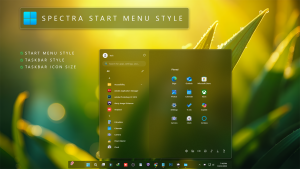
Spectra Start Menu Style : The Spectra Start Menu Style for Windows 11 (Windhawk Mod) brings a bold and colorful redesign to your desktop, blending modern aesthetics with smooth performance.

Spectra Start Menu Style For Windows 11
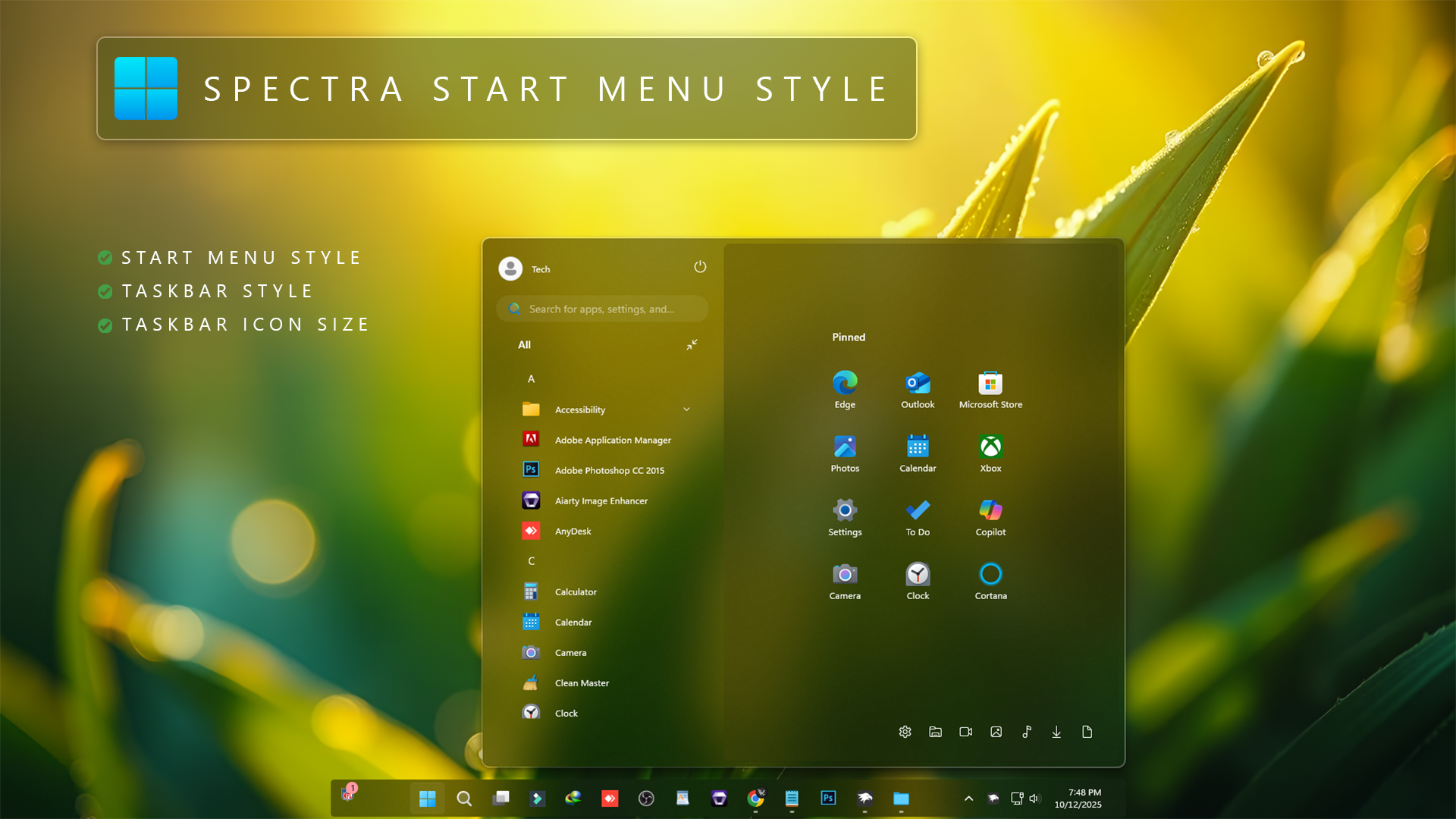
The Spectra Start Menu Style For Windows 11 gives the Start Menu a wider two-section layout with a clean, transparent finish. Instead of keeping everything inside the standard Windows 11 arrangement, it places the All Apps list on the left and gives pinned apps their own spacious section on the right.
The background uses soft acrylic transparency, allowing colors from your desktop wallpaper to remain visible through the Start Menu. This makes the menu feel connected to the desktop instead of looking like a completely separate solid panel.
The left section keeps everyday controls easy to reach. A compact search box sits near the top, followed by the All Apps list below it. The user profile and power controls are also positioned within the upper part of the menu, keeping the layout practical without taking up unnecessary space.
On the right, pinned apps are arranged inside a larger dedicated area. A subtle transparent overlay separates this section from the All Apps panel while still allowing the wallpaper colors underneath to influence the overall appearance. The result is a layered look that stays clean and readable.
Two-Section Start Menu Layout
Spectra changes the Windows 11 Start Menu into a wide side-by-side layout. The left side is focused on the All Apps list, while the right side is reserved for pinned apps.
This arrangement makes it easier to browse installed apps without giving up quick access to frequently used pinned programs. Both sections remain visible together, so there is less need to move back and forth between different Start Menu pages.
All Apps on the Left
The left side of the Start Menu contains the alphabetical All Apps list. Apps are shown in a compact vertical layout, making the section easy to scan while keeping more of the menu available for pinned items.
A search box is placed near the top of this section for quickly finding apps, settings, and other Windows items. The profile and power controls are also kept nearby for convenient access.
Pinned Apps on the Right
The larger right section is dedicated to pinned apps. Icons are arranged in a spacious grid with enough room between each item, giving the Start Menu a cleaner and less crowded appearance.
This section uses its own soft acrylic overlay. The overlay adds a little separation from the All Apps area without turning the pinned section into a heavy solid panel.
Soft Acrylic Transparency
Transparency is one of the main parts of the Spectra design. The Start Menu uses a lightly tinted acrylic background instead of a fully opaque surface, so colors from the wallpaper can pass through naturally.
The effect is deliberately soft. There are no strong glowing elements competing with the app icons or text. The wallpaper provides most of the color, while the transparent layers help maintain contrast and readability.
Navigation Shortcuts
A compact navigation area is placed along the lower part of the Start Menu. It keeps useful Windows shortcuts together without adding another large panel to the layout.
Because these shortcuts are separated from the main app grid, the pinned section stays tidy while common locations remain easy to access.
Key Features of Spectra Start Menu Style
- Wide Two-Section Layout: Places All Apps on the left and pinned apps on the right.
- Left-Side Search: Keeps the Start Menu search field close to the All Apps list.
- Dedicated Pinned Area: Gives pinned apps a larger and more organized grid.
- Acrylic Overlay: Adds a transparent layer behind the pinned section for better separation.
- Soft Transparency: Allows wallpaper colors to remain visible through the Start Menu.
- Compact Navigation: Keeps useful shortcut icons together near the bottom of the menu.
- Rounded Design: Uses rounded corners and subtle borders to match the Windows 11 interface.
- Windhawk Based: Applied through the Windows 11 Start Menu Styler mod.
Best Wallpaper Choice
Spectra works especially well with wallpapers that have clear colors, soft lighting, or gentle contrast. Since the Start Menu background is partially transparent, the colors behind it become part of the overall design.
Nature wallpapers, abstract backgrounds, darker images, and colorful desktop setups can all work well. A wallpaper with enough contrast behind the menu will usually keep app names and icons easier to read.
Download Windhawk To Use The Style
Compatibility
- Windows 11 21H2 YES
- Windows 11 22H2 YES
- Windows 11 23H2 YES
- Windows 11 24H2 YES
- Windows 11 25H2 YES
Installation Steps
- Download and install Windhawk.
- Open Windhawk and install the Windows 11 Start Menu Styler mod.
- Open the mod and go to the Advanced tab.
- Copy the Spectra configuration for your Windows 11 version.
- Paste the configuration into the Mod settings box.
- Click Save and open the Start Menu again.
Important Notes
Before applying Windows customization mods, creating a System Restore Point is a sensible precaution. Windows updates can occasionally change Start Menu components, which may affect third-party styling configurations.
If the style does not apply correctly, first check that the Windows 11 Start Menu Styler mod is enabled and that the complete configuration has been pasted into the correct section. Restarting Windows Explorer or signing out and back in can also help refresh the Start Menu after a configuration change.
{ "controlStyles[0].target": "Windows.UI.Xaml.Controls.Grid#UndockedRoot", "controlStyles[0].styles[0]": "Visibility=Visible", "controlStyles[0].styles[1]": "Width=450", "controlStyles[0].styles[2]": "Margin=200,-10,0,0", "controlStyles[1].target": "Windows.UI.Xaml.Controls.Grid#AllAppsRoot", "controlStyles[1].styles[0]": "Visibility=Visible", "controlStyles[1].styles[1]": "Width=350", "controlStyles[1].styles[2]": "Transform3D:=<CompositeTransform3D TranslateX=\"-1350\" />", "controlStyles[1].styles[3]": "Margin=180,0,-220,0", "controlStyles[2].target": "Windows.UI.Xaml.Controls.Button#CloseAllAppsButton", "controlStyles[2].styles[0]": "Visibility=Collapsed", "controlStyles[3].target": "StartDocked.StartSizingFrame", "controlStyles[3].styles[0]": "MaxWidth=850", "controlStyles[3].styles[1]": "MinWidth=850", "controlStyles[3].styles[2]": "MaxHeight=700", "controlStyles[4].target": "StartDocked.LauncherFrame > Grid#RootPanel > Grid#RootGrid", "controlStyles[4].styles[0]": "MinWidth=850", "controlStyles[4].styles[1]": "MaxWidth=850", "controlStyles[5].target": "StartDocked.LauncherFrame > Grid#RootPanel > Grid#RootGrid > Grid#RootContent", "controlStyles[5].styles[0]": "MinWidth=850", "controlStyles[5].styles[1]": "MaxWidth=850", "controlStyles[6].target": "Windows.UI.Xaml.Controls.Grid#ShowMoreSuggestions", "controlStyles[6].styles[0]": "Visibility=Collapsed", "controlStyles[7].target": "Windows.UI.Xaml.Controls.Button#ShowAllAppsButton", "controlStyles[7].styles[0]": "Visibility=Collapsed", "controlStyles[8].target": "Windows.UI.Xaml.Controls.GridView#RecommendedList > Windows.UI.Xaml.Controls.Border > Windows.UI.Xaml.Controls.ScrollViewer#ScrollViewer > Windows.UI.Xaml.Controls.Border#Root > Windows.UI.Xaml.Controls.Grid > Windows.UI.Xaml.Controls.ScrollContentPresenter#ScrollContentPresenter > Windows.UI.Xaml.Controls.ItemsPresenter > Windows.UI.Xaml.Controls.ItemsWrapGrid > Windows.UI.Xaml.Controls.GridViewItem", "controlStyles[8].styles[0]": "MaxWidth=190", "controlStyles[8].styles[1]": "MinWidth=190", "controlStyles[8].styles[2]": "Margin=0,0,0,0", "controlStyles[9].target": "StartDocked.AllAppsGridListView#AppsList", "controlStyles[9].styles[0]": "Padding=90,3,6,16", "controlStyles[10].target": "Windows.UI.Xaml.Controls.Grid#AllAppsPaneHeader", "controlStyles[10].styles[0]": "Margin=97,-10,0,0", "controlStyles[11].target": "Windows.UI.Xaml.Controls.Grid#SuggestionsParentContainer", "controlStyles[11].styles[0]": "Visibility=Collapsed", "controlStyles[12].target": "StartDocked.NavigationPaneView#NavigationPane", "controlStyles[12].styles[0]": "FlowDirection=0", "controlStyles[12].styles[1]": "Margin=30,0,30,0", "controlStyles[13].target": "StartDocked.PowerOptionsView", "controlStyles[13].styles[0]": "Margin=-550,-1256,-10,0", "controlStyles[13].styles[1]": "CornerRadius=10", "controlStyles[14].target": "Windows.UI.Xaml.Controls.ItemsStackPanel", "controlStyles[14].styles[0]": "FlowDirection=1", "controlStyles[15].target": "Windows.UI.Xaml.Controls.ListViewItem", "controlStyles[15].styles[0]": "FlowDirection=0", "controlStyles[16].target": "Windows.UI.Xaml.Controls.ItemsStackPanel > Windows.UI.Xaml.Controls.ListViewItem", "controlStyles[16].styles[0]": "FlowDirection=0", "controlStyles[17].target": "StartDocked.SearchBoxToggleButton#StartMenuSearchBox", "controlStyles[17].styles[0]": "Margin=23,-101,23,-514", "controlStyles[18].target": "Windows.UI.Xaml.Controls.TextBlock#NoSuggestionsWithoutSettingsLink", "controlStyles[18].styles[0]": "Margin=11,0,48,0", "controlStyles[19].target": "StartDocked.LauncherFrame > Windows.UI.Xaml.Controls.Grid#RootGrid > Windows.UI.Xaml.Controls.Grid#RootContent > Windows.UI.Xaml.Controls.Grid#MainContent > Windows.UI.Xaml.Controls.Grid#InnerContent > Windows.UI.Xaml.Shapes.Rectangle", "controlStyles[19].styles[0]": "Margin=67,7,0,21", "controlStyles[20].target": "Windows.UI.Xaml.Controls.SemanticZoom#ZoomControl", "controlStyles[20].styles[0]": "IsZoomOutButtonEnabled=true", "controlStyles[21].target": "Windows.UI.Xaml.Controls.Button#ZoomOutButton > Windows.UI.Xaml.Controls.ContentPresenter#ContentPresenter > Windows.UI.Xaml.Controls.TextBlock", "controlStyles[21].styles[0]": "Text=", "controlStyles[22].target": "Windows.UI.Xaml.Controls.Button#ZoomOutButton", "controlStyles[22].styles[0]": "Width=28", "controlStyles[22].styles[1]": "Height=28", "controlStyles[22].styles[2]": "Margin=0,-36,10,0", "controlStyles[22].styles[3]": "FontSize=14", "controlStyles[22].styles[4]": "CornerRadius=10", "controlStyles[22].styles[5]": "VerticalAlignment=0", "controlStyles[22].styles[6]": "Background=Transparent", "controlStyles[22].styles[7]": "BorderBrush=Transparent", "controlStyles[23].target": "Windows.UI.Xaml.Controls.ListView#ZoomAppsList", "controlStyles[23].styles[0]": "Padding=86,0,27,0", "controlStyles[24].target": "StartDocked.SearchBoxToggleButton", "controlStyles[24].styles[0]": "Height=35", "controlStyles[24].styles[1]": "Margin=-530,45,0,20", "controlStyles[24].styles[2]": "Width=280", "controlStyles[25].target": "StartMenu.PinnedList", "controlStyles[25].styles[0]": "Height=500", "controlStyles[25].styles[1]": "Margin=100,0,0,0", "controlStyles[26].target": "Windows.UI.Xaml.Controls.TextBlock#PinnedListHeaderText", "controlStyles[26].styles[0]": "Margin=100,-20,0,0", "controlStyles[27].target": "Windows.UI.Xaml.Controls.Grid#SuggestionsParentContainer", "controlStyles[27].styles[0]": "Margin=-20,0,0,0", "controlStyles[28].target": "Windows.UI.Xaml.Controls.Grid#TopLevelSuggestionsListHeader", "controlStyles[28].styles[0]": "Visibility=Collapsed", "controlStyles[29].target": "Windows.UI.Xaml.Controls.Border#ContentBorder > Windows.UI.Xaml.Controls.Grid#DroppedFlickerWorkaroundWrapper > Border@CommonStates", "controlStyles[29].styles[0]": "BorderBrush@Active:=<RevealBorderBrush Color=\"White\" TargetTheme=\"1\" Opacity=\"0.3\"/>", "controlStyles[29].styles[1]": "Background:=<RevealBorderBrush Color=\"Transparent\" TargetTheme=\"1\" Opacity=\"0.3\"/>", "controlStyles[29].styles[2]": "Margin=1", "controlStyles[29].styles[3]": "BorderBrush:=<RevealBorderBrush Color=\"Transparent\" TargetTheme=\"1\" Opacity=\"0.8\"/>", "controlStyles[30].target": "Windows.UI.Xaml.Controls.Border#ContentBorder > Windows.UI.Xaml.Controls.Grid#DroppedFlickerWorkaroundWrapper > Border#BackgroundBorder", "controlStyles[30].styles[0]": "Background:=<RevealBorderBrush Color=\"Transparent\" TargetTheme=\"0\" Opacity=\".1\"/>", "controlStyles[30].styles[1]": "Margin=2", "controlStyles[31].target": "Windows.UI.Xaml.Controls.TextBlock#PinnedListHeaderText", "controlStyles[31].styles[0]": "Visibility=Visible", "controlStyles[32].target": "Rectangle[4]", "controlStyles[32].styles[0]": "Margin=0,-20,0,0", "controlStyles[33].target": "Border#AcrylicBorder", "controlStyles[33].styles[0]": "CornerRadius=10", "controlStyles[33].styles[1]": "Margin=0", "controlStyles[33].styles[2]": "BorderThickness=2", "controlStyles[33].styles[3]": "Background:=<AcrylicBrush TintColor=\"{ThemeResource CardStrokeColorDefaultSolid}\" FallbackColor=\"{ThemeResource CardStrokeColorDefaultSolid}\" TintOpacity=\"0\" TintLuminosityOpacity=\".60\" Opacity=\"1\"/>", "controlStyles[33].styles[4]": "BorderBrush:=<LinearGradientBrush StartPoint=\"0,0\" EndPoint=\"1,1\" Opacity=\"0.6\"><GradientStop Color=\"#80ffffff\" Offset=\"0.0\" /><GradientStop Color=\"{ThemeResource SurfaceStrokeColorDefault}\" Offset=\"0.55\" /><GradientStop Color=\"#80ffffff\" Offset=\"1\" /></LinearGradientBrush>", "controlStyles[34].target": "Border#AcrylicOverlay", "controlStyles[34].styles[0]": "Background:=<AcrylicBrush TintColor=\"{ThemeResource CardStrokeColorDefaultSolid}\" FallbackColor=\"{ThemeResource CardStrokeColorDefaultSolid}\" TintOpacity=\"0\" TintLuminosityOpacity=\".20\" Opacity=\"1\"/>", "controlStyles[34].styles[1]": "Width=520", "controlStyles[34].styles[2]": "RenderTransform:=<TranslateTransform Y=\"2\" X=\"155\" />", "controlStyles[34].styles[3]": "CornerRadius=8", "controlStyles[34].styles[4]": "Margin=0,6,0,-55", "controlStyles[35].target": "Border#DropShadow", "controlStyles[35].styles[0]": "CornerRadius=10", "controlStyles[35].styles[1]": "Margin=0", "controlStyles[36].target": "Border#DropShadowDismissTarget", "controlStyles[36].styles[0]": "CornerRadius=10", "controlStyles[36].styles[1]": "Margin=0", "controlStyles[37].target": "StartDocked.PowerOptionsView > StartDocked.NavigationPaneButton > Grid > Border", "controlStyles[37].styles[0]": "CornerRadius=99", "controlStyles[37].styles[1]": "Margin=2,3,2,0", "controlStyles[38].target": "StartDocked.UserTileView", "controlStyles[38].styles[0]": "Margin=-20,-1250,0,0", "controlStyles[39].target": "StartDocked.UserTileView > StartDocked.NavigationPaneButton > Grid > Border", "controlStyles[39].styles[0]": "Margin=8,0,0,0", "controlStyles[39].styles[1]": "CornerRadius=10", "controlStyles[40].target": "StartDocked.SearchBoxToggleButton > Grid > Border", "controlStyles[40].styles[0]": "Background=#11ffffff", "controlStyles[41].target": "StartDocked.LauncherFrame > Grid#RootGrid > Grid#RootContent > Grid#MainContent > Grid#InnerContent > Rectangle", "controlStyles[41].styles[0]": "Visibility=Collapsed", "controlStyles[42].target": "StartDocked.NavigationPaneView", "controlStyles[42].styles[0]": "Height=50", "controlStyles[43].target": "StartDocked.AppListView#NavigationPanePlacesListView", "controlStyles[43].styles[0]": "Margin=0,-30,0,0", "controlStyles[44].target": "StartDocked.AppListViewItem > Grid", "controlStyles[44].styles[0]": "Margin=2", "controlStyles[44].styles[1]": "BorderBrush:=<RevealBorderBrush Color=\"Transparent\" TargetTheme=\"1\" Opacity=\"1\"/>", "controlStyles[44].styles[2]": "BorderThickness=1", "controlStyles[44].styles[3]": "Background:=<RevealBorderBrush Color=\"Transparent\" TargetTheme=\"1\" Opacity=\"0.3\"/>", "controlStyles[45].target": "StartDocked.AppListViewItem > Grid#ContentBorder@CommonStates", "controlStyles[45].styles[0]": "CornerRadius=10", "controlStyles[46].target": "MenuFlyoutPresenter", "controlStyles[46].styles[0]": "BorderBrush:=<RevealBorderBrush Color=\"Transparent\" TargetTheme=\"1\" Opacity=\"0.8\"/>", "controlStyles[46].styles[1]": "BorderThickness=1", "controlStyles[47].target": "Windows.UI.Xaml.Controls.FlyoutPresenter[1]", "controlStyles[47].styles[0]": "Transform3D:=<CompositeTransform3D TranslateX=\"50\"/>", "disableNewStartMenuLayout": "1"}{ "theme": "", "controlStyles[0].target": "Grid#MainMenu", "controlStyles[0].styles[0]": "Width=850", "controlStyles[0].styles[1]": "MinWidth=850", "controlStyles[0].styles[2]": "MaxWidth=850", "controlStyles[0].styles[3]": "CornerRadius=12", "controlStyles[1].target": "Grid#FrameRoot", "controlStyles[1].styles[0]": "Height=620", "controlStyles[1].styles[1]": "MaxHeight=620", "controlStyles[2].target": "Grid#SideBySidePinnedWrapper", "controlStyles[2].styles[0]": "ColumnDefinitions:=<ColumnDefinitionCollection><ColumnDefinition Width=\"265*\"/><ColumnDefinition Width=\"585*\"/></ColumnDefinitionCollection>", "controlStyles[3].target": "GridView#AllAppsGrid > Border > Grid#SideBySidePinnedWrapper > ScrollViewer#ScrollViewer", "controlStyles[3].styles[0]": "Grid.Column=0", "controlStyles[3].styles[1]": "Margin=0", "controlStyles[4].target": "ScrollViewer#SideBySidePinnedScrollViewer", "controlStyles[4].styles[0]": "Grid.Column=1", "controlStyles[4].styles[1]": "Margin=0", "controlStyles[5].target": "GridView#AllAppsGrid > Border > Grid#SideBySidePinnedWrapper > ScrollViewer#ScrollViewer > Border#Root", "controlStyles[5].styles[0]": "Background:=<AcrylicBrush BackgroundSource=\"Backdrop\" TintColor=\"#5B5415\" TintOpacity=\".22\" TintLuminosityOpacity=\".22\" FallbackColor=\"#4b4716\"/>", "controlStyles[5].styles[1]": "BorderBrush:=<SolidColorBrush Color=\"#55ffffff\" Opacity=\".20\"/>", "controlStyles[5].styles[2]": "BorderThickness=0,0,1,0", "controlStyles[6].target": "Grid#AllListHeading", "controlStyles[6].styles[0]": "Margin=0,78,0,0", "controlStyles[7].target": "Grid#AllListHeading > TextBlock#AllListHeadingText", "controlStyles[7].styles[0]": "Text=All", "controlStyles[7].styles[1]": "Margin=20,6,0,7", "controlStyles[7].styles[2]": "FontWeight=600", "controlStyles[8].target": "Grid#AllListHeading > Microsoft.UI.Xaml.Controls.DropDownButton#ViewSelectionButton", "controlStyles[8].styles[0]": "Margin=0,0,12,0", "controlStyles[8].styles[1]": "MaxWidth=34", "controlStyles[8].styles[2]": "CornerRadius=8", "controlStyles[9].target": "StartMenu.SearchBoxToggleButton#SearchBoxToggleButton", "controlStyles[9].styles[0]": "Width=210", "controlStyles[9].styles[1]": "Height=34", "controlStyles[9].styles[2]": "HorizontalAlignment=Left", "controlStyles[9].styles[3]": "Margin=22,42,0,0", "controlStyles[9].styles[4]": "Canvas.ZIndex=20", "controlStyles[10].target": "StartMenu.SearchBoxToggleButton#SearchBoxToggleButton > Grid@CommonStates > Border#BorderElement", "controlStyles[10].styles[0]": "Background:=<AcrylicBrush BackgroundSource=\"Backdrop\" TintColor=\"#9A8D1C\" TintOpacity=\".10\" TintLuminosityOpacity=\".18\" FallbackColor=\"#746a1a\"/>", "controlStyles[10].styles[1]": "BorderBrush:=<SolidColorBrush Color=\"#55ffffff\" Opacity=\".18\"/>", "controlStyles[10].styles[2]": "BorderThickness=1", "controlStyles[10].styles[3]": "CornerRadius=18", "controlStyles[11].target": "Grid#TopLevelSuggestionsListHeader", "controlStyles[11].styles[0]": "Visibility=Collapsed", "controlStyles[11].styles[1]": "Height=0", "controlStyles[12].target": "Grid#NoTopLevelSuggestionsText", "controlStyles[12].styles[0]": "Visibility=Collapsed", "controlStyles[12].styles[1]": "Height=0", "controlStyles[13].target": "Grid#TopLevelSuggestionsContainer", "controlStyles[13].styles[0]": "Visibility=Collapsed", "controlStyles[13].styles[1]": "Height=0", "controlStyles[14].target": "Grid#TopLevelSuggestionsRoot", "controlStyles[14].styles[0]": "Visibility=Collapsed", "controlStyles[14].styles[1]": "Height=0", "controlStyles[14].styles[2]": "MaxHeight=0", "controlStyles[15].target": "GridView#RecommendedList", "controlStyles[15].styles[0]": "Visibility=Collapsed", "controlStyles[15].styles[1]": "Height=0", "controlStyles[16].target": "Grid#ShowMoreSuggestions", "controlStyles[16].styles[0]": "Visibility=Collapsed", "controlStyles[16].styles[1]": "Height=0", "controlStyles[17].target": "Grid#MoreSuggestionsRoot", "controlStyles[17].styles[0]": "Visibility=Collapsed", "controlStyles[17].styles[1]": "Height=0", "controlStyles[18].target": "StartMenu.PinnedList#StartMenuPinnedList", "controlStyles[18].styles[0]": "Width=500", "controlStyles[18].styles[1]": "MaxWidth=500", "controlStyles[18].styles[2]": "Height=410", "controlStyles[18].styles[3]": "MaxHeight=410", "controlStyles[18].styles[4]": "Margin=38,92,38,110", "controlStyles[19].target": "TextBlock#PinnedListHeaderText", "controlStyles[19].styles[0]": "Text=Pinned", "controlStyles[19].styles[1]": "Margin=20,6,0,0", "controlStyles[19].styles[2]": "FontWeight=600", "controlStyles[19].styles[3]": "Visibility=Visible", "controlStyles[20].target": "Microsoft.UI.Xaml.Controls.PipsPager#PinnedListPipsPager", "controlStyles[20].styles[0]": "Visibility=Collapsed", "controlStyles[21].target": "StartMenu.PinnedList#StartMenuPinnedList Border#ContentBorder@CommonStates > Grid#DroppedFlickerWorkaroundWrapper > Border", "controlStyles[21].styles[0]": "CornerRadius=10", "controlStyles[21].styles[1]": "Height=88", "controlStyles[21].styles[2]": "Width=92", "controlStyles[21].styles[3]": "FocusVisualPrimaryBrush:=<SolidColorBrush Color=\"#b3cefd\" Opacity=\".10\"/>", "controlStyles[22].target": "StartMenu.PinnedList#StartMenuPinnedList Border#ContentBorder@CommonStates > Grid#DroppedFlickerWorkaroundWrapper > Border#BackgroundBorder", "controlStyles[22].styles[0]": "Background@Normal:=<AcrylicBrush BackgroundSource=\"Backdrop\" TintColor=\"#8A7D19\" TintOpacity=\".08\" TintLuminosityOpacity=\".22\" FallbackColor=\"#6b6217\"/>", "controlStyles[22].styles[1]": "Background@PointerOver:=<AcrylicBrush BackgroundSource=\"Backdrop\" TintColor=\"#B3A32A\" TintOpacity=\".10\" TintLuminosityOpacity=\".28\" FallbackColor=\"#8e821d\"/>", "controlStyles[22].styles[2]": "BorderBrush:=<SolidColorBrush Color=\"#55ffffff\" Opacity=\".14\"/>", "controlStyles[22].styles[3]": "BorderThickness=1", "controlStyles[22].styles[4]": "CornerRadius=10", "controlStyles[23].target": "Border#AcrylicBorder", "controlStyles[23].styles[0]": "Background:=<AcrylicBrush BackgroundSource=\"Backdrop\" TintColor=\"#6E671B\" TintOpacity=\".14\" TintLuminosityOpacity=\".34\" FallbackColor=\"#4E4916\"/>", "controlStyles[23].styles[1]": "BorderBrush:=<LinearGradientBrush StartPoint=\"0,0\" EndPoint=\"1,1\" Opacity=\"0.6\"><GradientStop Color=\"#80ffffff\" Offset=\"0.0\" /><GradientStop Color=\"#55d2c98a\" Offset=\"0.55\" /><GradientStop Color=\"#80ffffff\" Offset=\"1\" /></LinearGradientBrush>", "controlStyles[23].styles[2]": "BorderThickness=1", "controlStyles[23].styles[3]": "CornerRadius=10", "controlStyles[23].styles[4]": "Margin=0", "controlStyles[24].target": "Border#AcrylicOverlay", "controlStyles[24].styles[0]": "Background:=<AcrylicBrush BackgroundSource=\"Backdrop\" TintColor=\"#8A7E1B\" TintOpacity=\".05\" TintLuminosityOpacity=\".15\" FallbackColor=\"#665f16\"/>", "controlStyles[24].styles[1]": "CornerRadius=10", "controlStyles[24].styles[2]": "Margin=0", "controlStyles[25].target": "Border#DropShadow", "controlStyles[25].styles[0]": "CornerRadius=10", "controlStyles[25].styles[1]": "Margin=0", "controlStyles[26].target": "Border#StartDropShadow", "controlStyles[26].styles[0]": "CornerRadius=10", "controlStyles[27].target": "Grid#NavPanePlaceholder", "controlStyles[27].styles[0]": "Margin=22,0,22,10", "controlStyles[28].target": "StartDocked.NavigationPaneView#UserControl > Grid#RootPanel", "controlStyles[28].styles[0]": "FlowDirection=1", "controlStyles[29].target": "StartDocked.AppListView#NavigationPanePlacesListView > Border", "controlStyles[29].styles[0]": "Background:=<AcrylicBrush BackgroundSource=\"Backdrop\" TintColor=\"#8D811E\" TintOpacity=\".08\" TintLuminosityOpacity=\".22\" FallbackColor=\"#6d651a\"/>", "controlStyles[29].styles[1]": "CornerRadius=18", "controlStyles[29].styles[2]": "Margin=0,0,12,0", "controlStyles[29].styles[3]": "BorderThickness=1", "controlStyles[29].styles[4]": "BorderBrush:=<SolidColorBrush Color=\"#55ffffff\" Opacity=\".12\"/>", "controlStyles[30].target": "StartDocked.NavigationPaneButton#UserTileButton > Grid@CommonStates > Border", "controlStyles[30].styles[0]": "Background@Normal=Transparent", "controlStyles[30].styles[1]": "Background@PointerOver:=<AcrylicBrush TintColor=\"#938722\" TintOpacity=\".08\" TintLuminosityOpacity=\".16\"/>", "controlStyles[30].styles[2]": "CornerRadius=18", "controlStyles[31].target": "StartDocked.NavigationPaneButton#PowerButton > Grid@CommonStates > Border#BackgroundBorder", "controlStyles[31].styles[0]": "Background@Normal:=<AcrylicBrush BackgroundSource=\"Backdrop\" TintColor=\"#8D811E\" TintOpacity=\".08\" TintLuminosityOpacity=\".22\" FallbackColor=\"#6d651a\"/>", "controlStyles[31].styles[1]": "Background@PointerOver:=<AcrylicBrush BackgroundSource=\"Backdrop\" TintColor=\"#B8A72A\" TintOpacity=\".14\" TintLuminosityOpacity=\".20\" FallbackColor=\"#8d811e\"/>", "controlStyles[31].styles[2]": "BorderBrush@Normal:=<SolidColorBrush Color=\"#55ffffff\" Opacity=\".14\"/>", "controlStyles[31].styles[3]": "BorderBrush@PointerOver:=<SolidColorBrush Color=\"#80ffffff\" Opacity=\".22\"/>", "controlStyles[31].styles[4]": "CornerRadius=22", "controlStyles[31].styles[5]": "BorderThickness=1", "controlStyles[31].styles[6]": "Margin=0", "controlStyles[32].target": "StartDocked.UserTileView", "controlStyles[32].styles[0]": "Height=42", "controlStyles[33].target": "Grid#UserTileIcon", "controlStyles[33].styles[0]": "Width=32", "controlStyles[33].styles[1]": "Height=32", "controlStyles[34].target": "Windows.UI.Xaml.Controls.Primitives.ToggleButton#ShowHideCompanion", "controlStyles[34].styles[0]": "Visibility=Collapsed", "controlStyles[35].target": "Grid#CompanionRoot", "controlStyles[35].styles[0]": "Visibility=Collapsed", "controlStyles[36].target": "Grid#RightCompanionContainerGrid", "controlStyles[36].styles[0]": "Visibility=Collapsed", "controlStyles[37].target": "StartMenu.ExpandedFolderList > Grid > Grid", "controlStyles[37].styles[0]": "CornerRadius=10", "controlStyles[38].target": "StartMenu.ExpandedFolderList > Grid > Border", "controlStyles[38].styles[0]": "CornerRadius=10", "disableNewStartMenuLayout": "newLayoutSideBySide"}Disclaimer
This Spectra Start Menu Style is an unofficial third-party customization for Windows 11 and is intended for personal interface customization. It is not developed, endorsed, sponsored, or supported by Microsoft. Windows and related trademarks belong to their respective owners.
Final Word
The Spectra Start Menu Style For Windows 11 is built around a practical two-section layout rather than simply changing the color of the default Start Menu. Keeping All Apps on the left and pinned apps on the right gives the menu more room while keeping both areas easy to reach.
The soft acrylic background is what gives Spectra most of its character. Wallpaper colors remain visible through the menu, while the separate overlay behind pinned apps keeps that area readable and organized. It is a good fit for users who want a wider Start Menu without filling the desktop with unnecessary visual effects.
Frequently Asked Questions
What makes Spectra different from the default Windows 11 Start Menu?
Spectra uses a wider two-section layout. The All Apps list stays on the left, while pinned apps are placed in a larger section on the right.
Does Spectra use transparency?
Yes. The Start Menu uses soft acrylic transparency, allowing colors from the desktop wallpaper to remain visible through the background.
Why does the pinned section look slightly different from the All Apps section?
The pinned area uses a separate transparent overlay. This gives pinned apps a little more visual separation while keeping the overall Start Menu translucent.
Can I remove the Spectra Start Menu Style later?
Yes. You can disable the Windows 11 Start Menu Styler mod or remove the Spectra configuration to return to the standard Start Menu appearance.
Which wallpapers work well with Spectra?
Wallpapers with clear colors and moderate contrast work particularly well because their colors can remain visible through the acrylic Start Menu background.
You may also like


Disclaimer: All themes, visual styles, and concepts shared on this website are unofficial, fan-made creations built from imagination for customization purposes. We are not affiliated with, endorsed by, or sponsored by Microsoft or any other official brand.