
Inside Dream Rainmeter Skin
Inside Dream Rainmeter Skin:Inside Dream Rainmeter Skin is a visually stunning and highly customizable desktop skin designed for users who crave a minimalist yet futuristic aesthetic

Inside Dream Rainmeter Skin
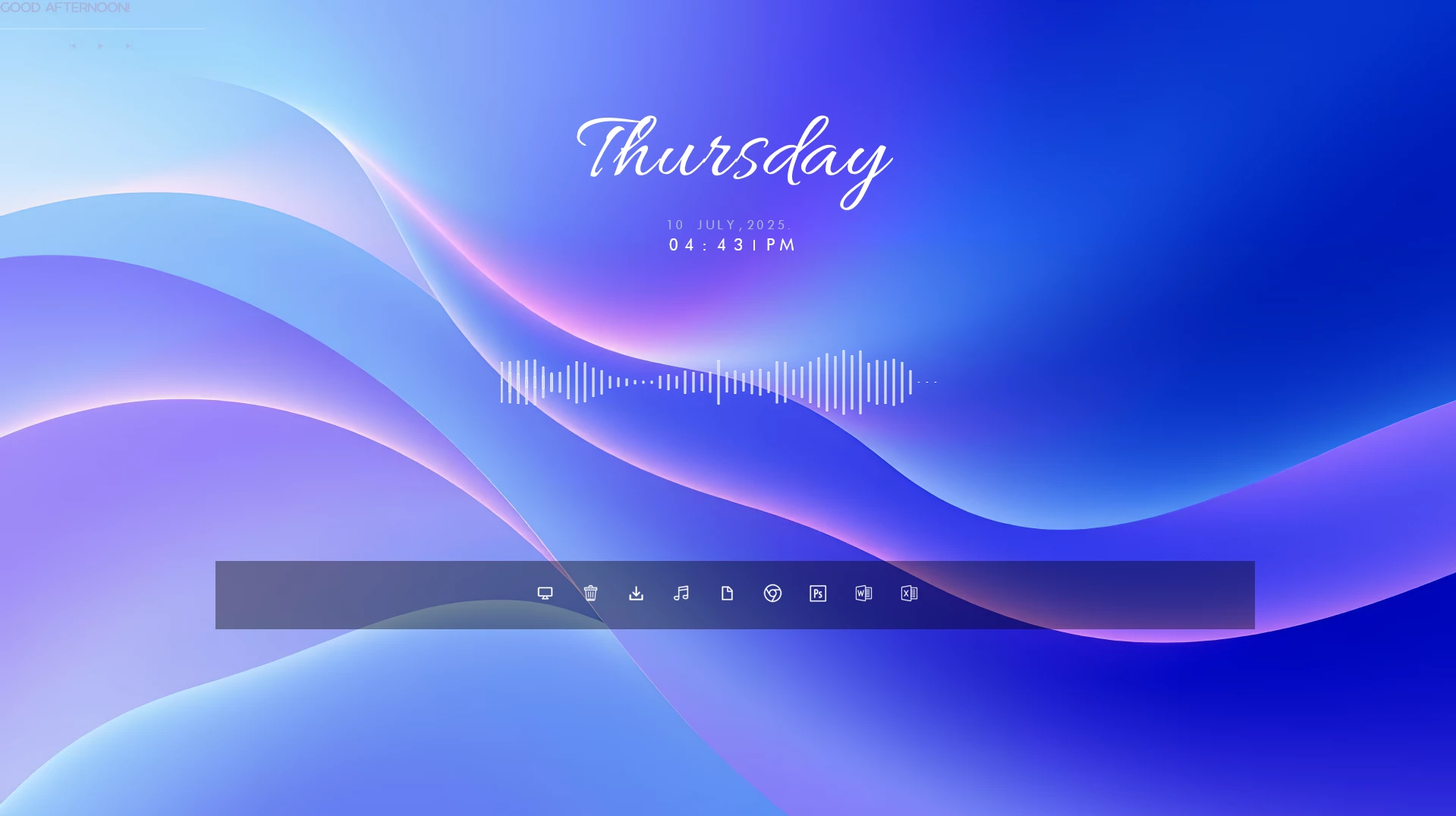
Inside Dream Rainmeter Skin is a minimal and elegant desktop customization theme designed for Windows users who prefer a clean and artistic desktop experience. With its smooth visual style, modern typography, and balanced layout, this Rainmeter skin creates a calm and stylish workspace without making the desktop feel crowded.
The skin features a centered clock and date display, a music-style audio visualizer, and a transparent shortcut panel placed near the bottom of the desktop. The combination of soft colors, simple elements, and a futuristic layout gives your Windows desktop a unique and premium appearance.
Inside Dream Rainmeter Skin is perfect for users who enjoy aesthetic and minimal desktop setups. It works beautifully with gradient wallpapers, modern icons, and other customization resources to create a personalized Windows environment while keeping the original system unchanged.
Design Overview
The main focus of Inside Dream Rainmeter Skin is simplicity and visual balance. The clean center alignment, elegant clock design, and subtle transparent elements create a relaxing desktop atmosphere suitable for both daily use and creative setups.
Key Features
- Minimal and modern desktop customization design.
- Elegant centered clock and date display.
- Music visualizer-style audio waveform element.
- Transparent shortcut panel layout.
- Clean typography and futuristic visual style.
- Works well with modern wallpapers.
- Lightweight Rainmeter-based customization.
- Suitable for aesthetic and minimal desktop setups.
Compatibility
Inside Dream Rainmeter Skin works through Rainmeter and adds customizable desktop elements without modifying Windows system files. The final appearance may vary depending on your wallpaper, screen resolution, and other customization resources.
- Windows 10 or Windows 11.
- Rainmeter installed on your computer.
- Recommended for Full HD and higher resolution displays.
- Basic knowledge of managing Rainmeter skins.
What Is Included in This Download?
- Inside Dream Rainmeter Skin files.
- Clock and date widget elements.
- Audio visualizer and shortcut panel components.
Required Customization Tool
How to Install Inside Dream Rainmeter Skin
- Download and install Rainmeter from the official website.
- Download the Inside Dream Rainmeter Skin package.
- Extract the downloaded file if required.
- Open the included .rmskin file.
- Click Install in the Rainmeter Skin Installer.
- Open Rainmeter from the Windows system tray.
- Navigate to the installed skin folder.
- Select the available components and click Load.
- Adjust the position according to your preferred desktop layout.
Rainmeter Skin3MB
Download Customization Tips
For the best visual result, use Inside Dream Rainmeter Skin with clean gradient wallpapers and minimal icon setups. Keeping enough empty space around the widgets helps maintain the elegant and balanced appearance shown in the preview.
How to Remove Inside Dream Rainmeter Skin
Removing Inside Dream Rainmeter Skin only removes the Rainmeter customization elements from your desktop. It does not affect Windows files, installed applications, or personal data.
- Right-click on any active Inside Dream Rainmeter element.
- Select Unload Skin.
- Open Rainmeter Manage from the system tray.
- Unload all related Inside Dream components.
- Remove the skin folder if you no longer need it.
Who Should Use This Skin?
Inside Dream Rainmeter Skin is suitable for users who enjoy clean, creative, and modern desktop customization.
- Users who prefer minimal desktop designs.
- People who enjoy artistic and futuristic layouts.
- Rainmeter users looking for lightweight visual customization.
- Users creating aesthetic Windows desktop setups.
Disclaimer
Inside Dream Rainmeter Skin is a third-party desktop customization resource created for Rainmeter users. It is not an official Microsoft product and is not affiliated with Microsoft Corporation. Windows, Rainmeter, and related trademarks belong to their respective owners. This resource is provided only for personal desktop customization purposes.
Final Thoughts
Inside Dream Rainmeter Skin offers a simple way to transform a normal Windows desktop into a clean and artistic workspace. Its centered clock, audio visualizer, transparent shortcut panel, and minimal design make it a great choice for users who prefer stylish but uncluttered desktop setups.
Combined with a suitable wallpaper and matching customization resources, this Rainmeter skin can help create a unique and visually balanced Windows desktop experience.








