

Frost Glass UI Rainmeter Skin
Frost Glass UI Rainmeter Skin:Frost Glass UI Rainmeter Skin combines modern looks with functionality, inspired by the frosted glass effect in modern UI’s.

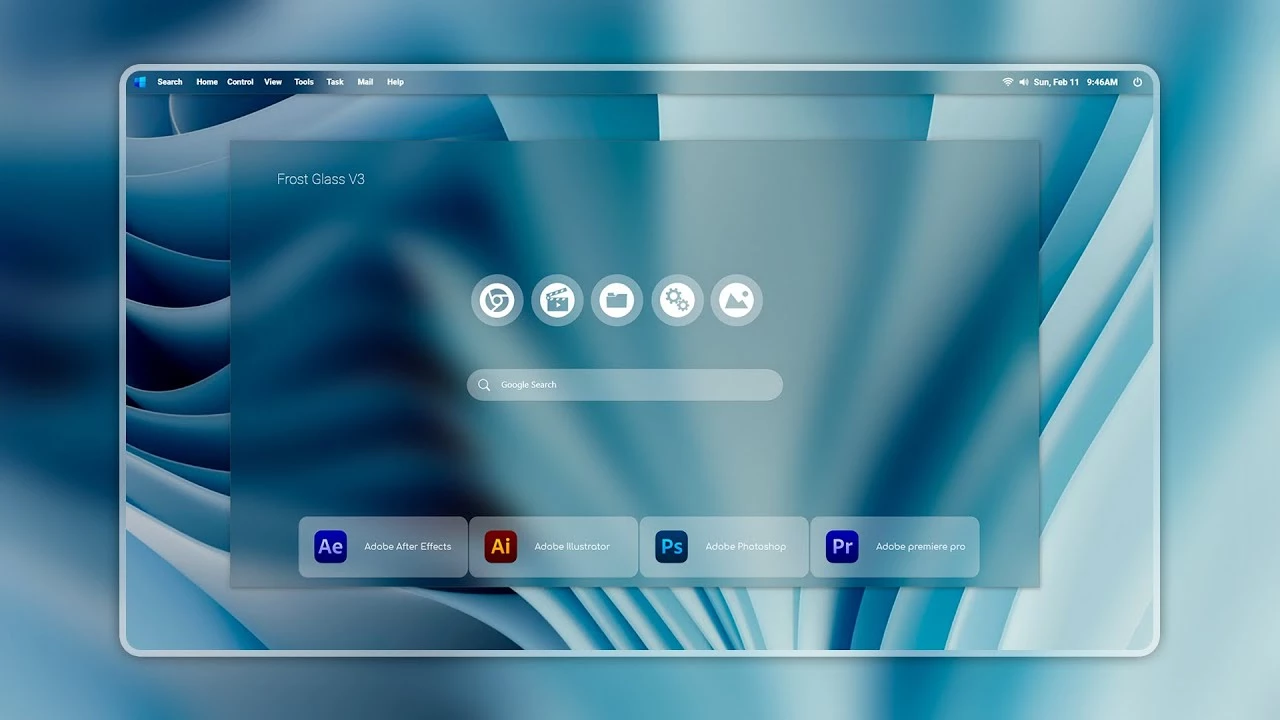
Frost Glass UI Rainmeter Skin
Frost Glass UI Rainmeter Skin is a modern desktop customization theme designed for Windows users who enjoy clean, elegant, and glass-inspired interfaces. Inspired by the frosted glass design trend found in modern user interfaces, this Rainmeter skin adds transparent panels, soft blur effects, and minimal visual elements to create a premium-looking desktop experience.
The skin focuses on creating a balanced workspace with a clean layout and subtle glass effects. It includes customizable desktop elements such as launchers, widgets, and visual panels that blend naturally with your wallpaper while keeping important information easy to access. The transparent design gives your desktop more depth without making the interface feel crowded.
Frost Glass UI Rainmeter Skin is lightweight and flexible, allowing users to adjust widget placement, transparency, and appearance according to their preferences. Whether you prefer a minimal workspace, productivity-focused setup, or a modern aesthetic desktop, this skin provides an easy way to personalize your Windows environment.
Key Features
- Modern frosted glass-inspired desktop design.
- Transparent panels with soft blur-style visual effects.
- Clean and minimal interface for Windows desktops.
- Customizable Rainmeter widgets and desktop elements.
- Works well with modern wallpapers and icon packs.
- Lightweight customization without modifying Windows system files.
- Suitable for minimal, productivity, and aesthetic desktop setups.
System Requirements
- Windows operating system.
- Rainmeter application installed on your computer.
- Basic knowledge of managing Rainmeter skins.
- A desktop environment capable of running Rainmeter smoothly.
What Is Included In This?
- Frost Glass UI Rainmeter Skin
Download & Install Rainmeter
How to Install Frost Glass UI Rainmeter Skin
Installation Steps
- Download and install Rainmeter from the official website.
- After installation, Rainmeter will start automatically and appear in the Windows system tray.
- Download the Frost Glass UI Rainmeter Skin package from this page.
- If the downloaded file is compressed, extract the files first.
- Open the included .rmskin file to launch the Rainmeter Skin Installer.
- Click Install to add the skin components to Rainmeter.
- Right-click the Rainmeter icon from the system tray.
- Open Manage and locate the installed Frost Glass UI components.
- Click Load to activate the available widgets.
- Adjust the position, transparency, and layout according to your preferred desktop style.
Compatibility
- Recommended Resolution: 1920 × 1080
Zip File92MB
Download How to Remove Frost Glass UI Rainmeter Skin
If you want to remove Frost Glass UI Rainmeter Skin from your desktop, you can easily disable it through the Rainmeter application. Removing this customization only removes the Rainmeter elements and does not affect your Windows files or installed applications.
- Right-click on any active Frost Glass UI Rainmeter widget.
- Select the Unload Skin option to remove the selected component.
- Open Rainmeter Manage from the system tray.
- Find Frost Glass UI components from the installed skin list.
- Unload all active widgets to completely remove the setup.
- If you no longer need Rainmeter, uninstall it from Windows Settings.
Who Should Use This Skin?
Frost Glass UI Rainmeter Skin is suitable for users who enjoy modern, clean, and visually appealing desktop customization.
- Users who like glass-style Windows desktop designs.
- People who prefer minimal and elegant interfaces.
- Rainmeter users looking for a premium desktop appearance.
- Users who enjoy customizing their workspace with widgets and visual effects.
Frequently Asked Questions
Does Frost Glass UI Rainmeter Skin modify Windows files?
No. This Rainmeter skin only adds customizable desktop elements and does not modify Windows system files.
Is Rainmeter included with this skin?
No. Rainmeter needs to be installed separately before using this customization package.
Can I customize the glass effect?
Yes. Rainmeter settings allow users to adjust widget placement, transparency, and other visual options depending on the skin configuration.
Can I use this on Windows 11?
Yes. Frost Glass UI Rainmeter Skin works with Windows setups where Rainmeter can run properly.
Disclaimer
Frost Glass UI Rainmeter Skin is a third-party desktop customization resource created for Rainmeter users. It is not an official Microsoft product and is not affiliated with Microsoft Corporation. Windows and related trademarks belong to their respective owners. This website provides customization resources for personal desktop personalization purposes only. Users should download and use third-party files at their own discretion.
Conclusion
Frost Glass UI Rainmeter Skin provides an elegant way to transform your Windows desktop with a modern frosted glass appearance. Its transparent panels, clean layout, and customizable Rainmeter elements help create a more stylish and personalized workspace.
For users who enjoy glass-inspired interfaces, minimal desktop setups, and creative Windows customization, Frost Glass UI Rainmeter Skin can be a great addition to their collection. Combined with suitable wallpapers and icons, it can help create a unique desktop environment.







