Eclips Start Menu Style For Windows 11
Eclips Start Menu Style : Eclips Start Menu Style – Windhawk Mod is a modern customization tool designed to give your Windows Start Menu a sleek, futuristic appearance

Eclips Start Menu Style for Windows 11
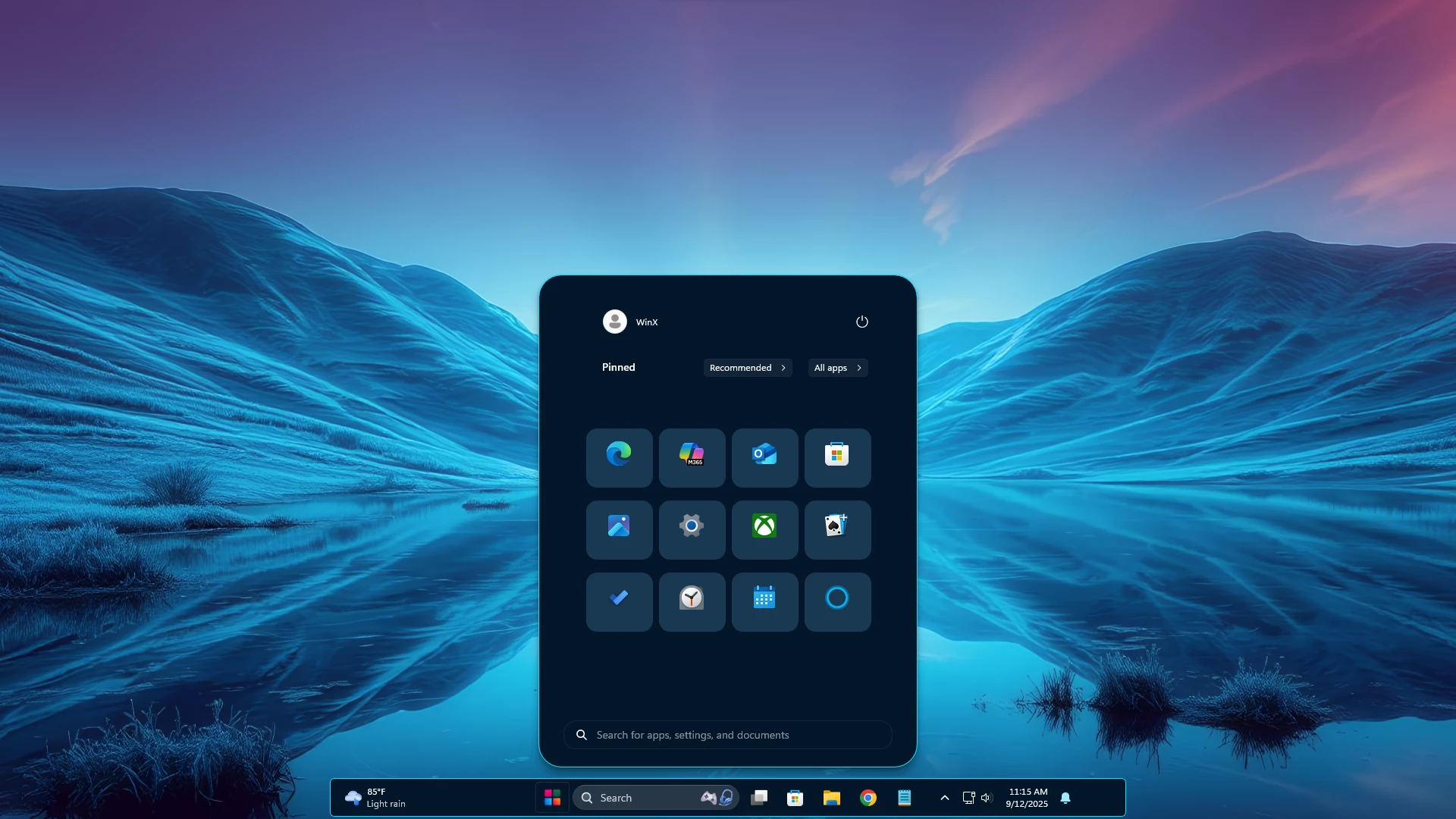
The Eclips Start Menu Style for Windows 11 is a compact and modern Windhawk customization created for users who prefer a clean, dark, and organized Start Menu appearance. As shown in the preview, the design uses a small centered panel with rounded corners, neatly arranged application shortcuts, and a simple layout that works well with minimal Windows 11 desktop setups.
Instead of adding unnecessary visual elements, the Eclips style focuses on a more streamlined Start Menu presentation. Its dark background, balanced spacing, compact application grid, and subtle interface details can give Windows 11 a distinctive look while keeping the familiar Start Menu environment underneath.
Design Overview
The main highlight of the Eclips Start Menu Style is its compact dark layout. The preview shows a narrow Start Menu panel with a clean top section, an organized grid of pinned applications, and additional controls positioned toward the bottom of the menu.
Rounded corners and consistent spacing help the different sections feel visually connected without making the Start Menu unnecessarily large. The dark color scheme also pairs naturally with blue, black, gradient, landscape, and other darker wallpapers.
This customization is intended to change supported visual properties of the existing Windows 11 Start Menu. It does not install a separate operating system or replace Windows 11 with another Start Menu application.
Why Use Eclips Start Menu Style?
The standard Windows 11 Start Menu may not match every desktop customization setup. The Eclips Start Menu Style provides an alternative visual direction for users who prefer a smaller and more focused menu design.
Its compact structure can fit nicely into minimal desktop setups where the wallpaper, taskbar, icons, and Start Menu follow a similar visual theme. You can also combine it with compatible taskbar and icon customizations to create a more consistent desktop appearance.
Main Features
- Compact dark Start Menu appearance
- Clean and organized pinned-app grid
- Rounded Start Menu panel
- Balanced spacing between interface elements
- Minimal top search and profile area
- Small utility and control section near the bottom
- Designed for Windows 11 personalization
- Works well with dark and blue desktop setups
- Designed for compatible Windhawk Start Menu styling
Perfect for Minimal Desktop Setups
The Eclips Start Menu Style can work especially well with clean wallpapers and a compact taskbar setup. In the preview, the dark Start Menu contrasts clearly against the blue landscape wallpaper while keeping the overall desktop uncluttered.
For a more consistent look, you can use matching taskbar colors, simple icons, and a wallpaper that provides enough contrast around the Start Menu. The exact appearance may vary depending on your Windows theme, display scaling, accent colors, and other active customizations.
Windhawk-Based Customization
This style is intended to be used with Windhawk and a compatible Windows 11 Start Menu styling mod. Windhawk allows supported Windows interface elements to be customized through mods and configuration settings.
The Eclips style changes the visual presentation of supported Start Menu elements rather than replacing the Windows operating system. Compatibility can vary depending on your Windows build, Windhawk version, Start Menu Styler version, and changes introduced through Windows updates.
- Designed for Windows 11 Start Menu customization
- Windhawk is required
- A compatible Windows 11 Start Menu Styler configuration is required
- Compatibility may vary depending on the Windows 11 build
- Major Windows updates may require an updated style configuration
- Windhawk Start Menu Style
- Windhawk Taskbar Style
- Windhawk Taskbar Size Configuration
How to Use This Style
- Download and install Windhawk.
- Install the required Windows 11 Start Menu styling mod.
- Back up your current Windhawk configuration before making changes.
- Download the Eclips style package provided on this page.
- Copy or apply the included configuration in the appropriate mod settings.
- Save the settings and check the Start Menu appearance.
- If additional taskbar configurations are included, apply them through their corresponding Windhawk mods.
{ "theme": "Down Aero", "controlStyles[0].target": "Grid#MainMenu", "controlStyles[0].styles[0]": "Width=460", "controlStyles[0].styles[1]": "MinWidth=460", "controlStyles[0].styles[2]": "MaxWidth=460", "controlStyles[1].target": "Grid#FrameRoot", "controlStyles[1].styles[0]": "Height=670", "controlStyles[1].styles[1]": "MaxHeight=670", "controlStyles[2].target": "Grid#MainContent", "controlStyles[2].styles[0]": "Grid.Row=0", "controlStyles[2].styles[1]": "VerticalAlignment=Top", "controlStyles[2].styles[2]": "MinHeight=Auto", "controlStyles[3].target": "Grid#TopLevelSuggestionsListHeader", "controlStyles[3].styles[0]": "Visibility=Collapsed", "controlStyles[3].styles[1]": "Height=0", "controlStyles[4].target": "Grid#NoTopLevelSuggestionsText", "controlStyles[4].styles[0]": "Visibility=Collapsed", "controlStyles[4].styles[1]": "Height=0", "controlStyles[5].target": "Grid#TopLevelSuggestionsContainer", "controlStyles[5].styles[0]": "Visibility=Collapsed", "controlStyles[5].styles[1]": "Height=0", "controlStyles[6].target": "Grid#TopLevelSuggestionsRoot", "controlStyles[6].styles[0]": "Visibility=Collapsed", "controlStyles[6].styles[1]": "Height=0", "controlStyles[6].styles[2]": "MaxHeight=0", "controlStyles[7].target": "GridView#RecommendedList", "controlStyles[7].styles[0]": "Visibility=Collapsed", "controlStyles[7].styles[1]": "Height=0", "controlStyles[8].target": "Grid#ShowMoreSuggestions", "controlStyles[8].styles[0]": "Visibility=Collapsed", "controlStyles[8].styles[1]": "Height=0", "controlStyles[9].target": "Grid#MoreSuggestionsRoot", "controlStyles[9].styles[0]": "Visibility=Collapsed", "controlStyles[9].styles[1]": "Height=0", "controlStyles[10].target": "StartMenu.SearchBoxToggleButton", "controlStyles[10].styles[0]": "Visibility=Collapsed", "controlStyles[10].styles[1]": "Height=0", "controlStyles[11].target": "StartMenu.PinnedList#StartMenuPinnedList", "controlStyles[11].styles[0]": "Width=430", "controlStyles[11].styles[1]": "MaxWidth=430", "controlStyles[11].styles[2]": "Height=325", "controlStyles[11].styles[3]": "MaxHeight=325", "controlStyles[11].styles[4]": "Margin=15,18,15,155", "controlStyles[12].target": "TextBlock#PinnedListHeaderText", "controlStyles[12].styles[0]": "Margin=18,10,0,0", "controlStyles[12].styles[1]": "FontWeight=600", "controlStyles[13].target": "Microsoft.UI.Xaml.Controls.PipsPager#PinnedListPipsPager", "controlStyles[13].styles[0]": "Visibility=Collapsed", "controlStyles[14].target": "Windows.UI.Xaml.Controls.Frame", "controlStyles[14].styles[0]": "Margin=0,-65,0,0", "controlStyles[15].target": "GridView#AllAppsGrid", "controlStyles[15].styles[0]": "Margin=0,0,0,58", "controlStyles[16].target": "GridView#AllAppsGrid > Border > ScrollViewer > Border > Grid > ScrollContentPresenter > ItemsPresenter > ItemsWrapGrid", "controlStyles[16].styles[0]": "Margin=30,-142,30,0", "controlStyles[17].target": "TextBlock#AllListHeadingText", "controlStyles[17].styles[0]": "Margin=45,-146,12,0", "controlStyles[18].target": "Microsoft.UI.Xaml.Controls.DropDownButton", "controlStyles[18].styles[0]": "MaxWidth=95", "controlStyles[19].target": "Microsoft.UI.Xaml.Controls.DropDownButton > Grid@CommonStates", "controlStyles[19].styles[0]": "Height=30", "controlStyles[19].styles[1]": "CornerRadius=5", "controlStyles[19].styles[2]": "BorderThickness=1", "controlStyles[19].styles[3]": "Background:=<AcrylicBrush TintColor=\"#191919\" TintOpacity=\".35\"/>", "controlStyles[19].styles[4]": "BorderBrush:=<SolidColorBrush Color=\"#30FFFFFF\"/>", "controlStyles[20].target": "Border#AcrylicBorder", "controlStyles[20].styles[0]": "Background:=<AcrylicBrush BackgroundSource=\"Backdrop\" TintColor=\"#191919\" TintOpacity=\".50\" TintLuminosityOpacity=\".35\" FallbackColor=\"#191919\"/>", "controlStyles[20].styles[1]": "BorderBrush:=<AcrylicBrush TintColor=\"{ThemeResource SurfaceStrokeColorDefault}\" FallbackColor=\"{ThemeResource SurfaceStrokeColorDefault}\" TintOpacity=\"0\" TintLuminosityOpacity=\".25\"/>", "controlStyles[20].styles[2]": "BorderThickness=1", "controlStyles[20].styles[3]": "CornerRadius=10", "controlStyles[20].styles[4]": "Margin=0", "controlStyles[21].target": "Border#AcrylicOverlay", "controlStyles[21].styles[0]": "Background:=<AcrylicBrush BackgroundSource=\"Backdrop\" TintColor=\"#191919\" TintOpacity=\".18\" TintLuminosityOpacity=\".20\" FallbackColor=\"#191919\"/>", "controlStyles[21].styles[1]": "CornerRadius=10", "controlStyles[21].styles[2]": "Margin=0", "controlStyles[22].target": "Border#DropShadow", "controlStyles[22].styles[0]": "CornerRadius=10", "controlStyles[23].target": "Border#StartDropShadow", "controlStyles[23].styles[0]": "CornerRadius=10", "controlStyles[24].target": "StartMenu.PinnedList#StartMenuPinnedList Border#ContentBorder@CommonStates > Grid#DroppedFlickerWorkaroundWrapper > Border", "controlStyles[24].styles[0]": "Height=80", "controlStyles[24].styles[1]": "Width=92", "controlStyles[24].styles[2]": "CornerRadius=5", "controlStyles[24].styles[3]": "FocusVisualPrimaryBrush:=<SolidColorBrush Color=\"#B3CEFD\" Opacity=\".10\"/>", "controlStyles[25].target": "StartMenu.PinnedList#StartMenuPinnedList Border#ContentBorder@CommonStates > Grid#DroppedFlickerWorkaroundWrapper > Border#BackgroundBorder", "controlStyles[25].styles[0]": "Background@Normal:=<AcrylicBrush TintColor=\"#191919\" TintOpacity=\".18\" TintLuminosityOpacity=\".35\"/>", "controlStyles[25].styles[1]": "Background@PointerOver:=<AcrylicBrush TintColor=\"#FFFFFF\" TintOpacity=\".07\" TintLuminosityOpacity=\".20\"/>", "controlStyles[25].styles[2]": "BorderBrush:=<SolidColorBrush Color=\"#28FFFFFF\"/>", "controlStyles[25].styles[3]": "BorderBrush@PointerOver:=<SolidColorBrush Color=\"#55FFFFFF\"/>", "controlStyles[25].styles[4]": "BorderThickness=1", "controlStyles[25].styles[5]": "CornerRadius=5", "controlStyles[26].target": "StartMenu.ExpandedFolderList > Grid > Grid", "controlStyles[26].styles[0]": "CornerRadius=8", "controlStyles[27].target": "StartMenu.ExpandedFolderList > Grid > Grid > Microsoft.UI.Xaml.Controls.PipsPager#PinnedListPipsPager", "controlStyles[27].styles[0]": "Visibility=Collapsed", "controlStyles[28].target": "Grid#NavPanePlaceholder", "controlStyles[28].styles[0]": "Margin=18,0,18,0", "controlStyles[29].target": "StartDocked.NavigationPaneView > Grid#RootPanel", "controlStyles[29].styles[0]": "Grid.Row=2", "controlStyles[30].target": "StartDocked.NavigationPaneView#UserControl > Grid#RootPanel", "controlStyles[30].styles[0]": "FlowDirection=1", "controlStyles[31].target": "StartDocked.PowerOptionsView#PowerButton", "controlStyles[31].styles[0]": "FlowDirection=0", "controlStyles[32].target": "ItemsStackPanel > ListViewItem", "controlStyles[32].styles[0]": "FlowDirection=0", "controlStyles[33].target": "StartDocked.AppListView#NavigationPanePlacesListView > Border", "controlStyles[33].styles[0]": "Background:=<AcrylicBrush TintColor=\"{ThemeResource CardStrokeColorDefaultSolid}\" FallbackColor=\"#191919\" TintOpacity=\"0\" TintLuminosityOpacity=\".55\"/>", "controlStyles[33].styles[1]": "BorderBrush:=<SolidColorBrush Color=\"#28FFFFFF\"/>", "controlStyles[33].styles[2]": "BorderThickness=1", "controlStyles[33].styles[3]": "CornerRadius=5", "controlStyles[33].styles[4]": "Margin=0,0,15,0", "controlStyles[34].target": "StartDocked.NavigationPaneButton#PowerButton > Grid@CommonStates > Border#BackgroundBorder", "controlStyles[34].styles[0]": "Background@Normal:=<AcrylicBrush TintColor=\"#191919\" TintOpacity=\".40\"/>", "controlStyles[34].styles[1]": "Background@PointerOver:=<AcrylicBrush TintColor=\"{ThemeResource SystemAccentColor}\" TintOpacity=\".15\"/>", "controlStyles[34].styles[2]": "BorderBrush@Normal:=<SolidColorBrush Color=\"#30FFFFFF\"/>", "controlStyles[34].styles[3]": "BorderBrush@PointerOver:=<SolidColorBrush Color=\"#70FFFFFF\"/>", "controlStyles[34].styles[4]": "BorderThickness=1", "controlStyles[34].styles[5]": "CornerRadius=10", "controlStyles[35].target": "StartDocked.NavigationPaneButton#UserTileButton > Grid@CommonStates > Border#BackgroundBorder", "controlStyles[35].styles[0]": "Background:=<AcrylicBrush TintColor=\"#191919\" TintOpacity=\".35\"/>", "controlStyles[35].styles[1]": "BorderBrush:=<SolidColorBrush Color=\"#28FFFFFF\"/>", "controlStyles[35].styles[2]": "BorderThickness=1", "controlStyles[35].styles[3]": "CornerRadius=10", "controlStyles[36].target": "StartDocked.UserTileView", "controlStyles[36].styles[0]": "Height=42", "controlStyles[37].target": "Grid#UserTileIcon", "controlStyles[37].styles[0]": "Width=36", "controlStyles[37].styles[1]": "Height=36", "controlStyles[38].target": "Windows.UI.Xaml.Controls.Primitives.ToggleButton#ShowHideCompanion", "controlStyles[38].styles[0]": "Visibility=Collapsed", "controlStyles[39].target": "Grid#CompanionRoot", "controlStyles[39].styles[0]": "Visibility=Collapsed", "controlStyles[40].target": "Grid#RightCompanionContainerGrid", "controlStyles[40].styles[0]": "Visibility=Collapsed", "controlStyles[41].target": "Grid#MainMenu > Grid#MainContent > Grid", "controlStyles[41].styles[0]": "Canvas.ZIndex=1", "disableNewStartMenuLayout": "forceNewLayout"}Compatibility Notes
Windows Start Menu elements can change after Windows updates. Because Windhawk styles depend on specific interface elements, a configuration that works correctly on one Windows build may require adjustments on another.
Display scaling can also affect menu dimensions and spacing. If the layout appears different from the preview, check your Windows display scaling, active theme, Windhawk settings, and other UI customization mods.
⚠️ Disclaimer: This Eclips Start Menu Style is an unofficial Windows 11 UI customization provided for personalization and educational purposes. It is not developed, endorsed, or supported by Microsoft. Compatibility may vary depending on your Windows build, Windhawk version, installed mods, display settings, and system configuration. Windows updates may also affect how the style appears or functions. Keep a backup of your current settings before applying changes.
Final Words
The Eclips Start Menu Style for Windows 11 is a good option for users who prefer a compact, dark, and organized Start Menu design. Its small rounded panel, neatly arranged application shortcuts, and minimal visual structure can give Windows 11 a cleaner customized appearance without presenting it as a replacement for the original operating system.
For a setup similar to the preview, pair the style with a dark or blue wallpaper, a compact taskbar, and matching icons. Since Windows interface elements can change through updates, keep your original configuration backed up and review compatibility when applying the style to a different Windows build.
Frequently Asked Questions
Do I need Windhawk to use the Eclips Start Menu Style?
Yes. This style is intended for use with Windhawk and a compatible Windows 11 Start Menu styling mod.
Does this replace the Windows 11 Start Menu?
No. It changes supported visual properties of the existing Windows 11 Start Menu. It does not install another operating system or a separate Start Menu replacement application.
Why does my Start Menu look different from the preview?
The final appearance can vary depending on your Windows build, display scaling, theme settings, Windhawk version, style configuration, and other active customization mods.
Can Windows updates affect this style?
Yes. Windows updates can change Start Menu interface elements, so an existing configuration may require updates or adjustments after a major Windows feature update.
Can I remove the style later?
Yes. You can disable the related Windhawk customization or restore your previous configuration. Keeping a backup of your original settings makes this easier.
Can I change the colors?
If the supplied configuration contains editable color, background, border, or transparency values, those settings can usually be adjusted to better match your wallpaper and desktop setup.