7TSP Auros Gaming Icon Pack
Download the 7TSP Auros Gaming Icon Pack for Windows and give your desktop a bold gaming-inspired look. Check safety notes, compatibility, and installation steps before applying.

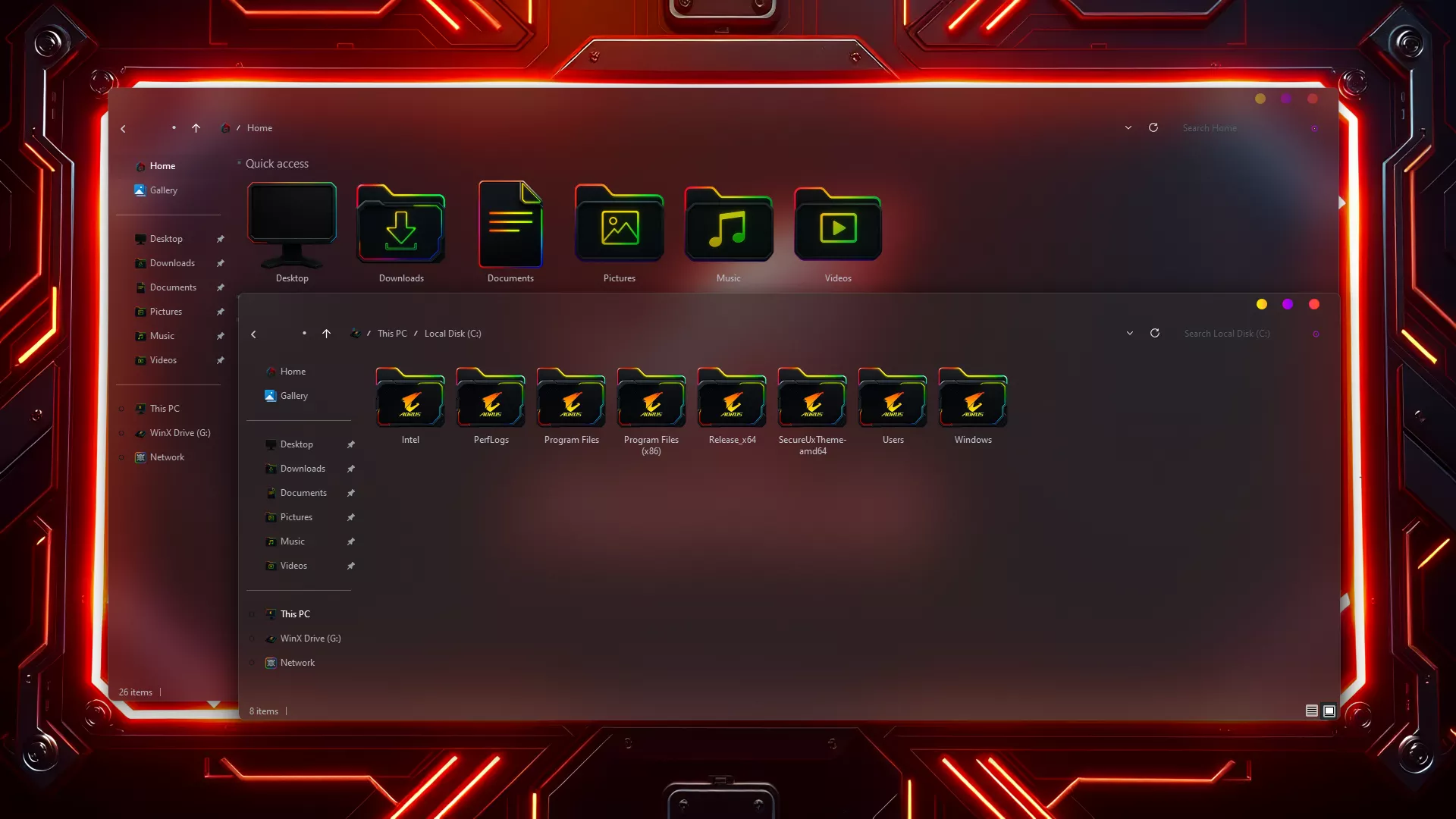
7TSP Auros Gaming Icon Pack for Windows
The 7TSP Auros Gaming Icon Pack is made for Windows users who want a stronger, cleaner, and more gaming-inspired desktop setup. If your current Windows icons feel too plain, this icon pack can help create a bold custom look that matches dark themes, gaming wallpapers, RGB-style setups, and modern desktop customization styles.
Disclaimer & Trademark Notice:
Windows, the Windows logo, and all related brand assets are registered trademarks of Microsoft Corporation. This website and the featured 7tsp icon packs are independent third-party projects and are not affiliated with, endorsed by, sponsored by, or officially connected to Microsoft Corporation.
7tsp (Seven Theme Source Patcher) theme packs modify system resources for customization. All content and downloads are provided strictly for educational, informational, and personal preview purposes only. Users apply these system modifications at their own risk.
This pack is suitable for users who already know how to apply 7TSP icon packs or want to personalize their Windows system icons carefully. It gives the desktop a more energetic visual style without making the interface look messy or overloaded.
Icon Pack Overview
The 7TSP Auros Gaming Icon Pack focuses on a modern gaming-style appearance. The design usually fits well with dark Windows themes, sharp wallpapers, and customized desktop layouts. The icons are designed to look more consistent than default Windows icons, helping folders, system areas, and desktop elements feel like part of one complete theme.
The overall style is bold and tech-inspired, with a visual direction that works well for gaming setups and futuristic desktop designs. Depending on the version of the pack, the icons may include customized folders, system icons, drives, and other Windows visual elements.
What This Icon Pack Changes
7TSP icon packs may change different parts of the Windows icon system depending on how the pack was created. The 7TSP Auros Gaming Icon Pack may customize folder icons, drive icons, system icons, control panel icons, file-type icons, and other Windows visual elements.
The exact changes can vary from one 7TSP pack to another. Before applying the pack, users should check the included preview, guide, or information file to understand what will be modified.
Main Features
- Custom Windows icon appearance
- Consistent folder and system icon style
- Works well with matching themes
- Designed for desktop personalization
- Gaming-inspired visual style for modern Windows setups
- Suitable for users who enjoy full desktop customization
Important Safety Note
Before applying any 7TSP icon pack, always create a system restore point. This is very important because 7TSP icon packs can modify Windows system resources to change the icon appearance. A restore point helps you return your system to its previous state if something does not work correctly.
Users should also read the included installation guide carefully before applying the pack. Do not rush the process, do not use unknown modified tools, and avoid unsafe downloads, cracks, or illegal system modification files. For the safest experience, use trusted sources and make sure the pack is compatible with your Windows version.
Compatibility
The 7TSP Auros Gaming Icon Pack is intended for Windows customization, but compatibility can depend on your Windows version, update build, and the 7TSP tool version you are using. Before applying the pack, check whether it supports your current Windows system.
If you recently updated Windows, it is better to confirm compatibility again. Some Windows updates may change system files, which can affect how icon packs are applied or restored.
Installation Guide
- Create a system restore point.
- Download and extract the icon pack.
- Open the supported 7TSP tool.
- Select the icon pack file.
- Apply carefully and restart if required.
- You Can also try this Auros Theme
After restarting, check your desktop, folders, drives, and system icons to make sure the icon pack has been applied properly. If some icons do not change immediately, refreshing the icon cache or restarting the system again may help.
- Windows 8/8.1
- Windows 10
- Windows 11
- 7TSP icon Pack
7TSP Icon Pack 10MB
DownloadHow to Restore Default Icons
If you want to return to the default Windows icons, use the backup or restore option provided by the supported 7TSP tool if available. If the result is not correct or the system does not look normal, use the system restore point you created before applying the icon pack.
This is why creating a restore point before installation is strongly recommended. It gives you a safer way to undo changes and return Windows to its previous condition.
Final Thoughts
The 7TSP Auros Gaming Icon Pack is a good choice for Windows users who want a gaming-style desktop with more personality and visual consistency. It can make folders, system icons, and desktop elements look more polished when used with a matching Windows theme, wallpaper, and cursor setup.
As with any 7TSP icon pack, apply it carefully and always create a system restore point first. When used responsibly, this icon pack can give your Windows desktop a clean, bold, and customized gaming look.