

Pride Start Menu Style – (Windhawk) For Windows 11
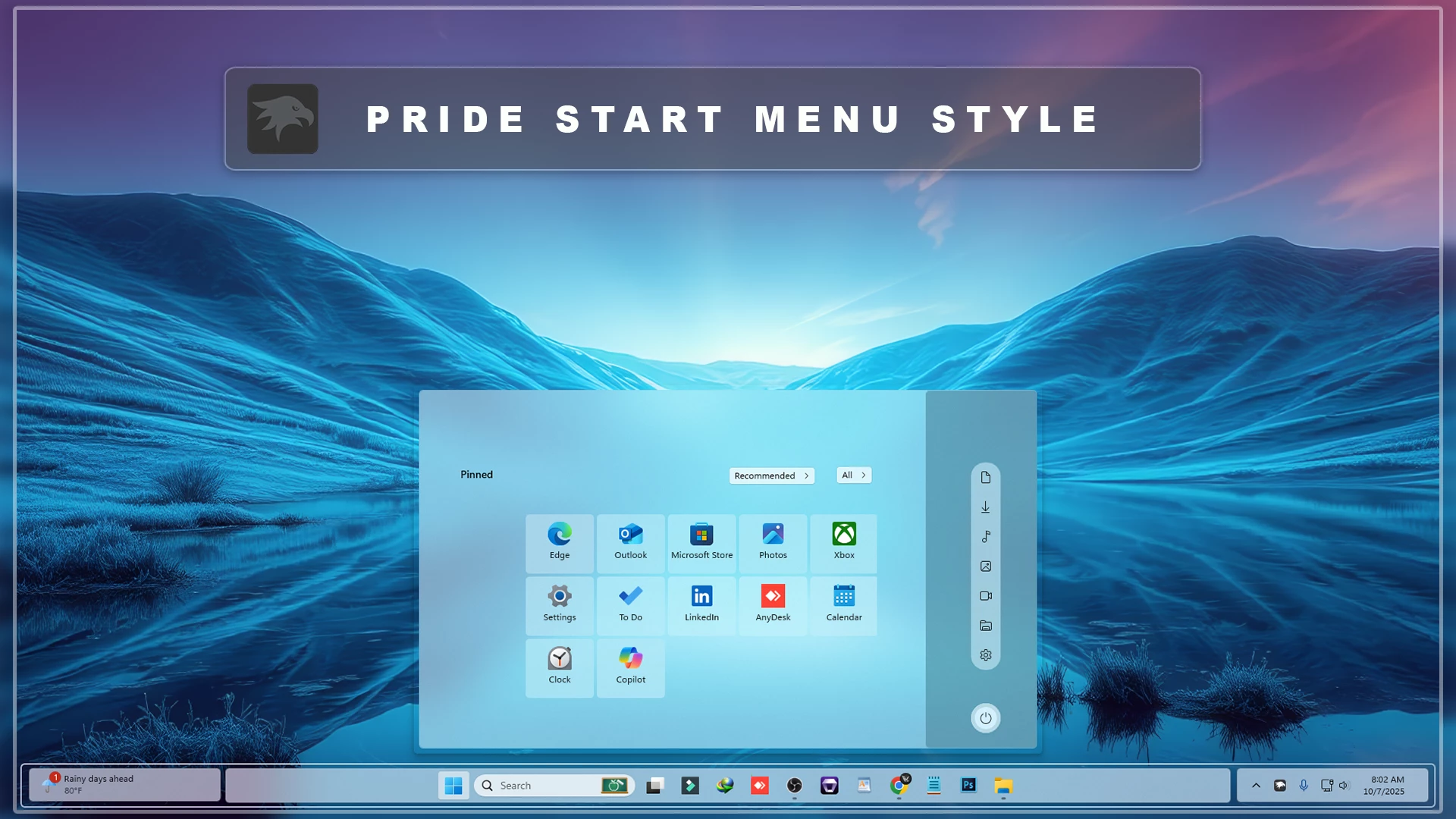
Pride Start Menu Style – Windhawk : The Pride Start Menu Style for Windows 11 (Windhawk Mod) celebrates diversity, creativity, and individuality through bold, vibrant colors inspired by the Pride flag

Pride Start Menu Style – Windhawk For Windows 11
The Pride Start Menu Style For Windows 11 is a bold, colorful, and meaningful Windhawk customization style designed for users who love vibrant desktop designs. Inspired by Pride-themed colors, this Start Menu style brings a bright and positive visual experience to Windows 11 while keeping the interface clean, modern, and easy to use.
Windows 11 already offers a smooth and minimal interface, but many users want a desktop that feels more personal and expressive. The Pride Start Menu Style transforms the default Start Menu into a colorful design with smooth gradients, glowing details, and a fresh visual layout. It is perfect for users who enjoy creative Windows customization, colorful themes, and unique desktop setups.
Using the Windhawk customization platform, this style introduces beautiful gradient transitions across red, orange, yellow, green, blue, and violet tones. These colors create a lively and energetic Start Menu design while maintaining the clean structure of the Windows 11 interface. Every element, from the background to the app grid, is designed to feel balanced, modern, and visually attractive.
The Pride Start Menu Style For Windows 11 is lightweight and optimized for smooth performance. It works well with bright wallpapers, glass-style taskbars, colorful icon packs, and minimal Rainmeter skins. Whether you are building a colorful desktop theme or a complete Windows 11 customization setup, this style can give your PC a fresh and eye-catching look.
What Is Pride Start Menu Style For Windows 11?
The Pride Start Menu Style is a Windows 11 customization setup made for Windhawk users. It changes the appearance of the default Start Menu and gives it a colorful, gradient-based, and modern design. Instead of using a plain background, this style adds vivid colors and soft visual effects to make the Start Menu look more energetic and expressive.
This style is especially suitable for users who like colorful desktop themes, creative design, and modern Windows customization. It keeps the Start Menu functional and readable while adding a strong visual identity to your Windows 11 setup.
Why Choose Pride Start Menu Style?
The main reason to choose the Pride Start Menu Style For Windows 11 is its bright and unique appearance. The gradient colors make the Start Menu stand out, while the clean layout keeps everything easy to navigate. It is a great choice for users who want their desktop to feel more personal, positive, and visually different from the default Windows 11 look.
Another benefit is that this style uses Windhawk mods, which makes it easy to apply, adjust, or remove. You do not need to replace important Windows system files. This makes the customization process more flexible and convenient for users who enjoy trying different Windows 11 themes.
Key Features of Pride Start Menu Style
- Colorful Gradient Design: Adds Pride-inspired gradient colors to the Windows 11 Start Menu.
- Modern Visual Layout: Keeps the Start Menu clean, organized, and easy to use.
- Soft Glow Effects: Creates a lively and polished desktop appearance.
- Wallpaper Friendly: Works well with bright, dark, abstract, and gradient wallpapers.
- Windhawk Based: Easy to apply and manage using Windhawk customization mods.
- Taskbar Matching Support: Pairs nicely with glass, gradient, and colorful taskbar styles.
- Lightweight Performance: Designed to look stylish without making Windows feel slow.
Best Desktop Setup for This Style
The Pride Start Menu Style looks best with colorful or minimal wallpapers that match the gradient tones of the Start Menu. You can pair it with a transparent taskbar, glassy icons, modern Rainmeter widgets, and a clean desktop layout to create a complete Windows 11 customization setup.
If you are creating a bright, creative, or futuristic Windows theme, this style can be a perfect choice. The colorful design adds personality to the desktop while keeping the Start Menu practical for daily use.
Download Windhawk To Use The Style
Compatibility
This customization works perfectly on Windows 11 versions up to 24H2. However, after the Windows 11 25H2 update, this mod is no longer compatible and will not work properly due to changes introduced in the newer Windows version.
- Windows 11 21H2 – YES
- Windows 11 22H2 – YES
- Windows 11 23H2 – YES
- Windows 11 24H2 – YES (Fully Compatible)
- Windows 11 25H2 – NO (Not Supported)
Installation steps:
- Download and install Windhawk.
- Install and open the Windows 11 Start Menu Styler mod in Windhawk.
- Go to the Advanced tab.
- Copy the style code to the text box under Mod settings.
- Click Save to apply the Pride Start Menu Style.
- Restart Windows Explorer if the style does not appear instantly.
What is included in this?
- Windhawk Start Menu Mods
- Windhawk Taskbar Mods
- Windhawk Taskbar Size Mods
{ "controlStyles[0].target": "Windows.UI.Xaml.Controls.Grid#TopLevelSuggestionsListHeader", "controlStyles[0].styles[0]": "Width=450", "controlStyles[1].target": "Windows.UI.Xaml.Controls.Grid#NoTopLevelSuggestionsText", "controlStyles[1].styles[0]": "Height=0", "controlStyles[2].target": "Windows.UI.Xaml.Controls.Grid#TopLevelSuggestionsContainer", "controlStyles[2].styles[0]": "Height=0", "controlStyles[3].target": "Windows.UI.Xaml.Controls.Grid#ShowMoreSuggestions", "controlStyles[3].styles[0]": "RenderTransform:=<TranslateTransform Y=\"-474\" X=\"-242\" />", "controlStyles[4].target": "StartMenu.PinnedList", "controlStyles[4].styles[0]": "Height=100", "controlStyles[4].styles[1]": "Width=500", "controlStyles[4].styles[2]": "RenderTransform:=<TranslateTransform Y=\"30\" X=\"250\" />", "controlStyles[5].target": "Windows.UI.Xaml.Controls.Grid#ShowMoreSuggestions > Windows.UI.Xaml.Controls.Button > Windows.UI.Xaml.Controls.ContentPresenter > Windows.UI.Xaml.Controls.StackPanel > Windows.UI.Xaml.Controls.TextBlock", "controlStyles[5].styles[0]": "Text=Recommended", "controlStyles[6].target": "StartDocked.StartSizingFrame", "controlStyles[6].styles[0]": "MaxWidth=850", "controlStyles[6].styles[1]": "MinWidth=850", "controlStyles[6].styles[2]": "MaxHeight=500", "controlStyles[7].target": "Grid#RootContent", "controlStyles[7].styles[0]": "MinWidth=850", "controlStyles[7].styles[1]": "MaxWidth=850", "controlStyles[8].target": "StartDocked.LauncherFrame > Grid#RootPanel > Grid#RootGrid", "controlStyles[8].styles[0]": "MinWidth=850", "controlStyles[8].styles[1]": "MaxWidth=850", "controlStyles[9].target": "StartDocked.LauncherFrame > Grid#RootPanel > Grid#RootGrid > Grid#RootContent", "controlStyles[9].styles[0]": "MinWidth=850", "controlStyles[9].styles[1]": "MaxWidth=850", "controlStyles[10].target": "Border#AcrylicOverlay", "controlStyles[10].styles[0]": "Background:=<AcrylicBrush TintColor=\"#401f4b58\" TintOpacity=\"0.8\" />", "controlStyles[10].styles[1]": "Width=150", "controlStyles[10].styles[2]": "RenderTransform:=<TranslateTransform Y=\"2\" X=\"342\" />", "controlStyles[10].styles[3]": "CornerRadius=5", "controlStyles[10].styles[4]": "Margin=0,6,0,-55", "controlStyles[11].target": "Border#AcrylicBorder", "controlStyles[11].styles[0]": "Background:=<AcrylicBrush TintColor=\"{ThemeResource CardStrokeColorDefaultSolid}\" FallbackColor=\"{ThemeResource CardStrokeColorDefaultSolid}\" TintOpacity=\"0\" TintLuminosityOpacity=\".55\" Opacity=\"1\"/>", "controlStyles[11].styles[1]": "BorderBrush:=<AcrylicBrush TintColor=\"{ThemeResource SurfaceStrokeColorDefault}\" FallbackColor=\"{ThemeResource SurfaceStrokeColorDefault}\" TintOpacity=\"0\" TintLuminosityOpacity=\".0\" Opacity=\"1\"/>", "controlStyles[11].styles[2]": "BorderThickness=1", "controlStyles[11].styles[3]": "CornerRadius=5", "controlStyles[11].styles[4]": "Margin=8", "controlStyles[12].target": "Border#DropShadow", "controlStyles[12].styles[0]": "CornerRadius=5", "controlStyles[12].styles[1]": "Margin=0", "controlStyles[13].target": "StartDocked.SearchBoxToggleButton", "controlStyles[13].styles[0]": "Height=38", "controlStyles[13].styles[1]": "CornerRadius=20", "controlStyles[13].styles[2]": "Canvas.ZIndex=1", "controlStyles[13].styles[3]": "RenderTransform:=<TranslateTransform Y=\"550\" X=\"0\" />", "controlStyles[14].target": "StartDocked.SearchBoxToggleButton#StartMenuSearchBox", "controlStyles[14].styles[0]": "RenderTransform:=<TranslateTransform Y=\"550\" X=\"0\" />", "controlStyles[15].target": "StartDocked.SearchBoxToggleButton > Grid > Border", "controlStyles[15].styles[0]": "Background:=<AcrylicBrush TintColor=\"{ThemeResource CardStrokeColorDefaultSolid}\" FallbackColor=\"{ThemeResource CardStrokeColorDefaultSolid}\" TintOpacity=\"0\" TintLuminosityOpacity=\".30\" Opacity=\"1\"/>", "controlStyles[15].styles[1]": "RenderTransform:=<TranslateTransform Y=\"0\" X=\"0\" />", "controlStyles[16].target": "StartDocked.LauncherFrame > Grid#RootGrid > Grid#RootContent > Grid#MainContent > Grid#InnerContent > Rectangle", "controlStyles[16].styles[0]": "RenderTransform:=<TranslateTransform Y=\"555\" X=\"0\" />", "controlStyles[17].target": "StartDocked.NavigationPaneView", "controlStyles[17].styles[0]": "Transform3D:=<CompositeTransform3D RotationZ=\"270\" TranslateY=\"-750\" TranslateX=\"740\"/>", "controlStyles[18].target": "StartDocked.UserTileView#UserTile", "controlStyles[18].styles[0]": "Transform3D:=<CompositeTransform3D RotationZ=\"90\" TranslateY=\"410\" TranslateX=\"-60\"/>", "controlStyles[19].target": "StartDocked.AppListViewItem > Grid > ContentPresenter", "controlStyles[19].styles[0]": "Transform3D:=<CompositeTransform3D RotationZ=\"90\" TranslateY=\"40\"/>", "controlStyles[20].target": "StartDocked.PowerOptionsView", "controlStyles[20].styles[0]": "Transform3D:=<CompositeTransform3D TranslateY=\"40\" TranslateX=\"30\" RotationZ=\"90\" />", "controlStyles[21].target": "StartDocked.LauncherFrame > Grid#RootGrid > Grid#RootContent > Grid#MainContent > Grid#InnerContent > Rectangle", "controlStyles[21].styles[0]": "Visibility=Collapsed", "controlStyles[22].target": "Windows.UI.Xaml.Controls.Grid#AllAppsRoot", "controlStyles[22].styles[0]": "Margin=0,0,155,0", "controlStyles[23].target": "Windows.UI.Xaml.Controls.TextBlock#PinnedListHeaderText", "controlStyles[23].styles[0]": "Visibility=Collapsed", "controlStyles[24].target": "Border#ContentBorder@CommonStates > Grid#DroppedFlickerWorkaroundWrapper > Border", "controlStyles[24].styles[0]": "FocusVisualPrimaryBrush:=<SolidColorBrush Color=\"#b3cefd\" Opacity=\".10\"/>", "controlStyles[24].styles[1]": "CornerRadius=5", "controlStyles[24].styles[2]": "Height=80", "controlStyles[24].styles[3]": "Width=92", "controlStyles[25].target": "StartMenu.PinnedList#StartMenuPinnedList", "controlStyles[25].styles[0]": "MaxWidth=500", "controlStyles[25].styles[1]": "Margin=-550,0,0,0", "controlStyles[25].styles[2]": "Height=410", "controlStyles[26].target": "Windows.UI.Xaml.Controls.Border#ContentBorder@CommonStates > Windows.UI.Xaml.Controls.Grid#DroppedFlickerWorkaroundWrapper > Border#BackgroundBorder", "controlStyles[26].styles[0]": "Background@Normal:=<AcrylicBrush TintColor=\"{ThemeResource CardStrokeColorDefaultSolid}\" FallbackColor=\"{ThemeResource CardStrokeColorDefaultSolid}\" TintOpacity=\"0\" TintLuminosityOpacity=\".45\" Opacity=\"1\"/>", "controlStyles[26].styles[1]": "Background@PointerOver:=<AcrylicBrush TintColor=\"{ThemeResource CardStrokeColorDefaultSolid}\" FallbackColor=\"{ThemeResource CardStrokeColorDefaultSolid}\" TintOpacity=\"0\" TintLuminosityOpacity=\".30\" Opacity=\"1\"/>", "controlStyles[27].target": "Windows.UI.Xaml.Controls.Grid#MoreSuggestionsRoot", "controlStyles[27].styles[0]": "Margin=50,0,150,0", "controlStyles[28].target": "StartDocked.AppListView#NavigationPanePlacesListView > Windows.UI.Xaml.Controls.Border", "controlStyles[28].styles[0]": "Background:=<AcrylicBrush TintColor=\"{ThemeResource CardStrokeColorDefaultSolid}\" FallbackColor=\"{ThemeResource CardStrokeColorDefaultSolid}\" TintOpacity=\"0\" TintLuminosityOpacity=\".55\" Opacity=\"1\"/>", "controlStyles[28].styles[1]": "CornerRadius=18", "controlStyles[28].styles[2]": "Margin=0,0,15,0", "controlStyles[29].target": "StartDocked.NavigationPaneButton#PowerButton > Windows.UI.Xaml.Controls.Grid@CommonStates > Windows.UI.Xaml.Controls.Border#BackgroundBorder", "controlStyles[29].styles[0]": "Background:=<AcrylicBrush TintColor=\"{ThemeResource CardStrokeColorDefaultSolid}\" FallbackColor=\"{ThemeResource CardStrokeColorDefaultSolid}\" TintOpacity=\"0\" TintLuminosityOpacity=\"1\" Opacity=\"1\"/>", "controlStyles[29].styles[1]": "BorderBrush@Normal:=<AcrylicBrush TintColor=\"{ThemeResource SurfaceStrokeColorDefault}\" FallbackColor=\"{ThemeResource SurfaceStrokeColorDefault}\" TintOpacity=\"0\" TintLuminosityOpacity=\".1\" Opacity=\"1\"/>", "controlStyles[29].styles[2]": "CornerRadius=30", "controlStyles[29].styles[3]": "BorderThickness=5", "controlStyles[29].styles[4]": "Margin=0", "controlStyles[29].styles[5]": "BorderBrush@PointerOver:=<AcrylicBrush TintColor=\"{ThemeResource SystemAccentColor}\" FallbackColor=\"{ThemeResource SystemAccentColor}\" TintOpacity=\".8\" TintLuminosityOpacity=\".5\" Opacity=\".55\"/>", "controlStyles[30].target": "Button#ShowAllAppsButton > ContentPresenter@CommonStates", "controlStyles[30].styles[0]": "Margin=0,0,15,0", "controlStyles[31].target": "Button#ShowAllAppsButton > ContentPresenter#ContentPresenter@CommonStates", "controlStyles[31].styles[0]": "RenderTransform:=<TranslateTransform Y=\"0\" X=\"-150\" />", "controlStyles[32].target": "Windows.UI.Xaml.Controls.GridView#PinnedList > Windows.UI.Xaml.Controls.Border > Windows.UI.Xaml.Controls.ScrollViewer > Windows.UI.Xaml.Controls.Border > Windows.UI.Xaml.Controls.Grid > Windows.UI.Xaml.Controls.ScrollContentPresenter > Windows.UI.Xaml.Controls.ItemsPresenter > Windows.UI.Xaml.Controls.ItemsWrapGrid > Windows.UI.Xaml.Controls.GridViewItem", "controlStyles[32].styles[0]": "Margin=0,0,0,0", "controlStyles[33].target": "StartMenu.PinnedList > Grid#Root", "controlStyles[33].styles[0]": "Padding=0","controlStyles[34].target": "Windows.UI.Xaml.Shapes.Rectangle","controlStyles[34].styles[0]": "Visibility=Collapsed", "disableNewStartMenuLayout": "1"}Final Thoughts
The Pride Start Menu Style For Windows 11 is a great option for users who want a colorful, expressive, and modern Start Menu design. Its vibrant gradient tones, smooth glow effects, and clean layout make Windows 11 feel more personal and visually attractive.
If you enjoy Windows customization and want your desktop to stand out, this Pride Start Menu Style is worth trying. It is lightweight, easy to apply, and perfect for building a bright and creative Windows 11 setup.
Frequently Asked Questions
Is Pride Start Menu Style free to use?
Yes, you can use this style with Windhawk mods. Always download Windhawk from the official website and use trusted style files.
Does this style slow down Windows 11?
The style is designed to be lightweight, so it should run smoothly on most modern Windows 11 devices.
Can I remove this Start Menu style later?
Yes. You can disable or remove the related Windhawk mods anytime to return to the default Windows 11 Start Menu.
Which wallpaper works best with Pride Start Menu Style?
Bright, gradient, colorful, abstract, and minimal wallpapers work best with this style because they match the vibrant Pride-inspired color design.
You may also like


Disclaimer: All themes, visual styles, and concepts shared on this website are unofficial, fan-made creations built from imagination for customization purposes. We are not affiliated with, endorsed by, or sponsored by Microsoft or any other official brand.