macOS 27 Inspired Explorer Style
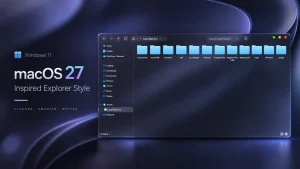
Explore macOS 27 Explorer Style for Windhawk and give your Windows 11 File Explorer a clean, modern, and macOS-inspired look safely.

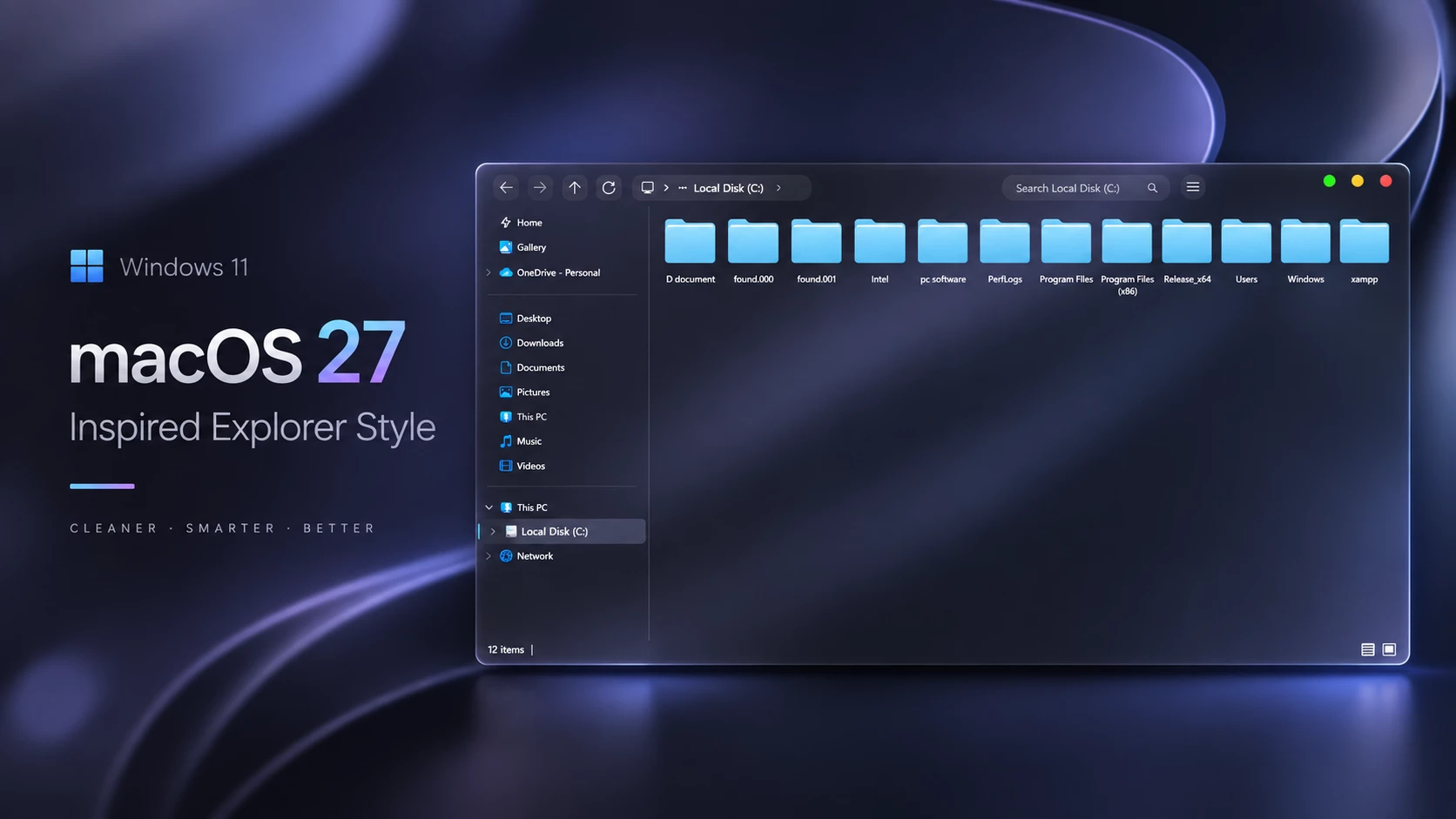
Bring the macOS Vibe to Windows 11 with the macOS 27 Explorer Style
If you love the clean, sleek aesthetics of macOS but prefer running Windows 11 as your daily driver, you aren’t alone. Many of us enjoy tweaking our desktops to get the best of both worlds. That is where tools like Windhawk come in handy, letting us completely reshape how Windows elements look and behave.
The macOS 27 Explorer Style is a gorgeous visual setup designed specifically for the Windows 11 File Explorer. By applying this configuration, you get a smoother, more minimal, and premium layout that breathes new life into your everyday file management routine.
What Makes This Style Stand Out?
- Transforms your standard File Explorer with a clean, modern, macOS-inspired look
- Smooth, minimal interface elements that are easy on the eyes
- Powered smoothly through trusted Windhawk customization scripts
- Gives Windows 11 a high-end, polished desktop feel
- Perfect for anyone who loves deep desktop personalization
Windows Compatibility Guide
Before jumping into the setup, make sure your operating system version plays nicely with the style. Here is what you need to know:
Compatibility
- Windows 11 21H2: Not Tested
- Windows 11 22H2: Not Tested
- Windows 11 23H2: Not Tested
- Windows 11 24H2: Not Tested
- Windows 11 25H2: Yes
Note: This is simply a third-party theme for Windows 11 designed to make your Windows 11 desktop look like macOS. It d oes not turn Windows into macOS or install macOS on your PC.
Step-by-Step Installation Guide
Getting this setup running on your PC only takes a couple of minutes. Just follow these simple steps:
Installation steps:
- First, download and install Windhawk on your PC.
- Open Windhawk, then find and install the Windows 11 File Explorer Styler mod.
- Head over to the mod’s Settings tab and switch to Textual mode.
- Copy the configuration code provided below, paste it right into the text box, and hit Save.
- For deeper configuration tips, check out this GitHub guide.
{ "theme": "macOS 27 Inspired By link Vegas", "backgroundTranslucentEffect": "mica", "backgroundTranslucentEffectRegion": "", "styleConstants[0]": "lvButton=<SolidColorBrush Color=\"{ThemeResource SystemBaseHighColor}\" Opacity=\"0.06\" />", "styleConstants[1]": "lvHover=<SolidColorBrush Color=\"{ThemeResource SystemBaseHighColor}\" Opacity=\"0.10\" />", "styleConstants[2]": "lvPressed=<SolidColorBrush Color=\"{ThemeResource SystemBaseHighColor}\" Opacity=\"0.15\" />", "styleConstants[3]": "lvDisabled=<SolidColorBrush Color=\"{ThemeResource SystemBaseHighColor}\" Opacity=\"0.025\" />", "styleConstants[4]": "lvField=<SolidColorBrush Color=\"{ThemeResource SystemBaseHighColor}\" Opacity=\"0.045\" />", "styleConstants[5]": "lvFocus=<SolidColorBrush Color=\"{ThemeResource SystemAccentColor}\" Opacity=\"0.12\" />", "styleConstants[6]": "lvAddressWidth={{lvHeaderWidth == `` ? 240 : max(140, min(240, (lvHeaderWidth - 492) * 0.52))}}", "styleConstants[7]": "lvSearchWidth={{lvHeaderWidth == `` ? 220 : max(112, min(220, (lvHeaderWidth - 492) - (max(140, min(240, (lvHeaderWidth - 492) * 0.52)))))}}", "styleConstants[8]": "lvAddressColumn={{lvHeaderWidth == `` ? 242 : (max(140, min(240, (lvHeaderWidth - 492) * 0.52))) + 2}}", "styleConstants[9]": "lvSearchColumn={{lvHeaderWidth == `` ? 236 : (max(112, min(220, (lvHeaderWidth - 492) - (max(140, min(240, (lvHeaderWidth - 492) * 0.52)))))) + 16}}", "styleConstants[10]": "lvGroupStart={{lvHeaderWidth == `` ? 440 : max(240, min(lvHeaderWidth - 252 - (max(140, min(240, (lvHeaderWidth - 492) * 0.52))) - (max(112, min(220, (lvHeaderWidth - 492) - (max(140, min(240, (lvHeaderWidth - 492) * 0.52)))))), lvHeaderWidth * 0.60 - ((max(140, min(240, (lvHeaderWidth - 492) * 0.52))) + (max(112, min(220, (lvHeaderWidth - 492) - (max(140, min(240, (lvHeaderWidth - 492) * 0.52)))))) + 72) * 0.5))}}", "styleConstants[11]": "lvMenuLeft={{lvHeaderWidth == `` ? 930 : (max(240, min(lvHeaderWidth - 252 - (max(140, min(240, (lvHeaderWidth - 492) * 0.52))) - (max(112, min(220, (lvHeaderWidth - 492) - (max(140, min(240, (lvHeaderWidth - 492) * 0.52)))))), lvHeaderWidth * 0.60 - ((max(140, min(240, (lvHeaderWidth - 492) * 0.52))) + (max(112, min(220, (lvHeaderWidth - 492) - (max(140, min(240, (lvHeaderWidth - 492) * 0.52)))))) + 72) * 0.5))) + (max(140, min(240, (lvHeaderWidth - 492) * 0.52))) + (max(112, min(220, (lvHeaderWidth - 492) - (max(140, min(240, (lvHeaderWidth - 492) * 0.52)))))) + 30}}", "styleConstants[12]": "lvAddressSearchSpacer={{lvHeaderWidth == `` ? 200 : (max(240, min(lvHeaderWidth - 252 - (max(140, min(240, (lvHeaderWidth - 492) * 0.52))) - (max(112, min(220, (lvHeaderWidth - 492) - (max(140, min(240, (lvHeaderWidth - 492) * 0.52)))))), lvHeaderWidth * 0.60 - ((max(140, min(240, (lvHeaderWidth - 492) * 0.52))) + (max(112, min(220, (lvHeaderWidth - 492) - (max(140, min(240, (lvHeaderWidth - 492) * 0.52)))))) + 72) * 0.5))) - 240}}", "controlStyles[0].target": "FileExplorerExtensions.CommandBarControl_Wave1, FileExplorerExtensions.CommandBarControl", "controlStyles[0].styles[0]": "Background=Transparent", "controlStyles[0].styles[1]": "Visibility=Visible", "controlStyles[0].styles[2]": "Opacity=1", "controlStyles[0].styles[3]": "IsHitTestVisible=True", "controlStyles[0].styles[4]": "Grid.Row=0", "controlStyles[0].styles[5]": "Grid.RowSpan=1", "controlStyles[0].styles[6]": "Canvas.ZIndex=10", "controlStyles[0].styles[7]": "HorizontalAlignment=Left", "controlStyles[0].styles[8]": "VerticalAlignment=Top", "controlStyles[0].styles[9]": "MinWidth=0", "controlStyles[0].styles[10]": "Width=42", "controlStyles[0].styles[11]": "MaxWidth=42", "controlStyles[0].styles[12]": "MinHeight=0", "controlStyles[0].styles[13]": "Height=48", "controlStyles[0].styles[14]": "Padding=0", "controlStyles[0].styles[15]": "Margin=$lvMenuLeft,2,0,2", "controlStyles[0].styles[16]": "UseLayoutRounding=True", "controlStyles[1].target": "FileExplorerExtensions.CommandBarControl_Wave1 > Grid, Grid#CommandBarControlRootGrid", "controlStyles[1].styles[0]": "Background=Transparent", "controlStyles[1].styles[1]": "Visibility=Visible", "controlStyles[1].styles[2]": "Opacity=1", "controlStyles[1].styles[3]": "IsHitTestVisible=True", "controlStyles[1].styles[4]": "BorderBrush=Transparent", "controlStyles[1].styles[5]": "BorderThickness=0", "controlStyles[1].styles[6]": "Grid.Row=0", "controlStyles[1].styles[7]": "Grid.RowSpan=1", "controlStyles[1].styles[8]": "HorizontalAlignment=Left", "controlStyles[1].styles[9]": "VerticalAlignment=Top", "controlStyles[1].styles[10]": "MinWidth=0", "controlStyles[1].styles[11]": "Width=42", "controlStyles[1].styles[12]": "MaxWidth=42", "controlStyles[1].styles[13]": "MinHeight=0", "controlStyles[1].styles[14]": "Height=48", "controlStyles[1].styles[15]": "Margin=0", "controlStyles[1].styles[16]": "Padding=0", "controlStyles[1].styles[17]": "ColumnDefinitions:=<ColumnDefinitionCollection><ColumnDefinition Width=\"42\"/><ColumnDefinition Width=\"0\"/></ColumnDefinitionCollection>", "controlStyles[2].target": "Microsoft.UI.Xaml.Controls.CommandBar#FileExplorerCommandBar", "controlStyles[2].styles[0]": "Grid.Column=0", "controlStyles[2].styles[1]": "Grid.ColumnSpan=1", "controlStyles[2].styles[2]": "Background=Transparent", "controlStyles[2].styles[3]": "Visibility=Visible", "controlStyles[2].styles[4]": "Opacity=1", "controlStyles[2].styles[5]": "IsHitTestVisible=True", "controlStyles[2].styles[6]": "HorizontalAlignment=Left", "controlStyles[2].styles[7]": "VerticalAlignment=Center", "controlStyles[2].styles[8]": "MinWidth=0", "controlStyles[2].styles[9]": "Width=42", "controlStyles[2].styles[10]": "MaxWidth=42", "controlStyles[2].styles[11]": "MinHeight=0", "controlStyles[2].styles[12]": "Height=48", "controlStyles[2].styles[13]": "Margin=0", "controlStyles[2].styles[14]": "Padding=0", "controlStyles[2].styles[15]": "IsDynamicOverflowEnabled=True", "controlStyles[2].styles[16]": "OverflowButtonVisibility=Visible", "controlStyles[2].styles[17]": "ClosedDisplayMode=Compact", "controlStyles[2].styles[18]": "CommandBarOverflowPresenterStyle:=<Style TargetType=\"CommandBarOverflowPresenter\"><Setter Property=\"MaxHeight\" Value=\"384\"/><Setter Property=\"MinWidth\" Value=\"232\"/><Setter Property=\"Padding\" Value=\"0,6,0,6\"/></Style>", "controlStyles[3].target": "CommandBar#FileExplorerSecondaryCommandBar", "controlStyles[3].styles[0]": "Visibility=Collapsed", "controlStyles[4].target": "AppBarToggleButton[Label=Details], AppBarButton[Label=Details]", "controlStyles[4].styles[0]": "Visibility=Collapsed", "controlStyles[5].target": "Microsoft.UI.Xaml.Controls.Border#BottomBorderLine", "controlStyles[5].styles[0]": "Visibility=Collapsed", "controlStyles[6].target": "FileExplorerExtensions.NavigationBarControl", "controlStyles[6].styles[0]": "Grid.Row=0", "controlStyles[6].styles[1]": "Grid.RowSpan=1", "controlStyles[6].styles[2]": "HorizontalAlignment=Stretch", "controlStyles[6].styles[3]": "VerticalAlignment=Top", "controlStyles[6].styles[4]": "MinHeight=0", "controlStyles[6].styles[5]": "Height=48", "controlStyles[6].styles[6]": "Padding=0", "controlStyles[6].styles[7]": "ActualWidth=>lvHeaderWidth", "controlStyles[6].styles[8]": "MinWidth=0", "controlStyles[6].styles[9]": "Margin=0,2,0,2", "controlStyles[6].styles[10]": "UseLayoutRounding=True", "controlStyles[7].target": "Microsoft.UI.Xaml.Controls.Grid#NavigationBarControlGrid", "controlStyles[7].styles[0]": "Background:=", "controlStyles[7].styles[1]": "BorderBrush=Transparent", "controlStyles[7].styles[2]": "MinHeight=0", "controlStyles[7].styles[3]": "Height=48", "controlStyles[7].styles[4]": "ColumnDefinitions:=<ColumnDefinitionCollection><ColumnDefinition Width=\"240\"/><ColumnDefinition Width=\"$lvAddressColumn\"/><ColumnDefinition Width=\"$lvAddressSearchSpacer\"/><ColumnDefinition Width=\"$lvSearchColumn\"/><ColumnDefinition Width=\"54\"/><ColumnDefinition Width=\"*\" MinWidth=\"0\"/></ColumnDefinitionCollection>", "controlStyles[7].styles[5]": "Margin=0,0,180,0", "controlStyles[7].styles[6]": "UseLayoutRounding=True", "controlStyles[8].target": "Grid#TabContainerGrid", "controlStyles[8].styles[0]": "Grid.Row=0", "controlStyles[8].styles[1]": "HorizontalAlignment=Left", "controlStyles[8].styles[2]": "Margin=100,0,0,0", "controlStyles[8].styles[3]": "Width=1", "controlStyles[8].styles[4]": "MaxWidth=1", "controlStyles[8].styles[5]": "MinWidth=0", "controlStyles[8].styles[6]": "Background:=", "controlStyles[8].styles[7]": "IsHitTestVisible=False", "controlStyles[9].target": "FileExplorerExtensions.FileExplorerTabControl", "controlStyles[9].styles[0]": "HorizontalAlignment=Left", "controlStyles[9].styles[1]": "Margin=100,0,0,0", "controlStyles[9].styles[2]": "Width=1", "controlStyles[9].styles[3]": "MaxWidth=1", "controlStyles[9].styles[4]": "MinWidth=0", "controlStyles[9].styles[5]": "Background:=", "controlStyles[9].styles[6]": "IsHitTestVisible=False", "controlStyles[10].target": "TabViewItem", "controlStyles[10].styles[0]": "Width=0", "controlStyles[10].styles[1]": "Visibility=Collapsed", "controlStyles[11].target": "Grid#TabContainerGrid > Border > Button#AddButton", "controlStyles[11].styles[0]": "Visibility=Collapsed", "controlStyles[12].target": "AutoSuggestBox#FileExplorerSearchBox > Grid#LayoutRoot > TextBox > Grid@CommonStates > Border#BorderElement", "controlStyles[12].styles[0]": "Background:=$lvField", "controlStyles[12].styles[1]": "Background@Normal:=$lvField", "controlStyles[12].styles[2]": "Background@PointerOver:=$lvHover", "controlStyles[12].styles[3]": "Background@Focused:=$lvFocus", "controlStyles[12].styles[4]": "Background@Disabled:=$lvDisabled", "controlStyles[12].styles[5]": "BorderThickness=0", "controlStyles[12].styles[6]": "BorderBrush=Transparent", "controlStyles[12].styles[7]": "CornerRadius=8", "controlStyles[13].target": "Microsoft.UI.Xaml.Controls.Grid#FileExplorerAddressBarGrid > Grid#LayoutRoot > TextBox > Grid@CommonStates > Border#BorderElement", "controlStyles[13].styles[0]": "Background=Transparent", "controlStyles[13].styles[1]": "BorderThickness=0", "controlStyles[13].styles[2]": "CornerRadius=8", "controlStyles[14].target": "Microsoft.UI.Xaml.Controls.AutoSuggestBox#FileExplorerSearchBox > Microsoft.UI.Xaml.Controls.Grid#LayoutRoot > Microsoft.UI.Xaml.Controls.TextBox#TextBox", "controlStyles[14].styles[0]": "Margin=0", "controlStyles[14].styles[1]": "MinWidth=0", "controlStyles[14].styles[2]": "Background=Transparent", "controlStyles[14].styles[3]": "BorderBrush=Transparent", "controlStyles[14].styles[4]": "HorizontalAlignment=Stretch", "controlStyles[14].styles[5]": "TextAlignment=Left", "controlStyles[14].styles[6]": "HorizontalContentAlignment=Left", "controlStyles[14].styles[7]": "CornerRadius=8", "controlStyles[14].styles[8]": "Width=$lvSearchWidth", "controlStyles[14].styles[9]": "Height=32", "controlStyles[14].styles[10]": "MinHeight=32", "controlStyles[14].styles[11]": "Padding=12,0,32,0", "controlStyles[14].styles[12]": "VerticalContentAlignment=Center", "controlStyles[15].target": "Microsoft.UI.Xaml.Controls.Grid#FileExplorerAddressBarGrid", "controlStyles[15].styles[0]": "Grid.Column=1", "controlStyles[15].styles[1]": "Grid.ColumnSpan=1", "controlStyles[15].styles[2]": "HorizontalAlignment=Left", "controlStyles[15].styles[3]": "VerticalAlignment=Center", "controlStyles[15].styles[4]": "MinWidth=0", "controlStyles[15].styles[5]": "Height=32", "controlStyles[15].styles[6]": "Margin=-16,0,0,0", "controlStyles[15].styles[7]": "Background:=", "controlStyles[15].styles[8]": "CornerRadius=8", "controlStyles[15].styles[9]": "Width=$lvAddressWidth", "controlStyles[15].styles[10]": "MaxWidth=$lvAddressWidth", "controlStyles[15].styles[11]": "MinHeight=32", "controlStyles[16].target": "AutoSuggestBox#FileExplorerSearchBox", "controlStyles[16].styles[0]": "Grid.Column=3", "controlStyles[16].styles[1]": "Grid.ColumnSpan=1", "controlStyles[16].styles[2]": "HorizontalAlignment=Left", "controlStyles[16].styles[3]": "VerticalAlignment=Center", "controlStyles[16].styles[4]": "MinWidth=0", "controlStyles[16].styles[5]": "Height=32", "controlStyles[16].styles[6]": "Margin=16,0,0,0", "controlStyles[16].styles[7]": "Background:=", "controlStyles[16].styles[8]": "Width=$lvSearchWidth", "controlStyles[16].styles[9]": "MaxWidth=$lvSearchWidth", "controlStyles[16].styles[10]": "MinHeight=32", "controlStyles[17].target": "AutoSuggestBox#FileExplorerSearchBox > Grid#LayoutRoot", "controlStyles[17].styles[0]": "Background:=", "controlStyles[17].styles[1]": "Margin=0", "controlStyles[17].styles[2]": "MinWidth=0", "controlStyles[17].styles[3]": "Width=$lvSearchWidth", "controlStyles[17].styles[4]": "Height=32", "controlStyles[17].styles[5]": "MinHeight=32", "controlStyles[18].target": "CommandBar#FileExplorerCommandBar > * > Button", "controlStyles[18].styles[0]": "FontSize=14", "controlStyles[18].styles[1]": "Background:=$lvButton", "controlStyles[18].styles[2]": "CornerRadius=7", "controlStyles[19].target": "CommandBar#FileExplorerCommandBar > * > AppBarButton", "controlStyles[19].styles[0]": "CornerRadius=7", "controlStyles[20].target": "AppBarButton#backButton > Grid#Root@CommonStates > Border#AppBarButtonInnerBorder, AppBarButton#forwardButton > Grid#Root@CommonStates > Border#AppBarButtonInnerBorder, AppBarButton#upButton > Grid#Root@CommonStates > Border#AppBarButtonInnerBorder, AppBarButton#refreshButton > Grid#Root@CommonStates > Border#AppBarButtonInnerBorder, CommandBar#FileExplorerCommandBar > * > AppBarButton > Grid#Root@CommonStates > Border#AppBarButtonInnerBorder", "controlStyles[20].styles[0]": "CornerRadius=7", "controlStyles[20].styles[1]": "Background:=$lvButton", "controlStyles[20].styles[2]": "Background@Normal:=$lvButton", "controlStyles[20].styles[3]": "Background@PointerOver:=$lvHover", "controlStyles[20].styles[4]": "Background@Pressed:=$lvPressed", "controlStyles[20].styles[5]": "Background@Disabled:=$lvDisabled", "controlStyles[21].target": "CommandBar#FileExplorerCommandBar > * > Button > ContentPresenter#ContentPresenter@CommonStates", "controlStyles[21].styles[0]": "CornerRadius=7", "controlStyles[21].styles[1]": "Background:=$lvButton", "controlStyles[21].styles[2]": "Background@Normal:=$lvButton", "controlStyles[21].styles[3]": "Background@PointerOver:=$lvHover", "controlStyles[21].styles[4]": "Background@Pressed:=$lvPressed", "controlStyles[21].styles[5]": "Background@Disabled:=$lvDisabled", "controlStyles[22].target": "FileExplorerExtensions.AddressBarControl > Grid#PART_LayoutRoot", "controlStyles[22].styles[0]": "Background:=$lvField", "controlStyles[22].styles[1]": "MinWidth=0", "controlStyles[22].styles[2]": "Margin=0", "controlStyles[22].styles[3]": "CornerRadius=8", "controlStyles[23].target": "FileExplorerExtensions.AddressBarControl > Grid#PART_LayoutRoot > Grid#NormalModeGrid", "controlStyles[23].styles[0]": "Background=Transparent", "controlStyles[23].styles[1]": "CornerRadius=8", "controlStyles[24].target": "CommandBar#FileExplorerCommandBar > Grid#LayoutRoot, CommandBar#FileExplorerCommandBar > Grid#LayoutRoot > Grid#ContentRoot", "controlStyles[24].styles[0]": "Background=Transparent", "controlStyles[24].styles[1]": "Visibility=Visible", "controlStyles[24].styles[2]": "Opacity=1", "controlStyles[24].styles[3]": "MinHeight=0", "controlStyles[24].styles[4]": "Height=48", "controlStyles[24].styles[5]": "Margin=0", "controlStyles[24].styles[6]": "Padding=0", "controlStyles[25].target": "CommandBar#FileExplorerCommandBar > Grid#LayoutRoot > Grid#ContentRoot > ItemsControl#PrimaryItemsControl, CommandBar#FileExplorerCommandBar > Grid#LayoutRoot > Grid#ContentRoot > Grid > ItemsControl#PrimaryItemsControl", "controlStyles[25].styles[0]": "MinHeight=0", "controlStyles[25].styles[1]": "Height=48", "controlStyles[25].styles[2]": "Margin=0", "controlStyles[26].target": "CommandBar#FileExplorerCommandBar > Grid#LayoutRoot > Grid#ContentRoot > Grid#OverflowSeparator", "controlStyles[26].styles[0]": "Visibility=Collapsed", "controlStyles[27].target": "CommandBar#FileExplorerCommandBar > Grid#LayoutRoot > Grid#ContentRoot > Button#MoreButton", "controlStyles[27].styles[0]": "Visibility=Visible", "controlStyles[27].styles[1]": "Opacity=1", "controlStyles[27].styles[2]": "IsHitTestVisible=True", "controlStyles[27].styles[3]": "Width=32", "controlStyles[27].styles[4]": "MinWidth=32", "controlStyles[27].styles[5]": "MaxWidth=32", "controlStyles[27].styles[6]": "Height=32", "controlStyles[27].styles[7]": "MinHeight=0", "controlStyles[27].styles[8]": "MaxHeight=32", "controlStyles[27].styles[9]": "Margin=0", "controlStyles[27].styles[10]": "Padding=0", "controlStyles[27].styles[11]": "HorizontalAlignment=Left", "controlStyles[27].styles[12]": "VerticalAlignment=Center", "controlStyles[27].styles[13]": "HorizontalContentAlignment=Center", "controlStyles[27].styles[14]": "VerticalContentAlignment=Center", "controlStyles[27].styles[15]": "CornerRadius=16", "controlStyles[27].styles[16]": "Background:=$lvButton", "controlStyles[27].styles[17]": "Foreground:=<SolidColorBrush Color=\"{ThemeResource SystemBaseHighColor}\" />", "controlStyles[27].styles[18]": "BorderBrush=Transparent", "controlStyles[27].styles[19]": "BorderThickness=0", "controlStyles[27].styles[20]": "UseLayoutRounding=True", "controlStyles[28].target": "CommandBar#FileExplorerCommandBar > Grid#LayoutRoot > Grid#ContentRoot > Button#MoreButton > Grid", "controlStyles[28].styles[0]": "Width=32", "controlStyles[28].styles[1]": "Height=32", "controlStyles[28].styles[2]": "MinWidth=0", "controlStyles[28].styles[3]": "MinHeight=0", "controlStyles[28].styles[4]": "Margin=0", "controlStyles[28].styles[5]": "Padding=0", "controlStyles[28].styles[6]": "CornerRadius=16", "controlStyles[28].styles[7]": "Background=Transparent", "controlStyles[29].target": "CommandBar#FileExplorerCommandBar > Grid#LayoutRoot > Grid#ContentRoot > Button#MoreButton > Grid@CommonStates > ContentPresenter#ContentPresenter", "controlStyles[29].styles[0]": "Margin=0", "controlStyles[29].styles[1]": "Padding=0", "controlStyles[29].styles[2]": "CornerRadius=16", "controlStyles[29].styles[3]": "BorderThickness=0", "controlStyles[29].styles[4]": "HorizontalContentAlignment=Center", "controlStyles[29].styles[5]": "VerticalContentAlignment=Center", "controlStyles[29].styles[6]": "Background:=$lvButton", "controlStyles[29].styles[7]": "Background@Normal:=$lvButton", "controlStyles[29].styles[8]": "Background@PointerOver:=$lvHover", "controlStyles[29].styles[9]": "Background@Pressed:=$lvPressed", "controlStyles[29].styles[10]": "Background@Disabled:=$lvDisabled", "controlStyles[30].target": "CommandBar#FileExplorerCommandBar > Grid#LayoutRoot > Grid#ContentRoot > Button#MoreButton > * > FontIcon#EllipsisIcon", "controlStyles[30].styles[0]": "Visibility=Visible", "controlStyles[30].styles[1]": "Opacity=1", "controlStyles[30].styles[2]": "Foreground:=<SolidColorBrush Color=\"{ThemeResource SystemBaseHighColor}\" />", "controlStyles[30].styles[3]": "FontFamily=Segoe Fluent Icons", "controlStyles[30].styles[4]": "Width=16", "controlStyles[30].styles[5]": "Height=16", "controlStyles[30].styles[6]": "Margin=0", "controlStyles[30].styles[7]": "HorizontalAlignment=Center", "controlStyles[30].styles[8]": "VerticalAlignment=Center", "controlStyles[30].styles[9]": "Glyph=", "controlStyles[30].styles[10]": "FontSize=16", "controlStyles[30].styles[11]": "UseLayoutRounding=True", "controlStyles[31].target": "AppBarButton#backButton, AppBarButton#forwardButton, AppBarButton#upButton, AppBarButton#refreshButton", "controlStyles[31].styles[0]": "Width=32", "controlStyles[31].styles[1]": "MinWidth=32", "controlStyles[31].styles[2]": "MaxWidth=32", "controlStyles[31].styles[3]": "Height=32", "controlStyles[31].styles[4]": "MinHeight=32", "controlStyles[31].styles[5]": "MaxHeight=32", "controlStyles[31].styles[6]": "Margin=8,0,8,0", "controlStyles[31].styles[7]": "Padding=0", "controlStyles[31].styles[8]": "VerticalAlignment=Center", "controlStyles[31].styles[9]": "HorizontalContentAlignment=Center", "controlStyles[31].styles[10]": "VerticalContentAlignment=Center", "controlStyles[31].styles[11]": "LabelPosition=Collapsed", "controlStyles[31].styles[12]": "UseLayoutRounding=True", "controlStyles[32].target": "AppBarButton#backButton > Grid#Root, AppBarButton#forwardButton > Grid#Root, AppBarButton#upButton > Grid#Root, AppBarButton#refreshButton > Grid#Root", "controlStyles[32].styles[0]": "Width=32", "controlStyles[32].styles[1]": "MinWidth=0", "controlStyles[32].styles[2]": "Height=32", "controlStyles[32].styles[3]": "MinHeight=0", "controlStyles[32].styles[4]": "Margin=0", "controlStyles[32].styles[5]": "Padding=0", "controlStyles[32].styles[6]": "CornerRadius=7", "controlStyles[33].target": "AppBarButton#backButton > Grid#Root > Grid#ContentRoot, AppBarButton#forwardButton > Grid#Root > Grid#ContentRoot, AppBarButton#upButton > Grid#Root > Grid#ContentRoot, AppBarButton#refreshButton > Grid#Root > Grid#ContentRoot", "controlStyles[33].styles[0]": "MinHeight=0", "controlStyles[33].styles[1]": "Height=32", "controlStyles[33].styles[2]": "Margin=0", "controlStyles[33].styles[3]": "Padding=0", "controlStyles[33].styles[4]": "VerticalAlignment=Center", "controlStyles[33].styles[5]": "RowDefinitions:=<RowDefinitionCollection><RowDefinition Height=\"*\"/></RowDefinitionCollection>", "controlStyles[34].target": "AppBarButton#backButton > Grid#Root > Grid#ContentRoot > Viewbox#ContentViewbox, AppBarButton#forwardButton > Grid#Root > Grid#ContentRoot > Viewbox#ContentViewbox, AppBarButton#upButton > Grid#Root > Grid#ContentRoot > Viewbox#ContentViewbox, AppBarButton#refreshButton > Grid#Root > Grid#ContentRoot > Viewbox#ContentViewbox", "controlStyles[34].styles[0]": "Width=16", "controlStyles[34].styles[1]": "Height=16", "controlStyles[34].styles[2]": "Margin=0", "controlStyles[34].styles[3]": "HorizontalAlignment=Center", "controlStyles[34].styles[4]": "VerticalAlignment=Center", "controlStyles[35].target": "FileExplorerExtensions.AddressBarControl > Grid#PART_LayoutRoot, FileExplorerExtensions.AddressBarControl > Grid#PART_LayoutRoot > Grid#NormalModeGrid", "controlStyles[35].styles[0]": "MinHeight=32", "controlStyles[35].styles[1]": "Height=32", "controlStyles[35].styles[2]": "Margin=0", "controlStyles[35].styles[3]": "VerticalAlignment=Center", "controlStyles[35].styles[4]": "UseLayoutRounding=True", "controlStyles[36].target": "Grid#FileExplorerAddressBarGrid > FileExplorerExtensions.AddressBarControl", "controlStyles[36].styles[0]": "MinHeight=32", "controlStyles[36].styles[1]": "Height=32", "controlStyles[36].styles[2]": "MinWidth=0", "controlStyles[36].styles[3]": "Margin=0", "controlStyles[36].styles[4]": "VerticalAlignment=Center", "controlStyles[37].target": "CommandBar#FileExplorerCommandBar > * > Popup#OverflowPopup", "controlStyles[37].styles[0]": "DesiredPlacement=BottomEdgeAlignedRight", "controlStyles[37].styles[1]": "VerticalOffset=48", "controlStyles[38].target": "CommandBar#FileExplorerCommandBar > * > Grid#OverflowContentRoot, CommandBar#FileExplorerCommandBar > * > Border#OverflowContentRoot", "controlStyles[38].styles[0]": "Margin=0", "controlStyles[38].styles[1]": "VerticalAlignment=Top", "controlStyles[38].styles[2]": "MinHeight=0", "controlStyles[38].styles[3]": "MaxHeight=384", "controlStyles[38].styles[4]": "RenderTransform:=<TranslateTransform X=\"0\" Y=\"0\"/>", "controlStyles[38].styles[5]": "Clip:=", "controlStyles[39].target": "CommandBarOverflowPresenter > * > ScrollViewer", "controlStyles[39].styles[0]": "VerticalScrollBarVisibility=Auto", "controlStyles[39].styles[1]": "HorizontalScrollBarVisibility=Disabled", "controlStyles[39].styles[2]": "HorizontalScrollMode=Disabled", "explorerFrameContainerHeight": 52}Downloads & Resources
Ready to complete the full look? Grab the matching theme files below:
Theme & Icon Pack
How To Remove macOS 27 Explorer Style
If you want to return to the default Windows 11 File Explorer appearance, you can easily remove the macOS 27 Explorer Style by disabling the applied customization settings.
- Open Windhawk: Launch Windhawk and find the File Explorer customization mod used for this style.
- Open Mod Settings: Go to the settings page of the installed Explorer customization mod.
- Remove the Configuration: Delete the added macOS 27 Explorer Style configuration or restore your previous settings.
- Save Changes: Click the save button to apply the updated settings.
- Restart Windows Explorer: Restart Explorer or sign out and sign back in to reload the default appearance.
Frequently Asked Questions
What is macOS 27 Explorer Style for Windows 11?
macOS 27 Explorer Style is a Windows 11 customization that changes the visual appearance of File Explorer with a cleaner, minimal, and macOS-inspired design approach.
Does this replace Windows File Explorer?
No. This customization does not replace File Explorer. It only modifies supported visual elements to give the interface a different appearance.
Do I need Windhawk to use this Explorer style?
Yes. This style is designed to work with Windhawk-based customization methods. The required mod and configuration are needed to apply the changes.
Can I use this style with other Windows 11 customizations?
Yes. You can combine this Explorer style with compatible wallpapers, icon packs, Start Menu styles, and taskbar customizations to create a complete desktop setup.
Can I restore the default Windows 11 Explorer design?
Yes. You can remove the applied customization settings and restart Windows Explorer to return to the default interface appearance.
Disclaimer
macOS 27 Explorer Style is an independently created third-party Windows customization resource intended for desktop personalization purposes. It is not an official Apple or Microsoft product and is not affiliated with, endorsed by, or supported by either company.
The appearance and compatibility of this customization may vary depending on your Windows version, installed updates, Windhawk version, and system configuration. It is recommended to create a System Restore Point before applying any Windows customization.
Final Word
The macOS 27 Explorer Style brings a fresh visual approach to Windows 11 File Explorer by combining a clean layout, minimal design elements, and a modern macOS-inspired appearance. It is a good choice for users who enjoy customizing their desktop and creating a more personalized Windows experience.
With Windhawk-based customization, you can explore different interface styles while keeping the familiar Windows environment you use every day. Combined with matching wallpapers, icons, and other UI modifications, this Explorer style can help create a more consistent and stylish desktop setup.