

Mid Aero Settings Style for Windows 11
Mid Aero Settings Style for Windows 11 : Give the Windows 11 Settings app an Aero-inspired appearance with a translucent purple sidebar, dark content area, gradient cards, and subtle borders. This beginner-friendly guide explains what the Mid Aero style changes, how to apply it with Windhawk, and how to restore the default design.

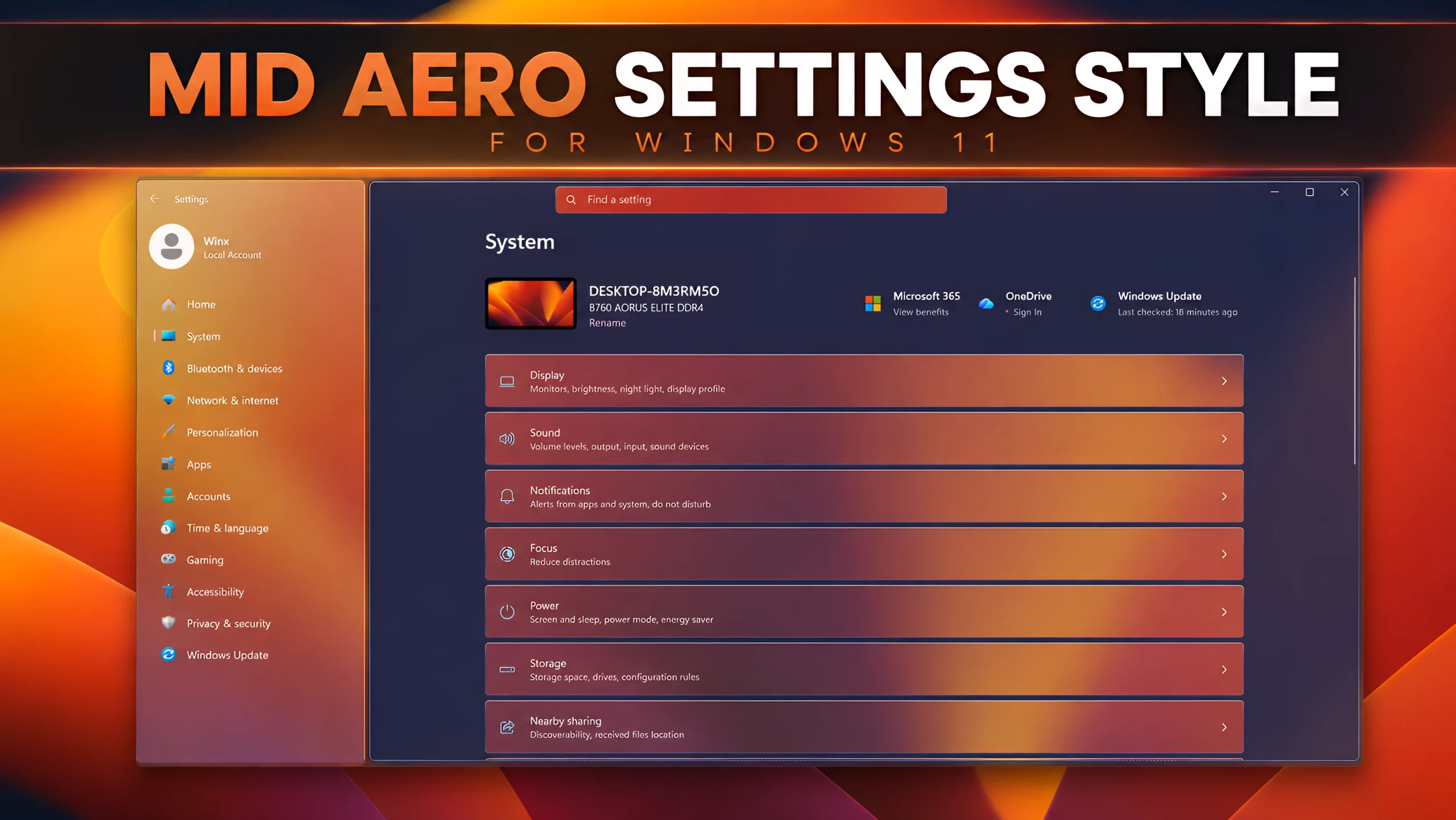
Mid Aero Windhawk Settings Style for Windows 11
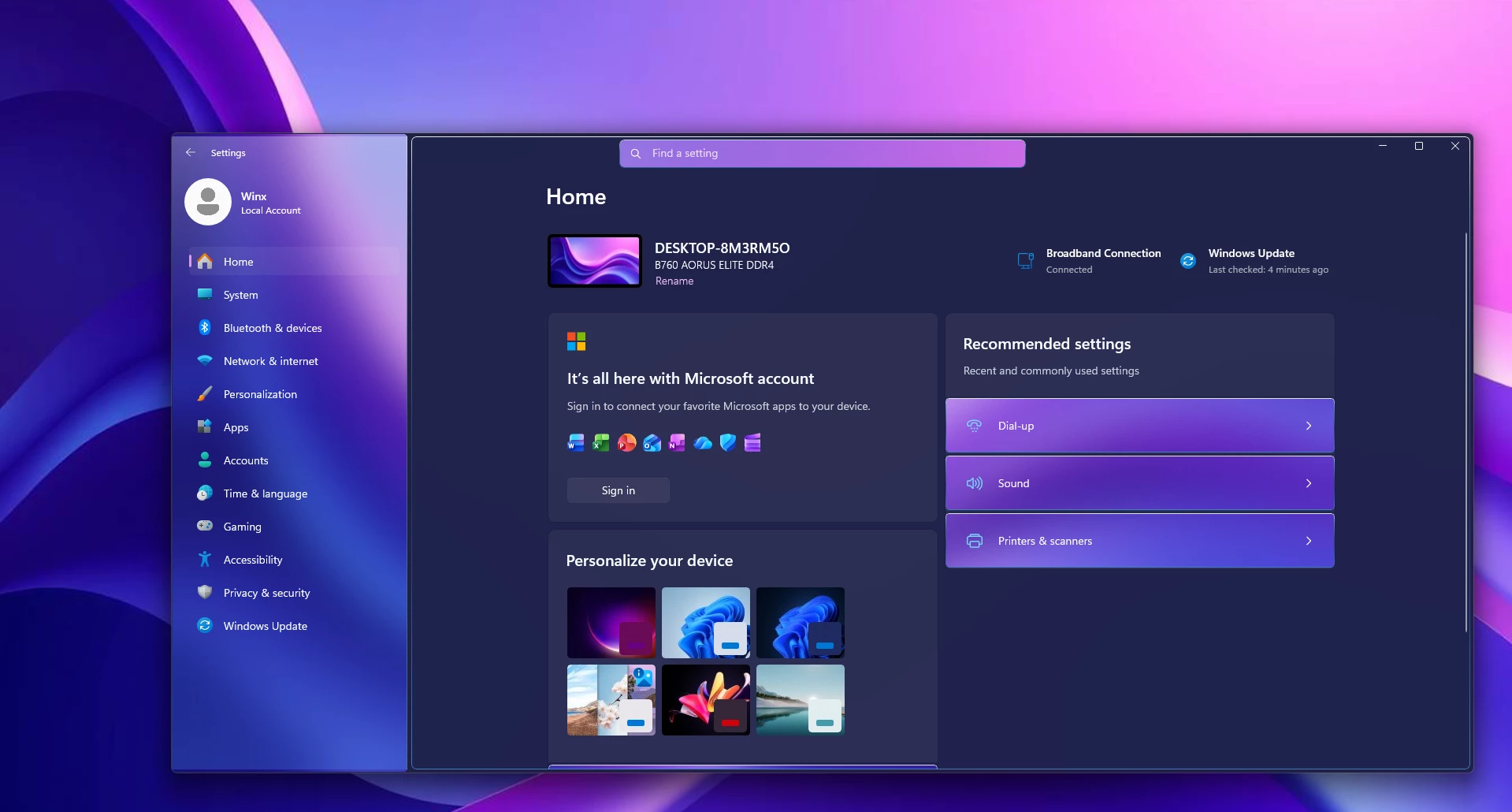
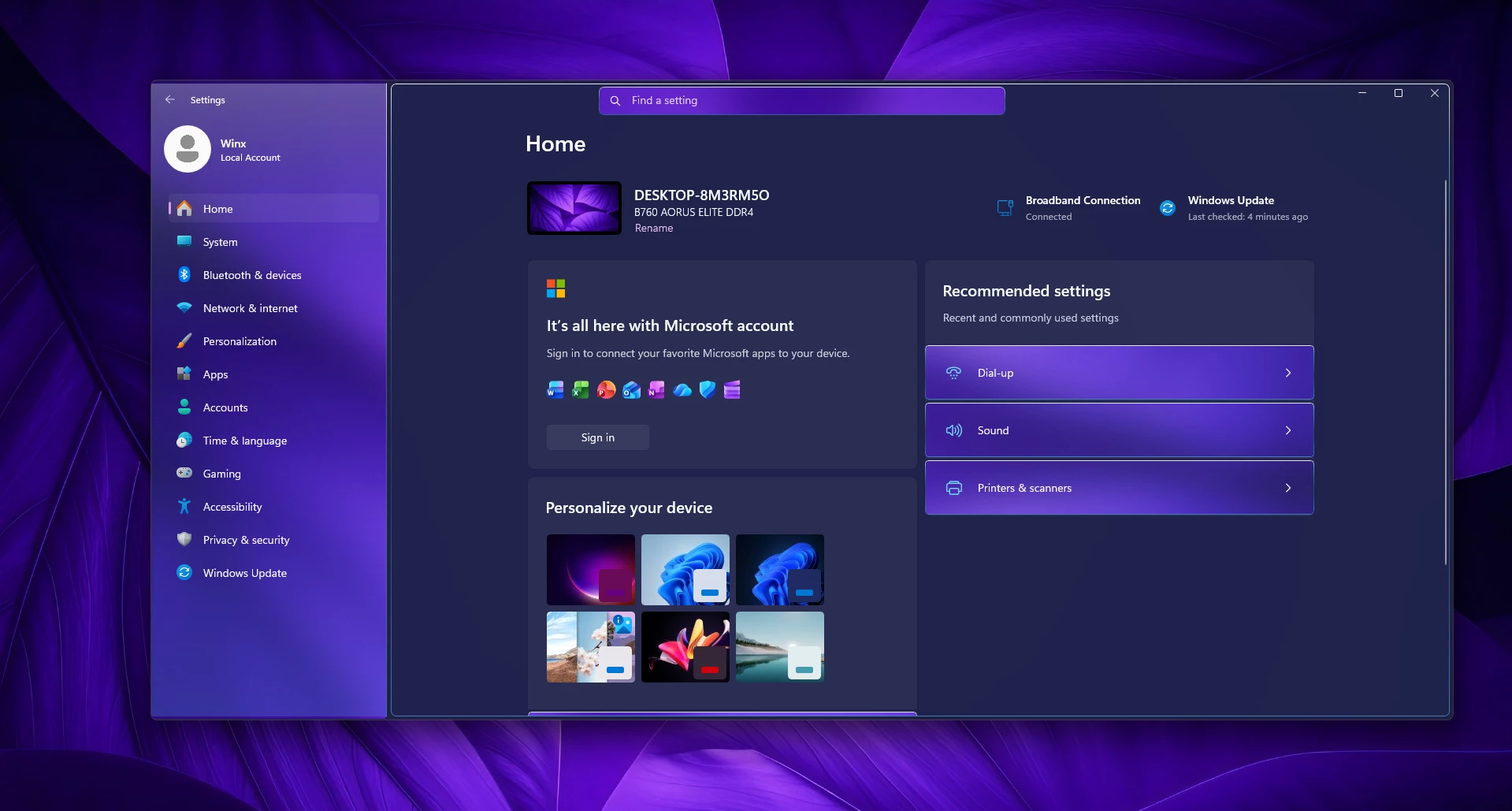
If you love the classic, glossy look of Windows Aero but want to keep the modern layout of Windows 11, you’re going to love this. The Mid Aero Settings Style gives your default Settings app a gorgeous, colorful glass makeover without altering how anything actually works under the hood.
As you can see in the preview above, this theme blends a translucent purple navigation sidebar with a deep navy content area and warm orange-gradient accent cards. Combined with thin, crisp borders and softly rounded corners, it delivers a polished and expressive desktop look while keeping all your important settings right where you expect them.
What Does the Mid Aero Settings Style Change?
Before jumping into the setup, keep in mind that this is purely a visual customization. It doesn’t modify core system functions, unlock hidden Windows features, or change how individual settings behave.
Features
- Translucent Purple Sidebar: A gorgeous, semi-transparent navigation pane on the left that gives a subtle nod to classic Aero aesthetics.
- Deep Navy Background: A rich, dark backdrop for the main settings area that reduces eye strain and looks sleek.
- Warm Gradient Accent Cards: Individual setting rows feature a striking orange-tinted transparent gradient that reacts smoothly.
- Clean Thin Borders: Delicate light borders outlining the window and separate content panels for better definition.
- Native Rounded Corners: Fully smoothed-out panel edges that perfectly match the modern Windows 11 design language.
- Vibrant Highlights: Bright accent colors carefully chosen for icons, the search bar, and active selections.
- Balanced Readability: Carefully tuned contrast ensuring that all menu labels and text remain crisp and easy to read against the dark backdrop.
Before You Install
- Create a system restore point before applying any Windows customization.
- Read the installation instructions carefully before making changes.
- Use trusted customization tools only.
- Keep a backup of important files and personal data.
- Check your Windows build before applying the style.
The final colors can look slightly different depending on your wallpaper, Windows accent color, display calibration, and operating system build. Purple, blue, and pink wallpapers usually complement this design particularly well.
What You Need Before Applying the Style
Prepare the following items before starting:
- A Windows 11 computer
- The latest compatible version of Windhawk
- The Windows 11 Settings Styler mod
- The Mid Aero preset or configuration supplied with this post
- Permission to install and configure desktop customization software
- A backup of your current Windhawk Settings Styler configuration
Compatibility
- Windows 11 21H2: May work Not tested
- Windows 11 22H2: May work Not Tested
- Windows 11 23H2: Recommended
- Windows 11 24H2: Recommended
- Windows 11 25H2: YES but test carefully after Windows updates
Installation steps:
- Download & Install windhawk.
- install & Open Windows 11 Settings Styler
- Go to the Advanced tab
- Copy the content below and paste it into the text box and click “Save”.
- For more details, visit this GitHub guide
- For more Windhawk Styler, visit Check My Windhawk Category
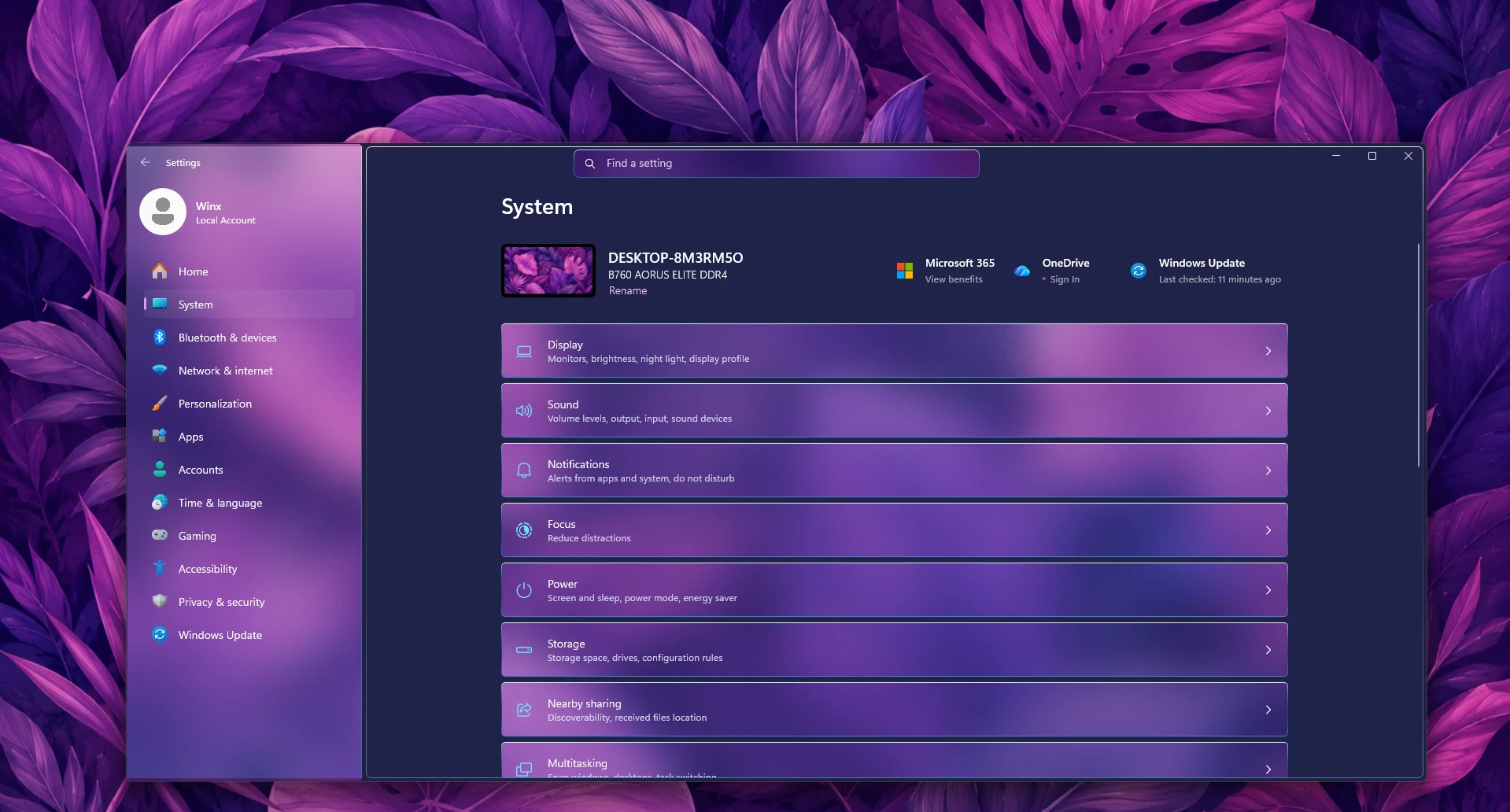
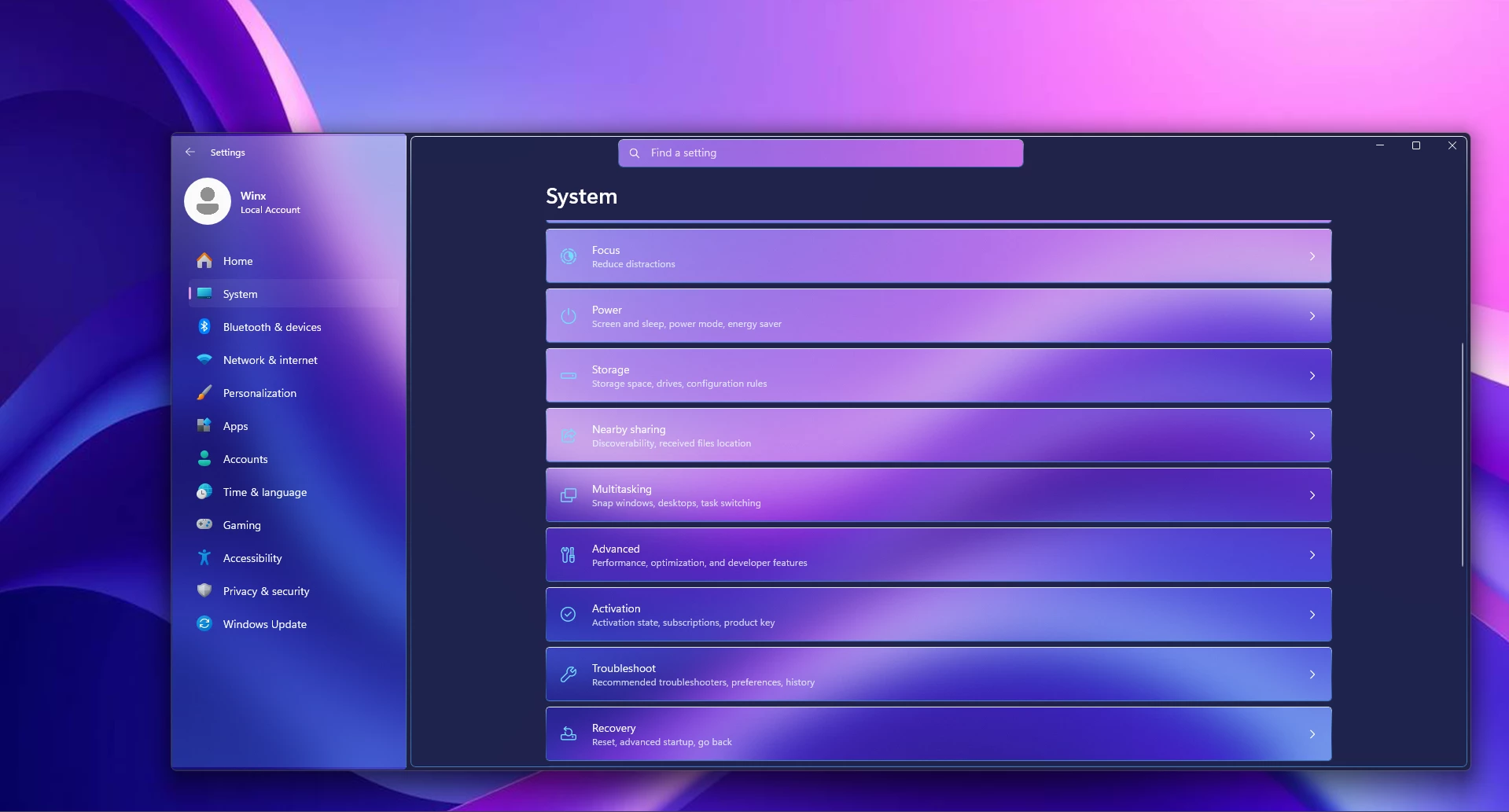
{ "Theme": "Mid Aero By link Vegas ", "styleConstants[0]": "AeroMain=<WindhawkBlur BlurAmount=\"16\" TintColor=\"#1E2655\" TintOpacity=\"0.46\" />", "styleConstants[1]": "AeroCard=<AcrylicBrush BackgroundSource=\"HostBackdrop\" TintColor=\"#267AC4\" TintOpacity=\"0.26\" TintLuminosityOpacity=\"0.22\" FallbackColor=\"#215D9F\" />", "styleConstants[2]": "AeroInput=<AcrylicBrush BackgroundSource=\"HostBackdrop\" TintColor=\"#0F4F96\" TintOpacity=\"0.40\" TintLuminosityOpacity=\"0.24\" FallbackColor=\"#174F8B\" />", "styleConstants[3]": "AeroBorder=<LinearGradientBrush StartPoint=\"0,0\" EndPoint=\"0,1\"><GradientStop Color=\"#E8F7FFFF\" Offset=\"0.0\" /><GradientStop Color=\"#A274D1FF\" Offset=\"0.12\" /><GradientStop Color=\"#4C286CB8\" Offset=\"0.55\" /><GradientStop Color=\"#C14799EB\" Offset=\"1.0\" /></LinearGradientBrush>", "styleConstants[4]": "AeroInnerBorder=<SolidColorBrush Color=\"#A8E8F8FF\" />", "styleConstants[5]": "AeroText=<SolidColorBrush Color=\"#FFF8FCFF\" />", "styleConstants[6]": "AeroSubText=<SolidColorBrush Color=\"#CDEAF6FF\" />", "styleConstants[7]": "AeroAccent=<SolidColorBrush Color=\"#FF72DEFF\" />", "styleConstants[8]": "LeftPaneGlass=<AcrylicBrush BackgroundSource=\"HostBackdrop\" TintColor=\"#0A3E7A\" TintOpacity=\"0.12\" TintLuminosityOpacity=\"0.12\" FallbackColor=\"#244B7D\" />", "styleConstants[9]": "LeftPaneShine=<LinearGradientBrush StartPoint=\"0,0\" EndPoint=\"0,1\"><GradientStop Color=\"#4CE9F8FF\" Offset=\"0.0\" /><GradientStop Color=\"#103F8DDA\" Offset=\"0.42\" /><GradientStop Color=\"#384CAFFF\" Offset=\"1.0\" /></LinearGradientBrush>", "styleConstants[10]": "LeftPaneHover=<LinearGradientBrush StartPoint=\"0,0\" EndPoint=\"0,1\"><GradientStop Color=\"#70DCF7FF\" Offset=\"0.0\" /><GradientStop Color=\"#3565BDF2\" Offset=\"1.0\" /></LinearGradientBrush>", "styleConstants[11]": "LeftPaneSelected=<LinearGradientBrush StartPoint=\"0,0\" EndPoint=\"0,1\"><GradientStop Color=\"#9BE6F9FF\" Offset=\"0.0\" /><GradientStop Color=\"#72547EDC\" Offset=\"1.0\" /></LinearGradientBrush>", "styleConstants[12]": "LeftPaneBorder=<LinearGradientBrush StartPoint=\"0,0\" EndPoint=\"0,1\"><GradientStop Color=\"#C9F5FFFF\" Offset=\"0.0\" /><GradientStop Color=\"#5869C4FF\" Offset=\"0.45\" /><GradientStop Color=\"#9A388CE2\" Offset=\"1.0\" /></LinearGradientBrush>", "styleConstants[13]": "Radius=6", "styleConstants[14]": "SmallRadius=4", "controlStyles[0].target": "SystemSettings.View.RootPage > Grid#RootPageGrid", "controlStyles[0].styles[0]": "Background:=$AeroMain", "controlStyles[1].target": "Microsoft.UI.Xaml.Controls.NavigationView#PermanentNavigationView", "controlStyles[1].styles[0]": "Background:=Transparent", "controlStyles[1].styles[1]": "Foreground:=$AeroText", "controlStyles[2].target": "SplitView#RootSplitView > Grid > Grid#PaneRoot", "controlStyles[2].styles[0]": "Background:=Transparent", "controlStyles[3].target": "SplitView#RootSplitView > Grid > Grid#PaneRoot > Border", "controlStyles[3].styles[0]": "Background:=$LeftPaneGlass", "controlStyles[3].styles[1]": "BorderBrush:=$LeftPaneBorder", "controlStyles[3].styles[2]": "BorderThickness=0,0,1,0", "controlStyles[4].target": "SplitView#RootSplitView > Grid > Grid#PaneRoot > Border > Grid#PaneContentGrid", "controlStyles[4].styles[0]": "Background:=$LeftPaneShine", "controlStyles[5].target": "SplitView#RootSplitView > Grid > Grid#PaneRoot > Border > Grid#PaneContentGrid > ContentControl#PaneCustomContentBorder", "controlStyles[5].styles[0]": "Background:=Transparent", "controlStyles[6].target": "SplitView#RootSplitView > Grid > Grid#PaneRoot > Border > Grid#PaneContentGrid > Grid#ItemsContainerGrid", "controlStyles[6].styles[0]": "Background:=Transparent", "controlStyles[7].target": "SplitView#RootSplitView > Grid > Grid#PaneRoot > Border > Grid#PaneContentGrid > Grid#ItemsContainerGrid > Microsoft.UI.Xaml.Controls.ItemsRepeaterScrollHost > ScrollViewer#MenuItemsScrollViewer > Border#Root", "controlStyles[7].styles[0]": "Background:=Transparent", "controlStyles[8].target": "SplitView#RootSplitView > Grid > Grid#ContentRoot > Border > Grid#ContentGrid", "controlStyles[8].styles[0]": "Background:=$AeroMain", "controlStyles[8].styles[1]": "BorderBrush:=$AeroBorder", "controlStyles[8].styles[2]": "BorderThickness=1", "controlStyles[8].styles[3]": "CornerRadius=$Radius", "controlStyles[8].styles[4]": "Margin=4", "controlStyles[9].target": "Frame#PermanentNavRootFrame", "controlStyles[9].styles[0]": "Background:=Transparent", "controlStyles[10].target": "ContentControl#PaneCustomContentBorder", "controlStyles[10].styles[0]": "Background:=Transparent", "controlStyles[11].target": "SystemSettings.View.UserProfileControl#UserProfileControl", "controlStyles[11].styles[0]": "Background:=Transparent", "controlStyles[12].target": "StackPanel#SettingsCommandSearchBoxBackground", "controlStyles[12].styles[0]": "Background:=$LeftPaneGlass", "controlStyles[12].styles[1]": "BorderBrush:=$LeftPaneBorder", "controlStyles[12].styles[2]": "BorderThickness=1", "controlStyles[12].styles[3]": "CornerRadius=$Radius", "controlStyles[12].styles[4]": "MinHeight=34", "controlStyles[13].target": "TextBox#CommandSearchTextBox", "controlStyles[13].styles[0]": "Background:=Transparent", "controlStyles[13].styles[1]": "Foreground:=$AeroText", "controlStyles[13].styles[2]": "CornerRadius=$Radius", "controlStyles[13].styles[3]": "MinHeight=34", "controlStyles[14].target": "TextBox#CommandSearchTextBox > Grid > Border#BorderElement", "controlStyles[14].styles[0]": "Background:=Transparent", "controlStyles[14].styles[1]": "BorderBrush:=Transparent", "controlStyles[15].target": "SystemSettings.View.SettingsNavigationViewItem", "controlStyles[15].styles[0]": "Background:=Transparent", "controlStyles[16].target": "SystemSettings.View.SettingsNavigationViewItem > Grid#NVIRootGrid", "controlStyles[16].styles[0]": "Background:=Transparent", "controlStyles[17].target": "SystemSettings.View.SettingsNavigationViewItem > Grid#NVIRootGrid > Microsoft.UI.Xaml.Controls.Primitives.NavigationViewItemPresenter#NavigationViewItemPresenter", "controlStyles[17].styles[0]": "Background@Normal:=Transparent", "controlStyles[17].styles[1]": "Background@PointerOver:=$LeftPaneHover", "controlStyles[17].styles[2]": "Background@Pressed:=$LeftPaneSelected", "controlStyles[17].styles[3]": "Background@Selected:=$LeftPaneSelected", "controlStyles[17].styles[4]": "Background@PointerOverSelected:=$LeftPaneSelected", "controlStyles[17].styles[5]": "Background@PressedSelected:=$LeftPaneSelected", "controlStyles[17].styles[6]": "BorderBrush:=$LeftPaneBorder", "controlStyles[17].styles[7]": "BorderThickness=1", "controlStyles[17].styles[8]": "CornerRadius=$SmallRadius", "controlStyles[17].styles[9]": "Margin=6,1,6,1", "controlStyles[18].target": "SystemSettings.View.SettingsNavigationViewItem > Grid#NVIRootGrid > Microsoft.UI.Xaml.Controls.Primitives.NavigationViewItemPresenter#NavigationViewItemPresenter > Grid#LayoutRoot > Grid#PresenterContentRootGrid > Grid#ContentGrid > ContentPresenter#ContentPresenter > TextBlock", "controlStyles[18].styles[0]": "Foreground:=$AeroText", "controlStyles[19].target": "SystemSettings.View.SettingsNavigationViewItem > Grid#NVIRootGrid > Microsoft.UI.Xaml.Controls.Primitives.NavigationViewItemPresenter#NavigationViewItemPresenter > Grid#LayoutRoot@PointerStates > Grid#PresenterContentRootGrid > Grid#ContentGrid > Border#IconColumn > Viewbox#IconBox > Border > ContentPresenter#Icon", "controlStyles[19].styles[0]": "Foreground@Normal:=$AeroSubText", "controlStyles[19].styles[1]": "Foreground@PointerOver:=$AeroText", "controlStyles[19].styles[2]": "Foreground@Pressed:=$AeroText", "controlStyles[19].styles[3]": "Foreground@Selected:=$AeroAccent", "controlStyles[19].styles[4]": "Foreground@PointerOverSelected:=$AeroAccent", "controlStyles[19].styles[5]": "Foreground@PressedSelected:=$AeroAccent", "controlStyles[20].target": "SystemSettings.View.EntityItem", "controlStyles[20].styles[0]": "Background:=$AeroCard", "controlStyles[20].styles[1]": "Foreground:=$AeroText", "controlStyles[20].styles[2]": "Margin=0,2,0,2", "controlStyles[21].target": "SystemSettings.View.EntityItem > Grid", "controlStyles[21].styles[0]": "Background:=$AeroCard", "controlStyles[21].styles[1]": "BorderBrush:=$AeroBorder", "controlStyles[21].styles[2]": "BorderThickness=1", "controlStyles[21].styles[3]": "CornerRadius=$SmallRadius", "controlStyles[22].target": "SystemSettings.View.ButtonEntityItem > Button#ContainerButton", "controlStyles[22].styles[0]": "Background@Normal:=$AeroCard", "controlStyles[22].styles[1]": "Background@PointerOver:=$LeftPaneHover", "controlStyles[22].styles[2]": "Background@Pressed:=$LeftPaneSelected", "controlStyles[22].styles[3]": "BorderBrush:=$AeroBorder", "controlStyles[22].styles[4]": "BorderThickness=1", "controlStyles[22].styles[5]": "CornerRadius=$SmallRadius", "controlStyles[22].styles[6]": "Foreground:=$AeroText", "controlStyles[23].target": "SystemSettings.View.SettingsExpander > Grid > SystemSettings.View.ExpanderToggleButton#ContainerButton", "controlStyles[23].styles[0]": "Background@Normal:=$AeroCard", "controlStyles[23].styles[1]": "Background@PointerOver:=$LeftPaneHover", "controlStyles[23].styles[2]": "Background@Pressed:=$LeftPaneSelected", "controlStyles[23].styles[3]": "BorderBrush:=$AeroBorder", "controlStyles[23].styles[4]": "BorderThickness=1", "controlStyles[23].styles[5]": "CornerRadius=$SmallRadius", "controlStyles[23].styles[6]": "Foreground:=$AeroText", "controlStyles[24].target": "SystemSettings.View.SettingsExpander > Grid > ContentPresenter#RevealedContent", "controlStyles[24].styles[0]": "Background:=$AeroCard", "controlStyles[24].styles[1]": "BorderBrush:=$AeroBorder", "controlStyles[24].styles[2]": "BorderThickness=1", "controlStyles[24].styles[3]": "CornerRadius=$SmallRadius", "controlStyles[25].target": "TextBlock#TitleContent", "controlStyles[25].styles[0]": "Foreground:=$AeroText", "controlStyles[26].target": "ContentPresenter#TitleContent", "controlStyles[26].styles[0]": "Foreground:=$AeroText", "controlStyles[27].target": "ContentPresenter#SubtitleContent", "controlStyles[27].styles[0]": "Foreground:=$AeroSubText", "controlStyles[28].target": "ContentPresenter#IconContentPresenter", "controlStyles[28].styles[0]": "Foreground:=$AeroAccent", "controlStyles[29].target": "Windows.UI.Xaml.Controls.ToggleSwitch > Windows.UI.Xaml.Controls.Grid > Windows.UI.Xaml.Controls.Grid > Windows.UI.Xaml.Shapes.Rectangle#OuterBorder", "controlStyles[29].styles[0]": "Fill:=<SolidColorBrush Color=\"#582B6CAC\" />", "controlStyles[29].styles[1]": "Stroke:=$AeroBorder", "controlStyles[29].styles[2]": "StrokeThickness=1", "controlStyles[29].styles[3]": "RadiusX=10", "controlStyles[29].styles[4]": "RadiusY=10", "controlStyles[30].target": "Windows.UI.Xaml.Controls.Grid#SwitchKnob > Windows.UI.Xaml.Controls.Border#SwitchKnobOn", "controlStyles[30].styles[0]": "Background:=$LeftPaneSelected", "controlStyles[30].styles[1]": "BorderBrush:=$AeroInnerBorder", "controlStyles[30].styles[2]": "BorderThickness=1", "controlStyles[30].styles[3]": "CornerRadius=8", "controlStyles[31].target": "Windows.UI.Xaml.Controls.Grid#SwitchKnob > Windows.UI.Xaml.Shapes.Rectangle#SwitchKnobOff", "controlStyles[31].styles[0]": "Fill:=<SolidColorBrush Color=\"#DDF4FBFF\" />", "controlStyles[31].styles[1]": "RadiusX=8", "controlStyles[31].styles[2]": "RadiusY=8", "controlStyles[32].target": "Windows.UI.Xaml.Controls.Primitives.Thumb#HorizontalThumb > Windows.UI.Xaml.Controls.Border", "controlStyles[32].styles[0]": "Background:=$LeftPaneHover", "controlStyles[32].styles[1]": "BorderBrush:=$AeroBorder", "controlStyles[32].styles[2]": "BorderThickness=1", "controlStyles[33].target": "Windows.UI.Xaml.Controls.Primitives.Thumb#VerticalThumb > Windows.UI.Xaml.Controls.Border", "controlStyles[33].styles[0]": "Background:=$LeftPaneHover", "controlStyles[33].styles[1]": "BorderBrush:=$AeroBorder", "controlStyles[33].styles[2]": "BorderThickness=1", "controlStyles[34].target": "Windows.UI.Xaml.Controls.FlyoutPresenter", "controlStyles[34].styles[0]": "Background:=$AeroCard", "controlStyles[34].styles[1]": "BorderBrush:=$AeroBorder", "controlStyles[34].styles[2]": "BorderThickness=1", "controlStyles[34].styles[3]": "CornerRadius=$Radius", "controlStyles[35].target": "Windows.UI.Xaml.Controls.MenuFlyoutPresenter > Windows.UI.Xaml.Controls.Border", "controlStyles[35].styles[0]": "Background:=$AeroCard", "controlStyles[35].styles[1]": "BorderBrush:=$AeroBorder", "controlStyles[35].styles[2]": "BorderThickness=1", "controlStyles[35].styles[3]": "CornerRadius=$Radius", "controlStyles[36].target": "Windows.UI.Xaml.Controls.Border#BackgroundElement > Windows.UI.Xaml.Controls.Grid#DialogSpace", "controlStyles[36].styles[0]": "Background:=$AeroCard", "controlStyles[36].styles[1]": "BorderBrush:=$AeroBorder", "controlStyles[36].styles[2]": "BorderThickness=1", "controlStyles[36].styles[3]": "CornerRadius=$Radius"}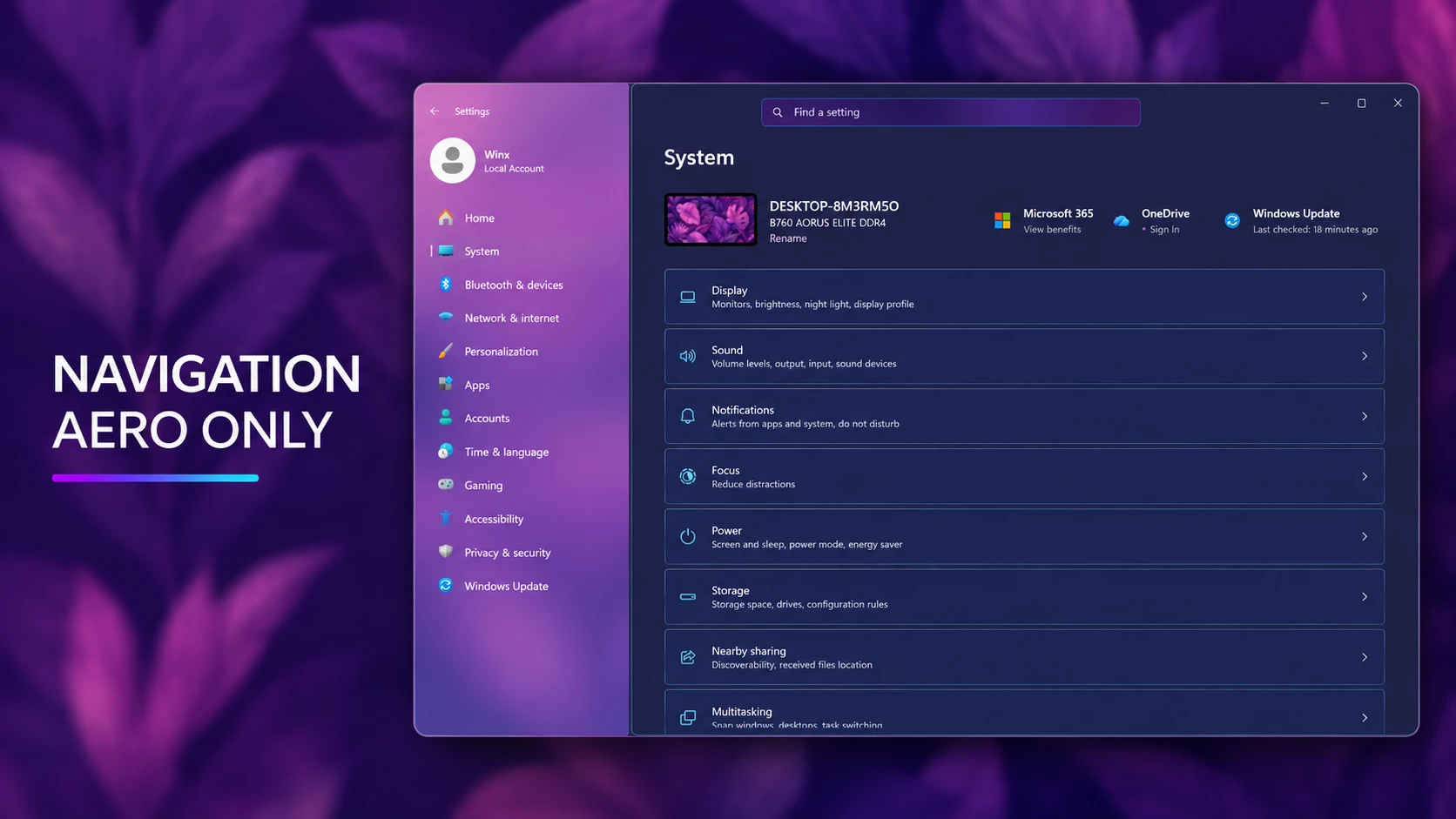
Left Navigation Aero Effects Only
This style applies a beautiful Aero glass effect only to the left navigation panel of the Windows 11 Settings app. The translucent purple background blends gently with your wallpaper, while the main Settings area remains dark, clean, and unchanged.
It adds a colorful glass appearance without making the complete interface overly bright or distracting.
- Aero-style transparency with a soft blur effect
- Applied only to the left navigation panel
- Clear and readable navigation icons
- Wallpaper-responsive purple color tones
- Clean separation between navigation and content
- Maintains the familiar Windows 11 Settings layout
{ "theme": "Nav only Mid aero By link Vegas", "styleConstants[0]": "AeroMain=<WindhawkBlur BlurAmount=\"16\" TintColor=\"#1E2655\" TintOpacity=\"0.46\" />", "styleConstants[1]": "AeroCard=<SolidColorBrush Color=\"#1E2655\" />", "styleConstants[2]": "AeroInput=<AcrylicBrush BackgroundSource=\"HostBackdrop\" TintColor=\"#0F4F96\" TintOpacity=\"0.40\" TintLuminosityOpacity=\"0.24\" FallbackColor=\"#174F8B\" />", "styleConstants[3]": "AeroBorder=<LinearGradientBrush StartPoint=\"0,0\" EndPoint=\"0,1\"><GradientStop Color=\"#E8F7FFFF\" Offset=\"0.0\" /><GradientStop Color=\"#A274D1FF\" Offset=\"0.12\" /><GradientStop Color=\"#4C286CB8\" Offset=\"0.55\" /><GradientStop Color=\"#C14799EB\" Offset=\"1.0\" /></LinearGradientBrush>", "styleConstants[4]": "AeroInnerBorder=<SolidColorBrush Color=\"#A8E8F8FF\" />", "styleConstants[5]": "AeroText=<SolidColorBrush Color=\"#FFF8FCFF\" />", "styleConstants[6]": "AeroSubText=<SolidColorBrush Color=\"#CDEAF6FF\" />", "styleConstants[7]": "AeroAccent=<SolidColorBrush Color=\"#FF72DEFF\" />", "styleConstants[8]": "LeftPaneGlass=<AcrylicBrush BackgroundSource=\"HostBackdrop\" TintColor=\"#0A3E7A\" TintOpacity=\"0.12\" TintLuminosityOpacity=\"0.12\" FallbackColor=\"#244B7D\" />", "styleConstants[9]": "LeftPaneShine=<LinearGradientBrush StartPoint=\"0,0\" EndPoint=\"0,1\"><GradientStop Color=\"#4CE9F8FF\" Offset=\"0.0\" /><GradientStop Color=\"#103F8DDA\" Offset=\"0.42\" /><GradientStop Color=\"#384CAFFF\" Offset=\"1.0\" /></LinearGradientBrush>", "styleConstants[10]": "LeftPaneHover=<LinearGradientBrush StartPoint=\"0,0\" EndPoint=\"0,1\"><GradientStop Color=\"#70DCF7FF\" Offset=\"0.0\" /><GradientStop Color=\"#3565BDF2\" Offset=\"1.0\" /></LinearGradientBrush>", "styleConstants[11]": "LeftPaneSelected=<LinearGradientBrush StartPoint=\"0,0\" EndPoint=\"0,1\"><GradientStop Color=\"#9BE6F9FF\" Offset=\"0.0\" /><GradientStop Color=\"#72547EDC\" Offset=\"1.0\" /></LinearGradientBrush>", "styleConstants[12]": "LeftPaneBorder=<LinearGradientBrush StartPoint=\"0,0\" EndPoint=\"0,1\"><GradientStop Color=\"#C9F5FFFF\" Offset=\"0.0\" /><GradientStop Color=\"#5869C4FF\" Offset=\"0.45\" /><GradientStop Color=\"#9A388CE2\" Offset=\"1.0\" /></LinearGradientBrush>", "styleConstants[13]": "Radius=6", "styleConstants[14]": "SmallRadius=4", "controlStyles[0].target": "SystemSettings.View.RootPage > Grid#RootPageGrid", "controlStyles[0].styles[0]": "Background:=$AeroMain", "controlStyles[1].target": "Microsoft.UI.Xaml.Controls.NavigationView#PermanentNavigationView", "controlStyles[1].styles[0]": "Background:=Transparent", "controlStyles[1].styles[1]": "Foreground:=$AeroText", "controlStyles[2].target": "SplitView#RootSplitView > Grid > Grid#PaneRoot", "controlStyles[2].styles[0]": "Background:=Transparent", "controlStyles[3].target": "SplitView#RootSplitView > Grid > Grid#PaneRoot > Border", "controlStyles[3].styles[0]": "Background:=$LeftPaneGlass", "controlStyles[3].styles[1]": "BorderBrush:=$LeftPaneBorder", "controlStyles[3].styles[2]": "BorderThickness=0,0,1,0", "controlStyles[4].target": "SplitView#RootSplitView > Grid > Grid#PaneRoot > Border > Grid#PaneContentGrid", "controlStyles[4].styles[0]": "Background:=$LeftPaneShine", "controlStyles[5].target": "SplitView#RootSplitView > Grid > Grid#PaneRoot > Border > Grid#PaneContentGrid > ContentControl#PaneCustomContentBorder", "controlStyles[5].styles[0]": "Background:=Transparent", "controlStyles[6].target": "SplitView#RootSplitView > Grid > Grid#PaneRoot > Border > Grid#PaneContentGrid > Grid#ItemsContainerGrid", "controlStyles[6].styles[0]": "Background:=Transparent", "controlStyles[7].target": "SplitView#RootSplitView > Grid > Grid#PaneRoot > Border > Grid#PaneContentGrid > Grid#ItemsContainerGrid > Microsoft.UI.Xaml.Controls.ItemsRepeaterScrollHost > ScrollViewer#MenuItemsScrollViewer > Border#Root", "controlStyles[7].styles[0]": "Background:=Transparent", "controlStyles[8].target": "SplitView#RootSplitView > Grid > Grid#ContentRoot > Border > Grid#ContentGrid", "controlStyles[8].styles[0]": "Background:=$AeroMain", "controlStyles[8].styles[1]": "BorderBrush:=$AeroBorder", "controlStyles[8].styles[2]": "BorderThickness=1", "controlStyles[8].styles[3]": "CornerRadius=$Radius", "controlStyles[8].styles[4]": "Margin=4", "controlStyles[9].target": "Frame#PermanentNavRootFrame", "controlStyles[9].styles[0]": "Background:=Transparent", "controlStyles[10].target": "ContentControl#PaneCustomContentBorder", "controlStyles[10].styles[0]": "Background:=Transparent", "controlStyles[11].target": "SystemSettings.View.UserProfileControl#UserProfileControl", "controlStyles[11].styles[0]": "Background:=Transparent", "controlStyles[12].target": "StackPanel#SettingsCommandSearchBoxBackground", "controlStyles[12].styles[0]": "Background:=$LeftPaneGlass", "controlStyles[12].styles[1]": "BorderBrush:=$LeftPaneBorder", "controlStyles[12].styles[2]": "BorderThickness=1", "controlStyles[12].styles[3]": "CornerRadius=$Radius", "controlStyles[12].styles[4]": "MinHeight=34", "controlStyles[13].target": "TextBox#CommandSearchTextBox", "controlStyles[13].styles[0]": "Background:=Transparent", "controlStyles[13].styles[1]": "Foreground:=$AeroText", "controlStyles[13].styles[2]": "CornerRadius=$Radius", "controlStyles[13].styles[3]": "MinHeight=34", "controlStyles[14].target": "TextBox#CommandSearchTextBox > Grid > Border#BorderElement", "controlStyles[14].styles[0]": "Background:=Transparent", "controlStyles[14].styles[1]": "BorderBrush:=Transparent", "controlStyles[15].target": "SystemSettings.View.SettingsNavigationViewItem", "controlStyles[15].styles[0]": "Background:=Transparent", "controlStyles[16].target": "SystemSettings.View.SettingsNavigationViewItem > Grid#NVIRootGrid", "controlStyles[16].styles[0]": "Background:=Transparent", "controlStyles[17].target": "SystemSettings.View.SettingsNavigationViewItem > Grid#NVIRootGrid > Microsoft.UI.Xaml.Controls.Primitives.NavigationViewItemPresenter#NavigationViewItemPresenter", "controlStyles[17].styles[0]": "Background@Normal:=Transparent", "controlStyles[17].styles[1]": "Background@PointerOver:=$LeftPaneHover", "controlStyles[17].styles[2]": "Background@Pressed:=$LeftPaneSelected", "controlStyles[17].styles[3]": "Background@Selected:=$LeftPaneSelected", "controlStyles[17].styles[4]": "Background@PointerOverSelected:=$LeftPaneSelected", "controlStyles[17].styles[5]": "Background@PressedSelected:=$LeftPaneSelected", "controlStyles[17].styles[6]": "BorderBrush:=$LeftPaneBorder", "controlStyles[17].styles[7]": "BorderThickness=1", "controlStyles[17].styles[8]": "CornerRadius=$SmallRadius", "controlStyles[17].styles[9]": "Margin=6,1,6,1", "controlStyles[18].target": "SystemSettings.View.SettingsNavigationViewItem > Grid#NVIRootGrid > Microsoft.UI.Xaml.Controls.Primitives.NavigationViewItemPresenter#NavigationViewItemPresenter > Grid#LayoutRoot > Grid#PresenterContentRootGrid > Grid#ContentGrid > ContentPresenter#ContentPresenter > TextBlock", "controlStyles[18].styles[0]": "Foreground:=$AeroText", "controlStyles[19].target": "SystemSettings.View.SettingsNavigationViewItem > Grid#NVIRootGrid > Microsoft.UI.Xaml.Controls.Primitives.NavigationViewItemPresenter#NavigationViewItemPresenter > Grid#LayoutRoot@PointerStates > Grid#PresenterContentRootGrid > Grid#ContentGrid > Border#IconColumn > Viewbox#IconBox > Border > ContentPresenter#Icon", "controlStyles[19].styles[0]": "Foreground@Normal:=$AeroSubText", "controlStyles[19].styles[1]": "Foreground@PointerOver:=$AeroText", "controlStyles[19].styles[2]": "Foreground@Pressed:=$AeroText", "controlStyles[19].styles[3]": "Foreground@Selected:=$AeroAccent", "controlStyles[19].styles[4]": "Foreground@PointerOverSelected:=$AeroAccent", "controlStyles[19].styles[5]": "Foreground@PressedSelected:=$AeroAccent", "controlStyles[20].target": "SystemSettings.View.EntityItem", "controlStyles[20].styles[0]": "Background:=$AeroCard", "controlStyles[20].styles[1]": "Foreground:=$AeroText", "controlStyles[20].styles[2]": "Margin=0,2,0,2", "controlStyles[21].target": "SystemSettings.View.EntityItem > Grid", "controlStyles[21].styles[0]": "Background:=$AeroCard", "controlStyles[21].styles[1]": "BorderBrush:=$AeroBorder", "controlStyles[21].styles[2]": "BorderThickness=1", "controlStyles[21].styles[3]": "CornerRadius=$SmallRadius", "controlStyles[22].target": "SystemSettings.View.ButtonEntityItem > Button#ContainerButton", "controlStyles[22].styles[0]": "Background@Normal:=$AeroCard", "controlStyles[22].styles[1]": "Background@PointerOver:=$LeftPaneHover", "controlStyles[22].styles[2]": "Background@Pressed:=$LeftPaneSelected", "controlStyles[22].styles[3]": "BorderBrush:=$AeroBorder", "controlStyles[22].styles[4]": "BorderThickness=1", "controlStyles[22].styles[5]": "CornerRadius=$SmallRadius", "controlStyles[22].styles[6]": "Foreground:=$AeroText", "controlStyles[23].target": "SystemSettings.View.SettingsExpander > Grid > SystemSettings.View.ExpanderToggleButton#ContainerButton", "controlStyles[23].styles[0]": "Background@Normal:=$AeroCard", "controlStyles[23].styles[1]": "Background@PointerOver:=$LeftPaneHover", "controlStyles[23].styles[2]": "Background@Pressed:=$LeftPaneSelected", "controlStyles[23].styles[3]": "BorderBrush:=$AeroBorder", "controlStyles[23].styles[4]": "BorderThickness=1", "controlStyles[23].styles[5]": "CornerRadius=$SmallRadius", "controlStyles[23].styles[6]": "Foreground:=$AeroText", "controlStyles[24].target": "SystemSettings.View.SettingsExpander > Grid > ContentPresenter#RevealedContent", "controlStyles[24].styles[0]": "Background:=$AeroCard", "controlStyles[24].styles[1]": "BorderBrush:=$AeroBorder", "controlStyles[24].styles[2]": "BorderThickness=1", "controlStyles[24].styles[3]": "CornerRadius=$SmallRadius", "controlStyles[25].target": "TextBlock#TitleContent", "controlStyles[25].styles[0]": "Foreground:=$AeroText", "controlStyles[26].target": "ContentPresenter#TitleContent", "controlStyles[26].styles[0]": "Foreground:=$AeroText", "controlStyles[27].target": "ContentPresenter#SubtitleContent", "controlStyles[27].styles[0]": "Foreground:=$AeroSubText", "controlStyles[28].target": "ContentPresenter#IconContentPresenter", "controlStyles[28].styles[0]": "Foreground:=$AeroAccent", "controlStyles[29].target": "Windows.UI.Xaml.Controls.ToggleSwitch > Windows.UI.Xaml.Controls.Grid > Windows.UI.Xaml.Controls.Grid > Windows.UI.Xaml.Shapes.Rectangle#OuterBorder", "controlStyles[29].styles[0]": "Fill:=<SolidColorBrush Color=\"#582B6CAC\" />", "controlStyles[29].styles[1]": "Stroke:=$AeroBorder", "controlStyles[29].styles[2]": "StrokeThickness=1", "controlStyles[29].styles[3]": "RadiusX=10", "controlStyles[29].styles[4]": "RadiusY=10", "controlStyles[30].target": "Windows.UI.Xaml.Controls.Grid#SwitchKnob > Windows.UI.Xaml.Controls.Border#SwitchKnobOn", "controlStyles[30].styles[0]": "Background:=$LeftPaneSelected", "controlStyles[30].styles[1]": "BorderBrush:=$AeroInnerBorder", "controlStyles[30].styles[2]": "BorderThickness=1", "controlStyles[30].styles[3]": "CornerRadius=8", "controlStyles[31].target": "Windows.UI.Xaml.Controls.Grid#SwitchKnob > Windows.UI.Xaml.Shapes.Rectangle#SwitchKnobOff", "controlStyles[31].styles[0]": "Fill:=<SolidColorBrush Color=\"#DDF4FBFF\" />", "controlStyles[31].styles[1]": "RadiusX=8", "controlStyles[31].styles[2]": "RadiusY=8", "controlStyles[32].target": "Windows.UI.Xaml.Controls.Primitives.Thumb#HorizontalThumb > Windows.UI.Xaml.Controls.Border", "controlStyles[32].styles[0]": "Background:=$LeftPaneHover", "controlStyles[32].styles[1]": "BorderBrush:=$AeroBorder", "controlStyles[32].styles[2]": "BorderThickness=1", "controlStyles[33].target": "Windows.UI.Xaml.Controls.Primitives.Thumb#VerticalThumb > Windows.UI.Xaml.Controls.Border", "controlStyles[33].styles[0]": "Background:=$LeftPaneHover", "controlStyles[33].styles[1]": "BorderBrush:=$AeroBorder", "controlStyles[33].styles[2]": "BorderThickness=1", "controlStyles[34].target": "Windows.UI.Xaml.Controls.FlyoutPresenter", "controlStyles[34].styles[0]": "Background:=$AeroCard", "controlStyles[34].styles[1]": "BorderBrush:=$AeroBorder", "controlStyles[34].styles[2]": "BorderThickness=1", "controlStyles[34].styles[3]": "CornerRadius=$Radius", "controlStyles[35].target": "Windows.UI.Xaml.Controls.MenuFlyoutPresenter > Windows.UI.Xaml.Controls.Border", "controlStyles[35].styles[0]": "Background:=$AeroCard", "controlStyles[35].styles[1]": "BorderBrush:=$AeroBorder", "controlStyles[35].styles[2]": "BorderThickness=1", "controlStyles[35].styles[3]": "CornerRadius=$Radius", "controlStyles[36].target": "Windows.UI.Xaml.Controls.Border#BackgroundElement > Windows.UI.Xaml.Controls.Grid#DialogSpace", "controlStyles[36].styles[0]": "Background:=$AeroCard", "controlStyles[36].styles[1]": "BorderBrush:=$AeroBorder", "controlStyles[36].styles[2]": "BorderThickness=1", "controlStyles[36].styles[3]": "CornerRadius=$Radius", "themeResourceVariables[0]": ""}Why the Style May Look Different on Your Computer
If you’ve applied the code but the Settings app doesn’t look exactly like my screenshots, don’t worry! Windows 11 is constantly receiving updates, and Microsoft sometimes tweaks the internal layout of the Settings app. Because of this, a style that looks perfect on one build might shift slightly on another.
Here are a few other common reasons why your setup might look a bit different:
- System Accent Color: Your active Windows accent color might be clashing with the preset.
- Light Mode is Enabled: This theme is heavily optimized for Dark Mode. Using Light Mode can wash out the glass effects.
- Transparency Effects are Off: Make sure transparency is toggled on in your Windows Personalization settings.
- Older Mod Versions: You might be using an outdated version of Windhawk or the Settings Styler mod.
- Display Scaling: Extreme display scaling or different monitor resolutions can slightly alter the panel proportions.
- Clashing Customizations: Another third-party customization tool might be trying to alter the same interface simultaneously.
- Code Error: An incomplete code copy or a missing bracket when pasting the JSON configuration.
How to Remove the Mid Aero Style
One of the best things about Windhawk mods is how easy they are to undo. If you ever want to go back to the boring, default Windows 11 Settings look, it only takes a few seconds:
- Open the Windows 11 Settings Styler mod inside the Windhawk app.
- Simply paste your original, backed-up configuration code back into the Textual mode tab and hit save.
- If you want a quicker route, just toggle the mod off to instantly disable the styling.
- If you no longer plan to use it, you can uninstall the mod entirely through Windhawk.
- Finally, close your Windows Settings app and open it again to see the default look restored.
There is absolutely no need to run a full System Restore just to remove this visual tweak. However, it’s always a good habit to keep a restore point handy just in case Windows acts up on its own.
Disclaimer
Just a quick heads-up: This Mid Aero style is an unofficial, third-party customization provided purely for educational and desktop personalization purposes. Link Vegas Theme is not affiliated with, sponsored by, or endorsed by Microsoft or the Windhawk team.
Visual results and compatibility can vary depending on your specific Windows 11 build, display setup, and other installed mods. Please remember to back up your current Windhawk settings and create a system restore point before applying any new JSON codes. Download Windhawk only from its official website. You are applying these changes at your own discretion, and we cannot be held responsible for any data loss, software conflicts, or system instability.
Wrapping Up
If you miss the vibrant, glossy days of Windows Aero but love the modern functionality of Windows 11, the Mid Aero Settings Style strikes the perfect balance. The dark navy background combined with the warm gradient cards really makes navigating your system settings a lot more visually exciting.
Just take a moment to back up your existing configuration and set a restore point before diving in. Once that’s done, apply the code, tweak your accent colors, and enjoy your beautifully customized desktop!
Did you run into any issues while pasting the code, or do you have a specific wallpaper that pairs perfectly with this theme? Let me know in the comments below!
You may also like
Disclaimer: All themes, visual styles, and concepts shared on this website are unofficial, fan-made creations built from imagination for customization purposes. We are not affiliated with, endorsed by, or sponsored by Microsoft or any other official brand.